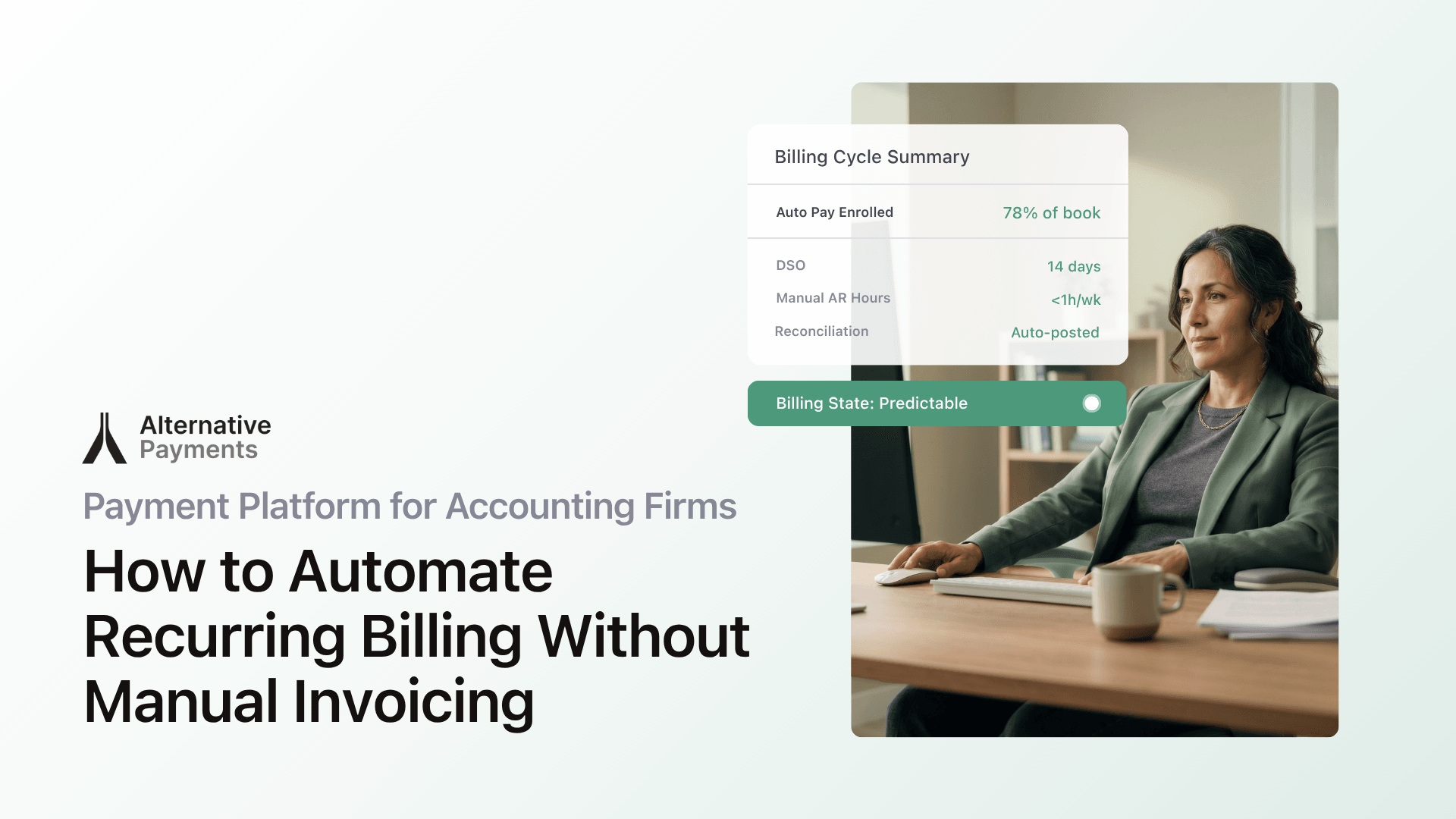
Late payments are the norm in B2B services, not the exception. According to the Atradius Payment Practices Barometer (2024), half of all U.S. B2B invoices are currently overdue, and administrative inefficiencies in payment processes are the leading cause. For accounting firms managing recurring engagements across dozens of clients, that statistic demands a different approach: a payment platform for accounting firms that replaces manual invoicing with automatic, recurring billing.
Every overdue invoice triggers a chain: manual follow-ups, reconciliation errors, and cash flow gaps that compound month after month. Most firms didn’t choose this reality. They inherited it from billing tools that treat each invoice as a standalone event instead of a recurring obligation. The fix isn’t working harder at collections. It’s automating the entire billing loop, from issuance through reconciliation.
This guide breaks down what to look for in a recurring billing platform built for accounting firms, how auto-pay enrollment works in practice, and where the biggest time savings come from.
Why Manual Invoicing Costs More Than You Think
The visible cost of manual invoicing is time: generating invoices, emailing them, logging into a portal to check who paid, then keying payment data into QuickBooks or Xero. The hidden cost is everything that goes wrong between those steps.
Invoices go out late because someone forgot to run the billing cycle. Clients miss payments because reminders land in spam or never get sent. Reconciliation breaks because the payment processor records a lump sum that doesn’t map cleanly to individual invoices. And the person chasing all of it is usually the same person closing the books.
According to PYMNTS Intelligence (2024), more than 60% of B2B invoices are paid late, and delayed payments directly stall a firm’s ability to pay its own vendors on time. For firms running client advisory services (CAS) or managing multiple client books, even a handful of late invoices can cascade into missed deadlines and strained trust.
The Institute of Finance and Management (IOFM, 2024) found that companies using automated AR workflows reduce day sales outstanding (DSO) by an average of 15–25% and cut manual collection labor by up to 40%. Those gains don’t come from sending more reminders. They come from automating the entire billing loop.
Where Standard Billing Tools Fall Short
QuickBooks Online Payments, Xero invoicing, and generic payment processors each solve one piece of the billing puzzle. But they weren’t designed to handle the recurring, contract-driven billing that accounting firms depend on.
Here’s where the gaps show up:
- Recurring schedule limitations. Most tools let you create a recurring invoice template, but they don’t manage auto-pay enrollment, payment method storage, or failed-payment retry logic. You still chase clients who forget to pay.
- Disconnected reconciliation. When a client pays through a generic processor, the payment posts as a lump deposit. Matching that deposit to the right invoice in QuickBooks or Xero is manual work, and a common source of errors.
- No client self-service. Generic processors send a payment link. They don’t offer a persistent portal where clients can view their invoice history, update payment methods, or enroll in auto-pay on their own terms.
- Limited payment options. Clients have different preferences. Some want to pay by ACH to avoid fees. Others need credit card processing or installment plans. Most basic billing tools support one or two methods, not all of them in a single checkout experience.
The result: your billing “system” is really three or four tools duct-taped together, with your team acting as the glue. Every new client you onboard adds more manual work to the pile.
What a Purpose-Built Payment Platform Does Differently
A payment platform designed for recurring service billing handles the full lifecycle: issuance, communication, collection, reconciliation, and reporting. Each stage connects to the next, so nothing falls through the cracks.
Here’s how that lifecycle works for an accounting firm:
Invoice issuance
Invoices generate automatically based on the recurring schedule you set: monthly retainers, quarterly engagements, or custom billing cycles. The platform pulls line items, amounts, and terms from your engagement agreements, so you’re not recreating invoices by hand every cycle.
Client communication
Automated reminders go out before due dates, on due dates, and at intervals you define after due dates. These aren’t generic “you have a balance” emails. They include the invoice details, a direct payment link, and a clear path to resolve questions. Firms using AR automation report fewer “I didn’t get the invoice” responses because the communication cadence is consistent and traceable.
Payment collection
This is where auto-pay changes the game. Clients enroll in auto-pay through a white-label checkout branded to your firm, not a third-party portal. They choose their payment method (ACH, credit card, or both), and the platform charges the stored method on the due date automatically. No login required, no manual action on either side.
For clients who prefer to pay manually, the same checkout gives them instant access to pay by ACH or card, and they can opt into installment financing if the engagement calls for it.
Auto-reconciliation
Every payment maps to the specific invoice it covers. When the platform integrates with QuickBooks, Xero, or your ERP, it posts the payment record directly, with no lump-sum deposits, no manual matching. This is the step where most generic processors fail and where accounting firms save the most time.
Reporting
You see DSO, on-time payment ratios, overdue balances, and exception rates in one view. Instead of pulling reports from three tools, you get a single dashboard that shows your firm’s AR health in real time.
How Auto-Pay Enrollment Actually Works
“I want clients to just pay automatically” is one of the most common requests from accounting firm owners, and it’s the feature that delivers the biggest time savings once it’s running.
Here’s the typical setup:
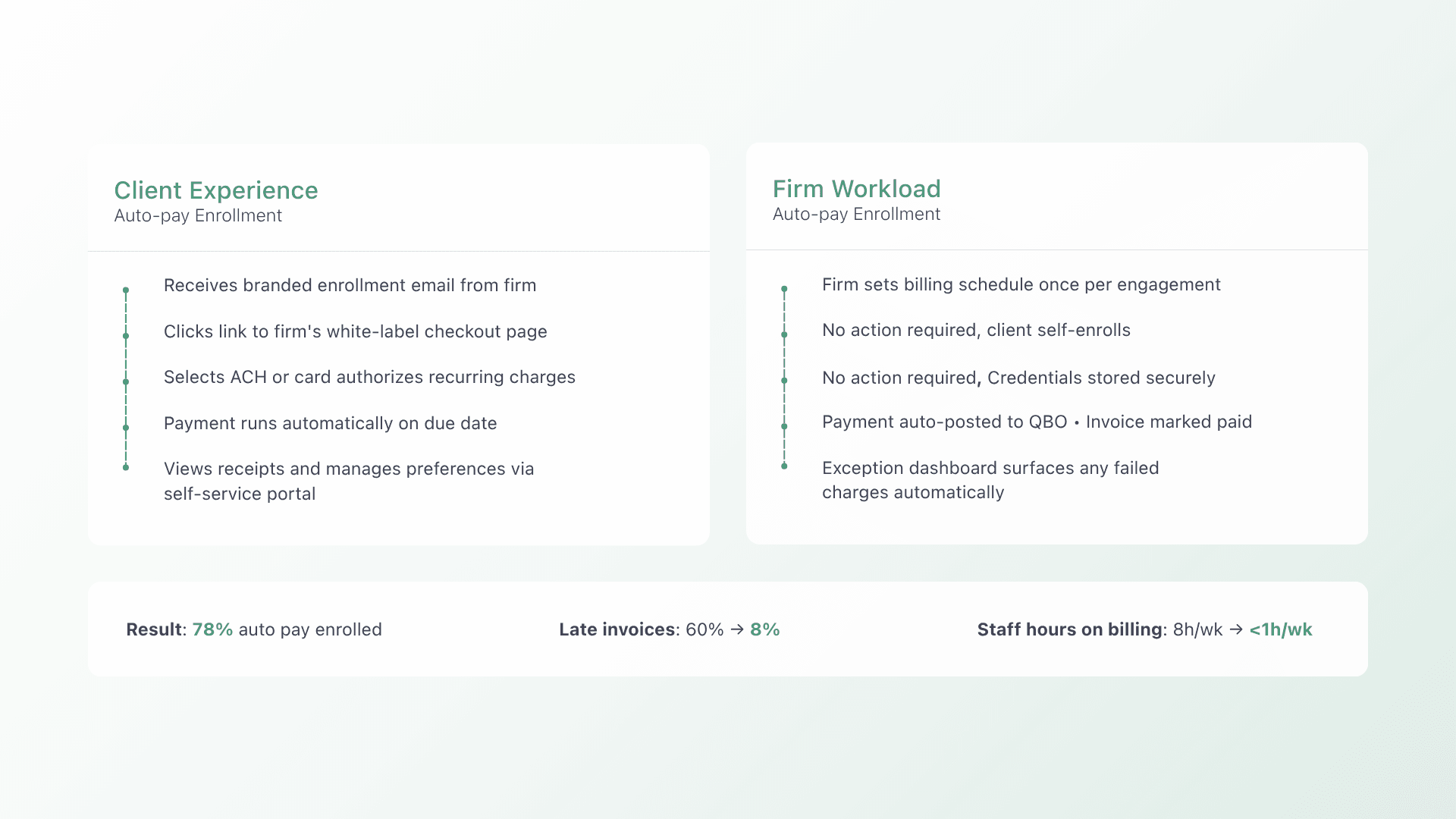
- You create the recurring billing schedule. Set the frequency (monthly, quarterly), amount, and payment terms for each client engagement.
- Clients receive an enrollment invitation. They get a branded email with a link to your firm’s checkout page, not a third-party site.
- Clients choose their payment method. ACH, credit card, or both. They authorize recurring charges and the platform securely stores their payment credentials.
- Payments run automatically. On the due date, the platform charges the stored method. If the charge fails (expired card, insufficient funds), the system retries according to rules you set and notifies both you and the client.
- Each payment posts to your accounting system. The reconciliation happens automatically: the payment maps to the invoice, the invoice marks as paid, and the GL entry posts.
The result: once a client enrolls, you never touch that invoice again unless there’s an exception. And even exceptions get surfaced automatically, so you resolve them before they age.
For firms managing 30, 50, or 100+ recurring clients, this eliminates hours of billing admin every week. It also removes the awkward collections conversation. Auto-pay makes paying invisible to the client and predictable for your firm.
Reconciliation That Closes the Loop
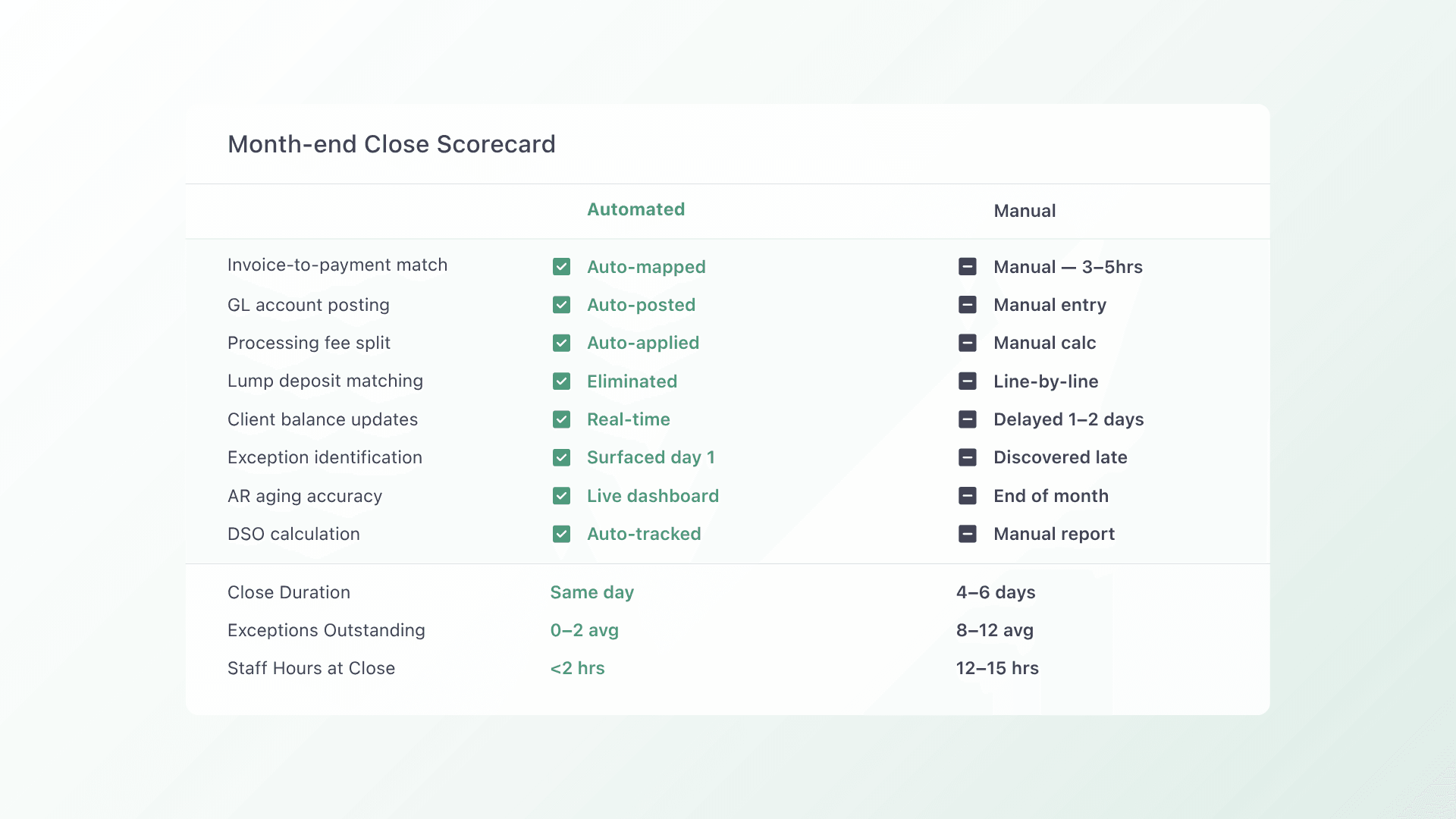
Reconciliation is where most billing workflows quietly break. A client pays, but the payment sits in a clearing account. Someone has to match it to the right invoice, apply the correct GL code, and confirm the posting in your accounting system. Multiply that by dozens of clients, and you’ve created a monthly bottleneck that delays your close.
A purpose-built platform eliminates this by integrating directly with your accounting stack. When a payment clears:
- It maps to the exact invoice. No lump sums, no guessing.
- It posts the GL entry automatically. Revenue, fees, and net amounts go to the correct accounts.
- It updates the client’s balance in real time. Both you and the client see the same status.
This matters especially for accounting firms running CAS engagements, where you’re managing your own firm’s AR and potentially advising clients on theirs. Clean reconciliation in your own operations builds credibility when you’re recommending process improvements to clients.
The Client Experience: Easy Payments Build Stronger Relationships
Billing friction erodes client relationships in ways that don’t always show up in churn metrics. A confusing payment portal, limited payment options, or unclear invoice details create small frustrations that accumulate. Over time, they make it easier for a client to say “yes” to a competitor who makes paying simpler.
A modern payment platform addresses this with:
- White-label checkouts. Clients see your firm’s branding, not a third-party payment processor. This maintains trust and professionalism at the moment of transaction.
- Multiple payment methods. ACH for clients who want lower fees. Credit cards for convenience. B2B buy now, pay later for larger engagements where installment options help clients manage their own cash flow.
- Self-service access. Clients can log in to view invoices, download receipts, update payment methods, and manage their auto-pay preferences, all without calling or emailing your team.
- Clear, itemized invoices. Every line item tied to the engagement, with payment terms and due dates front and center.
When paying is easy, clients pay on time. When they pay on time, your firm’s cash flow stabilizes and your team spends less time on collections.
How to Evaluate a Payment Platform for Your Accounting Firm
Not every platform that says “recurring billing” actually delivers it. Here’s what to check:
- Does it integrate with your accounting system? QuickBooks, Xero, or your ERP. The integration should handle invoice-level reconciliation, not just deposit tracking.
- Does it support auto-pay with stored payment methods? One-click enrollment, automatic retries, and client self-service for method updates.
- Does it offer ACH, cards, and financing in one checkout? Clients shouldn’t need separate portals for different payment methods.
- Is the checkout white-labeled? Your clients should see your brand, not a third-party processor.
- Does it provide AR reporting? DSO, aging reports, exception tracking, and payment success rates, all in one place.
- Is it built for service businesses with recurring revenue? This is the critical distinction. Platforms built for one-off ecommerce transactions don’t respect contract logic, engagement terms, or the PSA/accounting handoffs that service firms depend on.
Alternative Payments is built specifically for this use case, unifying collection, reconciliation, and financing in one platform for service businesses in the U.S. and Canada. It integrates with QuickBooks, Xero, and major PSA and ERP systems to automate the bridge between invoicing and your GL. Book a demo to see how it works for your firm’s engagement types and accounting stack.
FAQs
Can clients enroll themselves in auto-pay, or does my firm have to set it up? Clients can self-enroll through your firm’s branded checkout page. They choose their payment method (ACH or credit card), authorize recurring charges, and manage their preferences independently. Your team only needs to set the billing schedule and terms.
What happens when an auto-pay charge fails? The platform automatically retries according to rules you configure. For example, retry 3 days after a failed charge, then again at 7 days. Both your team and the client receive notifications so the issue gets resolved quickly. Failed charges surface in your exception dashboard rather than hiding in email threads.
How does reconciliation work with QuickBooks or Xero? Each payment maps to its corresponding invoice and posts directly to your accounting system. Revenue, processing fees, and net deposits go to the correct GL accounts automatically. There’s no lump-sum matching and no manual data entry. Learn more in our guide to QuickBooks payment integration for accounting firms.
Does the platform support both ACH and credit card payments? Yes. Clients choose their preferred method at checkout. ACH typically carries lower processing fees, while credit cards offer convenience. Both options are available in the same branded checkout experience, along with installment financing for larger engagements.
Is this only for accounting firms, or does it work for other service businesses? Alternative Payments serves U.S. and Canadian service businesses with recurring revenue models, including MSPs, telecom companies, and accounting firms. The platform is designed for any business where contract-based billing and recurring engagements are standard.
How long does implementation take? Most accounting firms complete full rollout within two billing cycles. The phased approach protects existing client relationships while the new workflow proves itself. Book a demo to see how the setup works for your firm’s specific engagement types and accounting stack.