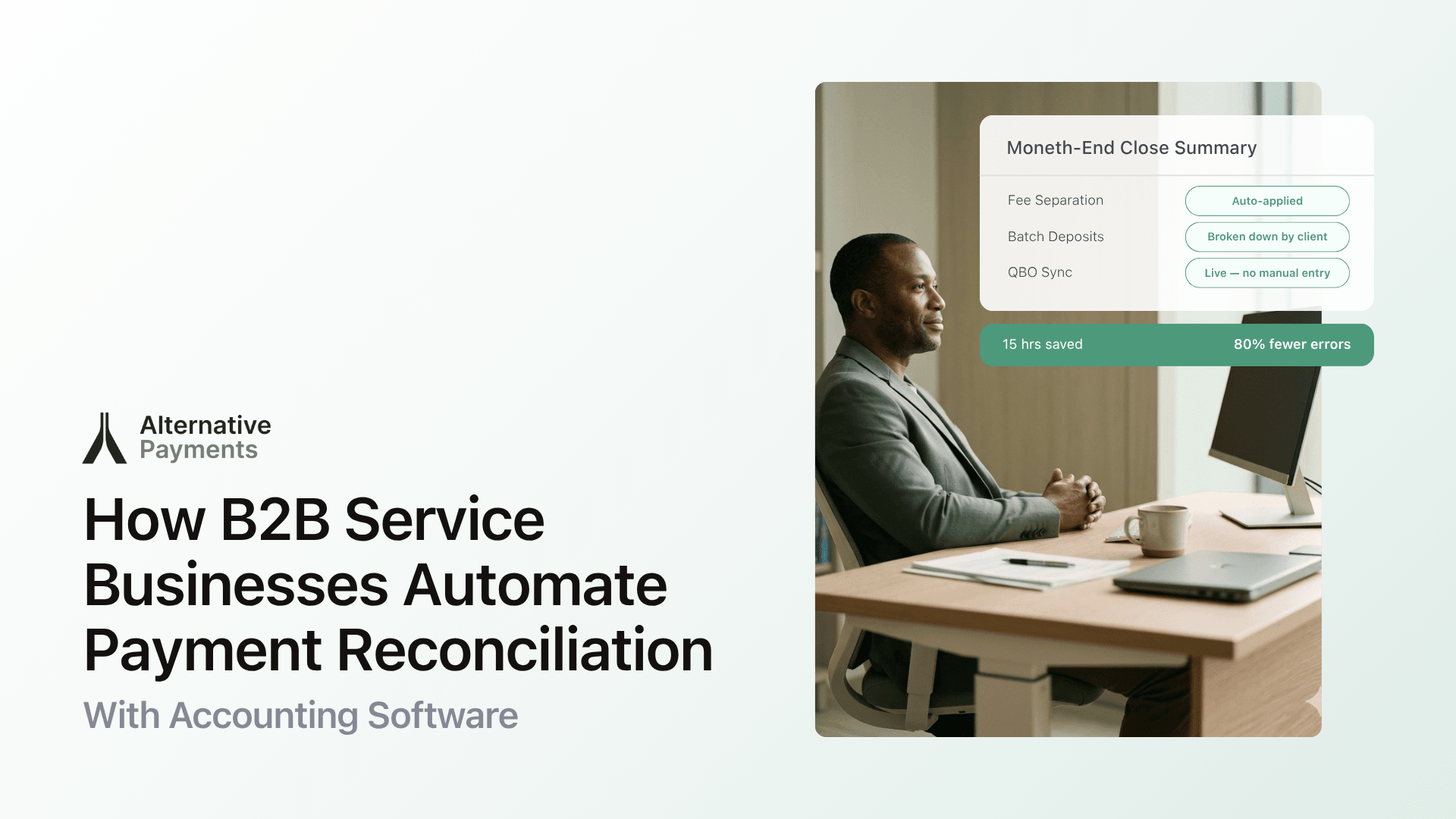
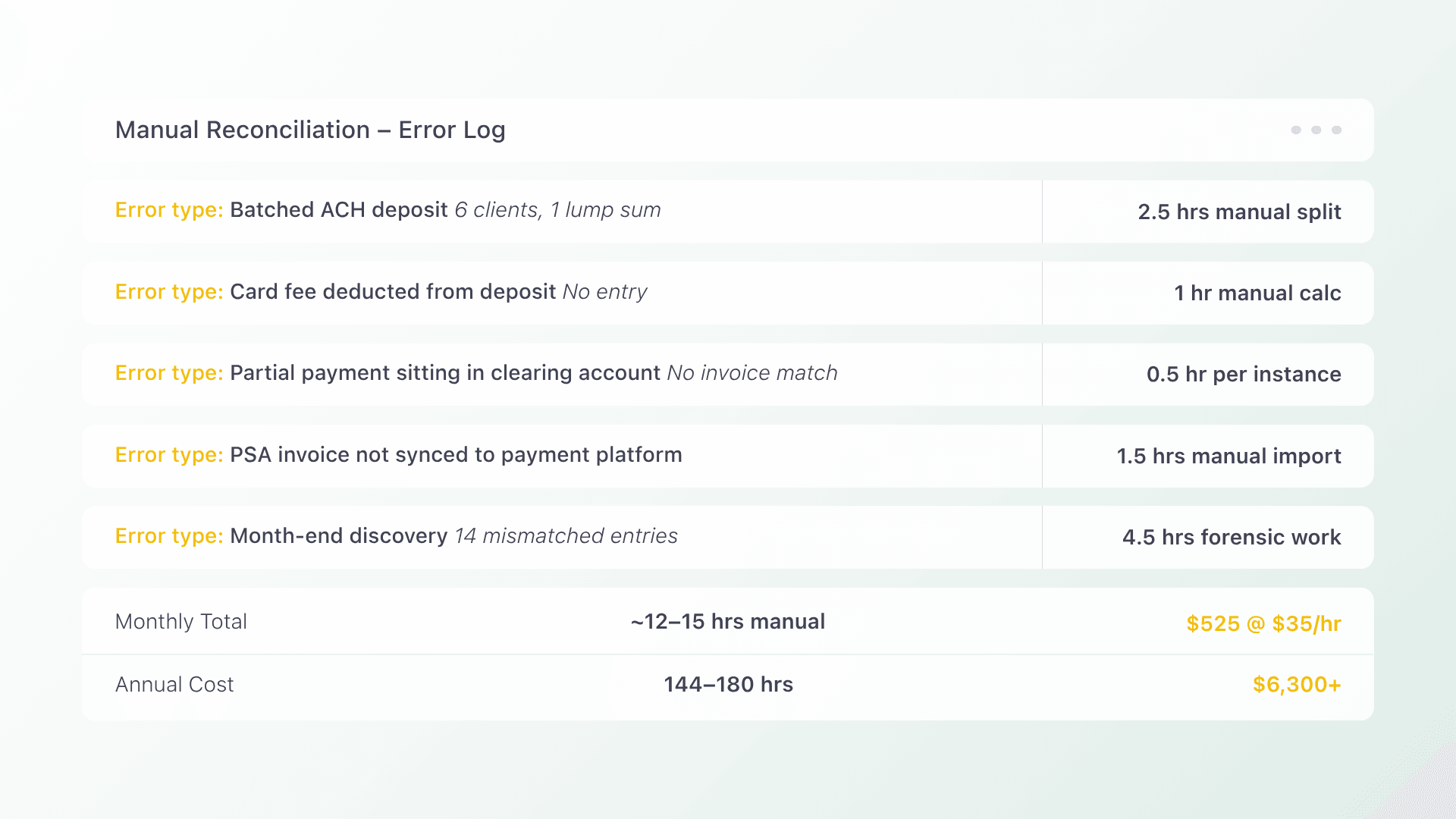
Every month-end, the same scene plays out in service businesses across the U.S. and Canada: a bookkeeper pulls up the PSA, opens the bank feed, switches to QuickBooks, and starts matching payments to invoices line by line. A batched ACH deposit combines six client payments into one lump sum. A credit card fee shaves dollars off another. A partial payment sits in limbo. Hours pass. Error compound. For businesses that have not yet adopted automated payment reconciliation, this cycle repeats every billing period, draining time, accuracy, and cash flow.
The fix is not another spreadsheet or a generic payment processor. It is a purpose-built reconciliation platform that connects your PSA, payment collection, and accounting software into one automated workflow. This article walks through how automated payment reconciliation works for B2B service businesses, where generic tools fall short, and what to look for in a platform that eliminates the month-end scramble.
Why Manual Reconciliation Breaks Down in Service Businesses
Manual reconciliation has a compounding cost. According to the PwC 2024 Finance Effectiveness Benchmarking study, finance teams spend roughly 29–40% of their time on manual tasks that could be automated, with customer billing departments averaging 45% at the median. For a service business running hundreds of recurring invoices, that time translates directly into delayed closes, stale AR data, and staff burnout.
The problem is structural. Service businesses operate across at least three disconnected systems:
- The PSA (ConnectWise, Autotask, or similar) holds contracts, invoices, and service agreements.
- The payment processor handles ACH, credit card, and sometimes financing transactions.
- The accounting software (QuickBooks, Xero, or an ERP) maintains the general ledger.
When these systems do not talk to each other, every payment requires a human to bridge the gap: verifying amounts, deducting fees, matching deposits to invoices, and posting entries to the GL. A single transposition error can cascade into hours of investigation. Multiply that across dozens or hundreds of clients, and the month-end close stretches from days into a week or more.
The hidden cost is not just labor. It is stale data. When reconciliation happens in batches at month-end, your aging report is always out of date. You cannot answer basic questions (which invoices are still open, what was collected this week, who is past due) without manually merging data from multiple sources.
What Automated Payment Reconciliation Actually Means
Automated payment reconciliation is not just faster data entry. It is the elimination of manual handoffs between collection and accounting. When it works correctly, every payment collected through your platform maps automatically to the originating invoice and posts to the correct account in your GL, without a human touching it.
For service businesses, this process follows a payment lifecycle with five stages:
- Issuance: Invoices are created in the PSA and synced to the payment platform.
- Communication: Clients receive payment reminders and links through automated workflows.
- Collection: Payments are accepted via ACH, credit card, or financing options through a branded checkout.
- Reconciliation: Each payment is matched to its invoice, fees are accounted for, and entries post to accounting software automatically.
- Reporting: DSO, exception rates, and on-time payment ratios are visible in real time.
The critical shift happens at stage four. In a manual workflow, reconciliation is a separate activity performed after the fact. In an automated workflow, reconciliation is embedded in the collection event itself. The moment a client pays, the data flows from the payment platform to accounting without waiting for a human to intervene.
Where Generic Payment Processors Fall Short
Most generic payment processors (Stripe, Square, PayPal) are designed for one-off ecommerce transactions. They process payment and deposit funds. What they do not do is understand the contract logic, recurring invoice structures, and multi-system data flows that service businesses depend on.
Here is where the disconnect shows up:
| Workflow step | Generic processor | Purpose-built platform |
| Invoice matching | Manual: you match deposits to invoices yourself | Automatic: each payment maps to the originating invoice |
| Fee handling | Fees deducted from deposits with no accounting entry | Fees separated, accounted for, and posted to the GL |
| Batch deposits | Lump-sum deposits combine multiple clients | Deposits broken down by client and invoice |
| PSA sync | No PSA awareness: invoices live in a separate system | Direct PSA integration: invoices flow into the platform |
| Recurring billing | Basic subscription tools, no contract logic | Contract-driven billing with installment and financing options |
| Reconciliation | Manual journal entries at month-end | Auto-reconciliation posts entries as payments are collected |
A generic processor does not know that invoice #4872 is tied to a managed services agreement with net-30 terms, or that a client’s ACH payment should clear against three open invoices and map to two GL accounts. Purpose-built platforms for service businesses start with this context because they integrate directly with your PSA and accounting stack.
What to Look for in a Reconciliation Platform
Not every “automated reconciliation” claim is equal. Some platforms automate matching but still require manual GL posting. Others sync with accounting but ignore the PSA. When evaluating solutions for a service business, focus on these capabilities:
End-to-end PSA and accounting integration
The platform should pull invoices from your PSA and push payment data to your accounting software. This eliminates the two most common manual steps: importing invoices into a payment system and entering payment records into the GL. Look for native integrations with tools like ConnectWise, Autotask, QuickBooks, and Xero, not just CSV exports.
Automatic fee separation and posting
Credit card processing fees, ACH fees, and financing costs should be separated from the payment amount and posted to the correct expense accounts automatically. If your team is still calculating net deposits manually, the platform is not doing enough.
Support for multiple payment methods in one checkout
Clients should be able to pay via ACH, credit card, or financing options like installments and B2B buy now pay later, all from a single, branded checkout experience. This reduces friction for clients and consolidates payment data into one reconciliation stream instead of three.
Exception handling and visibility
No system catches every edge case. What matters is how the platform handles exceptions: partial payments, overpayments, credits, and disputes. Look for real-time dashboards that surface unmatched transactions immediately, not at month-end, so your team resolves issues proactively. A platform with strong AR automation flags exceptions as they occur rather than burying them in batch reports.
White-label client experience
Your clients should see your brand, not your payment processor’s. A white-label checkout builds trust and reduces confusion, especially when clients receive payment reminders and links. This is not just cosmetic. It directly affects payment completion rates.
How the Automation Works: PSA to GL in Practice
Here is what the workflow looks like when collection and reconciliation are unified in a single platform:
Step 1: Invoice sync. Your PSA generates invoices based on contracts and service agreements. The payment platform pulls these invoices automatically. No manual import, no duplicate entry.
Step 2: Client notification. The platform sends branded payment reminders with a link to a secure checkout. Automated follow-ups escalate based on rules you set (for example, a reminder 3 days before due, another 7 days after).
Step 3: Payment collection. The client pays through the checkout using their preferred method: ACH, credit card, or a financing plan. The platform processes the payment and records it against the specific invoice.
Step 4: Auto-reconciliation. The payment maps to the invoice in the PSA and posts to your accounting software. Fees are separated. The GL entry is created. No journal entry required from your bookkeeper.
Step 5: Real-time reporting. Your AR dashboard updates immediately. You can see DSO, collection rates, overdue invoices, and exception items without running a manual report or merging spreadsheets.
This is the workflow that platforms like Alternative Payments are built around: starting at the PSA, finishing in the GL, and automating the bridge in between.
Measuring the Impact: What Changes When You Automate
Automated reconciliation delivers measurable improvements across three areas:
Time savings
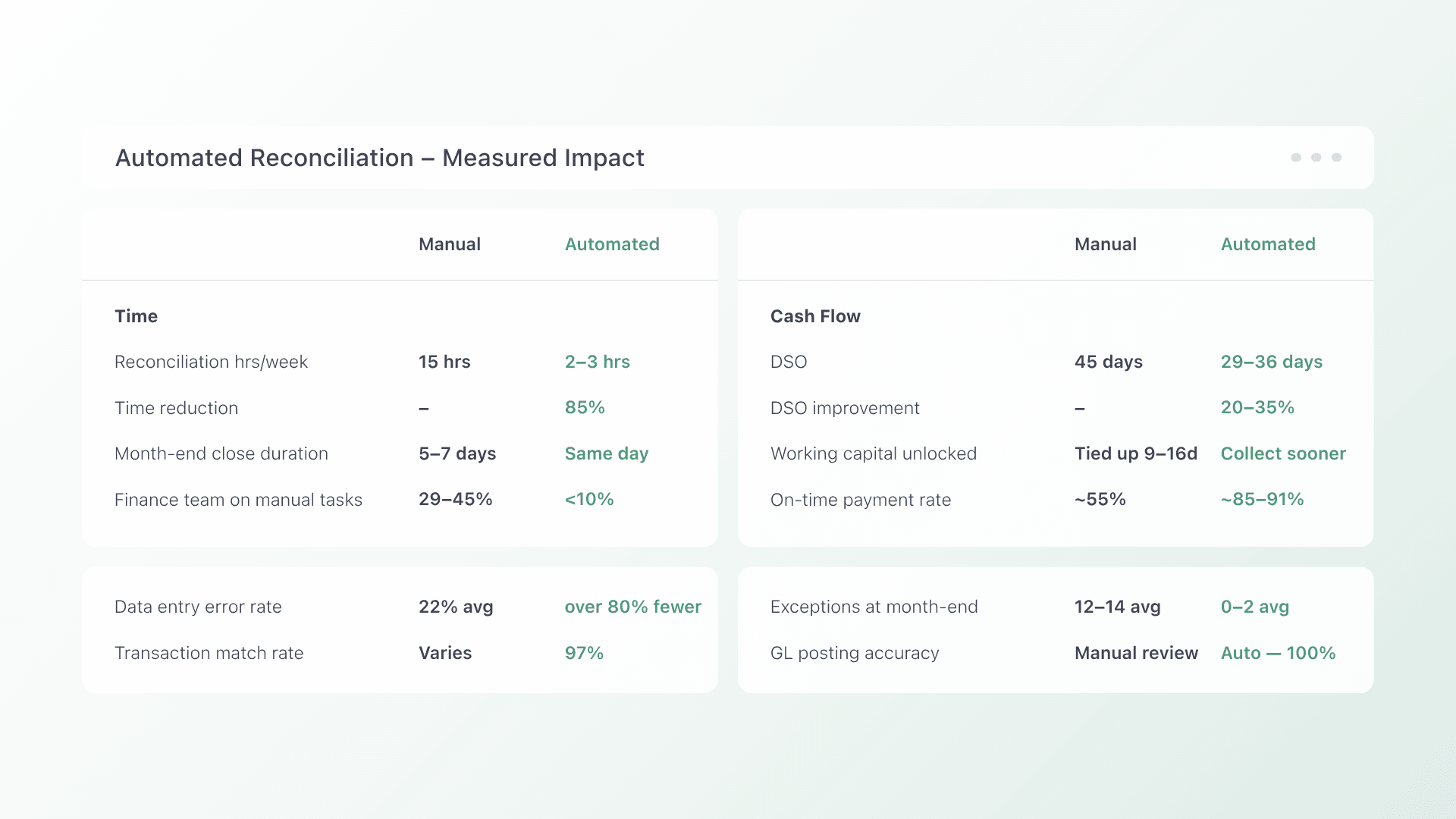
According to Complete Controller, manual payment reconciliation can consume up to 15 hours per week for small businesses. Automated integration reduces that by up to 85%, cutting reconciliation time to 2–3 hours weekly. For a growing service business, that is the difference between a finance team that closes the books in a day and one that spends a week on it.
DSO reduction
When clients can pay through a frictionless checkout with multiple payment options and automated reminders, they pay faster. According to Credit Pulse’s 2025 DSO benchmarks, AR automation platforms commonly deliver DSO improvements of 20–35%. For a service business with a 45-day DSO, that translates to collecting payment 9–16 days sooner on average, unlocking working capital that was previously tied up in aging receivables.
Error reduction
Manual data entry is the leading source of reconciliation discrepancies. Automated systems that match payments to invoices programmatically eliminate transposition errors, missed entries, and fee miscalculations. According to Open Ledger’s analysis of reconciliation ROI, organizations implementing automated reconciliation see an 80% reduction in data entry errors and 97% accuracy in transaction matching.
Frequently Asked Questions
What is automated payment reconciliation? Automated payment reconciliation is the process of automatically matching incoming payments to their corresponding invoices and posting the resulting entries to your accounting software or GL, without manual data entry. For service businesses, this means payments collected via ACH, credit card, or financing flow directly from the payment platform into QuickBooks, Xero, or your ERP.
Can automated reconciliation work with my existing PSA and accounting software? Yes, if you choose a platform with native integrations. Purpose-built solutions for service businesses integrate with PSAs like ConnectWise and Autotask and accounting tools like QuickBooks and Xero. The key is choosing a platform designed for recurring revenue workflows, not a generic processor that requires manual bridging.
How is this different from the reconciliation features in QuickBooks or Xero? QuickBooks and Xero offer bank reconciliation, matching bank feed transactions to entries already in the ledger. Automated payment reconciliation goes further by creating the accounting entries at the moment of collection. The payment platform knows which invoice was paid, how much was collected, what fees were deducted, and where to post each amount. Your accounting software receives clean, mapped data instead of raw bank deposits you have to decode.
What happens when a payment does not match cleanly? Good platforms surface exceptions in real time (partial payments, overpayments, or unmatched transactions) and flag them for review immediately. This replaces the month-end discovery of mismatches with proactive resolution. Some platforms also offer collections assist tools that automate follow-up on overdue or disputed invoices.
Is automated reconciliation worth it for a smaller service business? The ROI scales with transaction volume, but even businesses processing 50–100 recurring invoices monthly benefit from eliminating manual entry. The time savings, error reduction, and faster month-end close compound over every billing cycle. The real question is how many hours per month your team currently spends reconciling, and what they could do with that time back.
If manual reconciliation is still consuming your team’s time and delaying your month-end close, it is worth seeing what a purpose-built platform looks like in practice. Book a demo to see how Alternative Payments automates the bridge between your PSA, payment collection, and accounting software.