Why CAS Firm Payment Integration Is Harder Than It Looks
For client advisory services firms, payment integration is not just a technical task. It sits at the center of how your team manages billing, reconciliation, and cash flow visibility across an entire client book. When the tools in that workflow are not properly connected, the gap does not stay invisible for long.
Client payment data tends to accumulate across multiple platforms at once: QuickBooks Payments, Stripe, bank feeds, and Xero all holding different pieces of the same financial picture. Without a unified view, reconciliation becomes a manual exercise that runs in parallel with every other task your team is already managing.
When payment data flows through platforms that were not built to stay in sync with each other, reconciliation errors can surface that take hours to untangle. For a CAS firm billing across dozens of client accounts, that time compounds quickly.
According to the Association for Financial Professionals (AFP, 2024), 78% of finance teams report that manual payment reconciliation is among their most time consuming processes, averaging 8 or more hours per week. For firms running CAS workflows across multiple Xero clients, that is not a small operational drag. It is a structural inefficiency that a proper Xero payment integration is designed to eliminate.
The Xero Payment Integration Stack That Actually Works
The goal of any Xero payment integration is not just to connect tools. It is to remove every step where a human being has to move data from one system to another. The stack below is what consistently delivers that outcome for CAS firms.
The Recommended Stack
QuickBooks Online → Xero → Bill.com → Alternative Payments
Alternative Payments integrates natively with both QuickBooks Online and Xero, which makes it a natural fit for CAS firms that run a mixed client book across both platforms. Unlike general purpose payment tools that require middleware or manual configuration to stay in sync with your accounting software, Alternative Payments was purpose built for the way service businesses bill and collect.
For firms that use Bill.com as part of their accounts payable workflow, Alternative Payments sits alongside it on the receivables side, giving you a clean separation between what you owe and what you are owed, with both sides reconciling automatically into Xero or QuickBooks.
What Syncs Automatically
- Invoices created in Xero or QuickBooks Online pushed to the Alternative Payments client portal
- Payment status updates synced back to Xero or QuickBooks in real time
- Reconciliation posted automatically without manual matching
- Overdue payment reminders triggered through Collections Assist
- Client receipts sent upon payment confirmation
What Requires Configuration
- Payment method preferences per client (ACH, card, auto pay)
- Auto pay enrollment rules, billing cycles, and retry settings
- Branded client portal and checkout experience
- Surcharging rules by client or contract type
- Installment billing for larger advisory retainers
The Data Flow
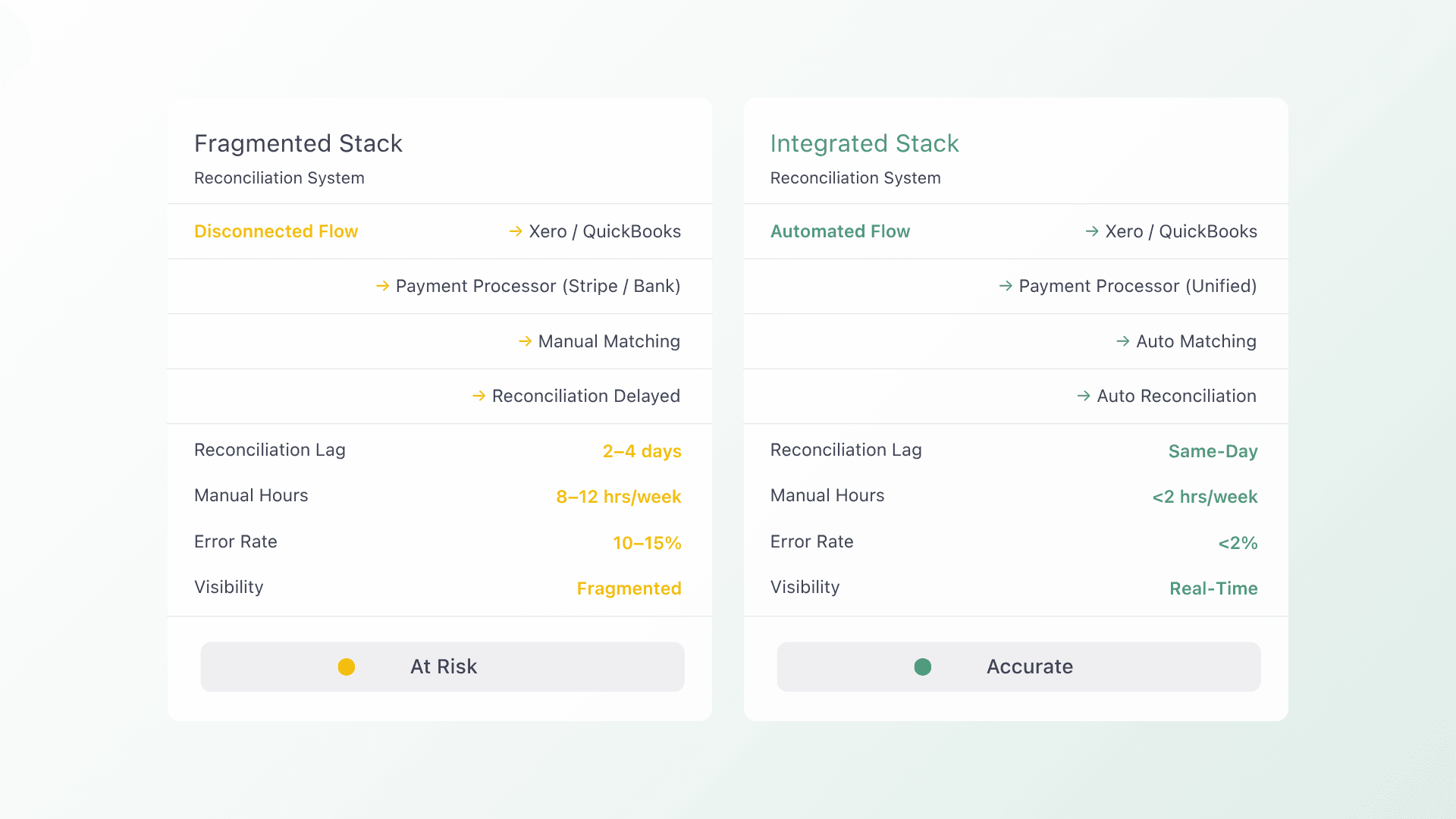
Invoice created in Xero or QuickBooks Online → pushed to Alternative Payments portal → client pays via ACH, card, or auto pay → payment posted back to Xero or QuickBooks → reconciliation auto posted with no manual steps.
That is a complete Xero payment integration loop where no one on your team is manually moving data at any stage. The result is faster collections, cleaner books, and a billing workflow that scales with your client book rather than against it.
Setup Walkthrough: From Disconnected to Integrated
A clean Xero payment integration does not require rebuilding your entire tech stack. The four steps below are how CAS firms make the transition without disrupting active client billing cycles.
Step 1: Audit Your Current Data Flow
Before you connect anything, map where manual re-entry is happening today. Which systems fall out of sync after a platform update? Where does a payment get recorded in Xero but not in your payment processor, or the other way around? Every manual touchpoint you find is a point the new stack will automate.
Step 2: Connect QuickBooks Online First
For firms running a mixed book, QuickBooks Online is the foundation. Your contracts, recurring services, and client billing data live here, which makes it the source of truth that all downstream systems should sync from.
Alternative Payments’ native QuickBooks Online connector installs without middleware and goes live within one to three business days. Once this connection is stable, adding the Xero integration layer follows the same pattern and requires no additional development work.
Step 3: Configure Payment Methods by Client
Set up ACH, card, and auto pay based on each client’s preferences and contract structure. Advisory retainers may suit auto pay enrollment, while project based clients may prefer ACH on invoice. Configure these at the client level rather than as a blanket rule so your billing stays flexible as the book evolves.
Step 4: Pilot with 5 Clients Before Full Rollout
Select five clients across a range of contract sizes and payment methods. Run two complete billing cycles with this group before expanding to the rest of your book. This gives your team time to validate the integration, confirm that reconciliation is posting correctly in Xero, and surface any configuration adjustments before they affect a wider group.
Most CAS firms complete full rollout within two billing cycles. The phased approach is not about moving slowly. It is about protecting your existing client relationships while the new workflow proves itself.
Integration Pitfalls to Avoid
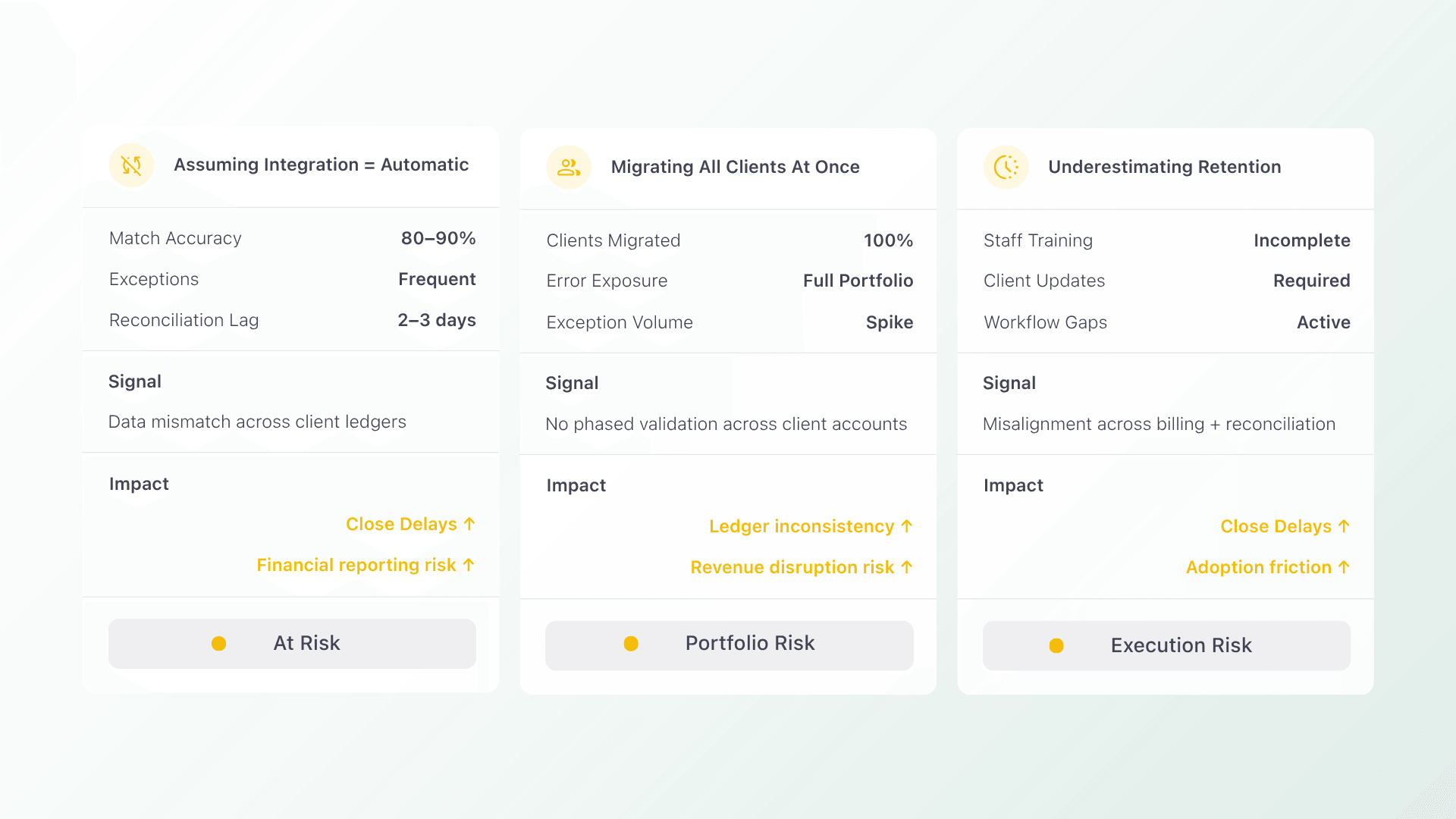
Even with the right stack and a clear plan, a few common mistakes slow CAS firms down during the transition to automated payment integration. Here is what to watch for before you start.
Assuming Integration Means Automatic
Connecting Xero to a payment platform is a starting point, not a finish line. Always validate the integration with real invoices from real clients before assuming the sync is working as expected. Confirm that payments are posting back to Xero accurately and that reconciliation is matching correctly across all client accounts.
Migrating All Clients at Once
Rolling out a new payment platform across your entire book simultaneously removes your ability to catch and fix issues in a controlled way. A phased approach starting with 10 to 20 clients first gives you the room to resolve configuration gaps before they reach your full client base.
Underestimating the Staff and Client Transition
Adding a new AR tool to a CAS workflow means two things happen at once: your team learns a new system, and your clients are asked to update their payment methods. Both of these create friction if not managed intentionally. Prioritize platforms that offer a smooth client onboarding experience and require minimal retraining for your internal team.
The right Xero payment integration should reduce complexity for everyone involved, not add to it. Platforms with bulk client import, auto pay re-enrollment, and a branded self service portal make that transition significantly easier on both sides.
A Connected Stack Changes How Your Firm Operates
The promise of Xero payment integration is not just cleaner books. It is a billing workflow that runs in the background while your team focuses on advisory work. When invoices, payments, and reconciliation move automatically across your stack, the operational overhead of managing a growing client book shrinks rather than scales.
Alternative Payments was built for exactly this. Native integrations with QuickBooks Online and Xero, auto pay and ACH support, surcharging built in, and Collections Assist for automated AR follow up. Setup in days, not weeks, with no middleware required.
FAQs
Q: How long does it take to integrate a new payment platform with QuickBooks Online?
A: Most integrations go live in one to three days for platforms with native connectors. Platforms that require middleware or Zapier workarounds add failure points and extend your timeline. Alternative Payments connects natively to QuickBooks Online and Xero without additional tooling.
Q: What breaks when you switch payment platforms?
A: The biggest transition risk is client payment method migration. Platforms that support bulk import and auto pay re-enrollment minimize disruption for your clients considerably. Look for this capability before committing to any new Xero payment integration platform.
Q: Can you run two payment systems in parallel during migration?
A: Yes, and it is recommended. Starting with 10 to 20 clients in a phased rollout is considered best practice for CAS firms. Most firms complete full migration within two billing cycles, giving the team enough time to validate the new stack before fully committing.
Q: Does Alternative Payments support both Xero and QuickBooks Online for CAS firms with mixed client books?
A: Yes. Alternative Payments integrates natively with both Xero and QuickBooks Online, making it a strong fit for CAS firms managing clients across both platforms. Invoices, payment status, and reconciliation sync automatically into whichever accounting platform each client uses.