What Accounting Firms Actually Need from a Payment Solution
Choosing a payment platform is not really about features. It is about whether the tool fits the way your firm actually works. Accounting firms operate inside tightly connected ecosystems: QuickBooks, Xero, practice management software, and client billing workflows that run on fixed schedules. A payment solution that does not plug cleanly into that ecosystem creates more work, not less.
According to the Institute of Finance and Management, 49% of finance teams still process a significant share of invoices manually. For accounting firms, the cost of that manual work shows up as delayed collections, slower cash flow, and staff time spent on tasks that should be automated.
Before comparing tools, it helps to define what you actually need the platform to do. For most accounting firms, that means: clean Stripe QuickBooks reconciliation, ACH support with surcharging built in, a client portal that lets clients pay without calling your office, and AR automation that reduces days sales outstanding without adding manual steps.
The right platform eliminates manual reconciliation, reduces DSO, and lets clients self-serve. Keep those three outcomes in mind as you evaluate your options.
How QuickBooks Payments Works and Who It Is Built For
QuickBooks Payments is Intuit’s native payment processing product, embedded directly inside QuickBooks Online and Desktop. For small businesses that already live inside QuickBooks and primarily need a simple way to accept card and ACH payments from clients, it does that job reasonably well.
The core appeal is convenience. Because QuickBooks Payments sits inside the same platform as your accounting data, payments and invoices stay connected without any additional integration work. For a solo bookkeeper or a very small firm, that simplicity has real value.
Where things get more complicated is when firms need capabilities beyond basic payment acceptance. QuickBooks Payments uses per transaction pricing, which becomes harder to manage at volume. It offers guest checkout rather than a persistent client portal, meaning clients cannot log in, view payment history, or manage their own payment methods. It also does not support surcharging, which is a compliance and cost consideration for firms passing card fees to clients.
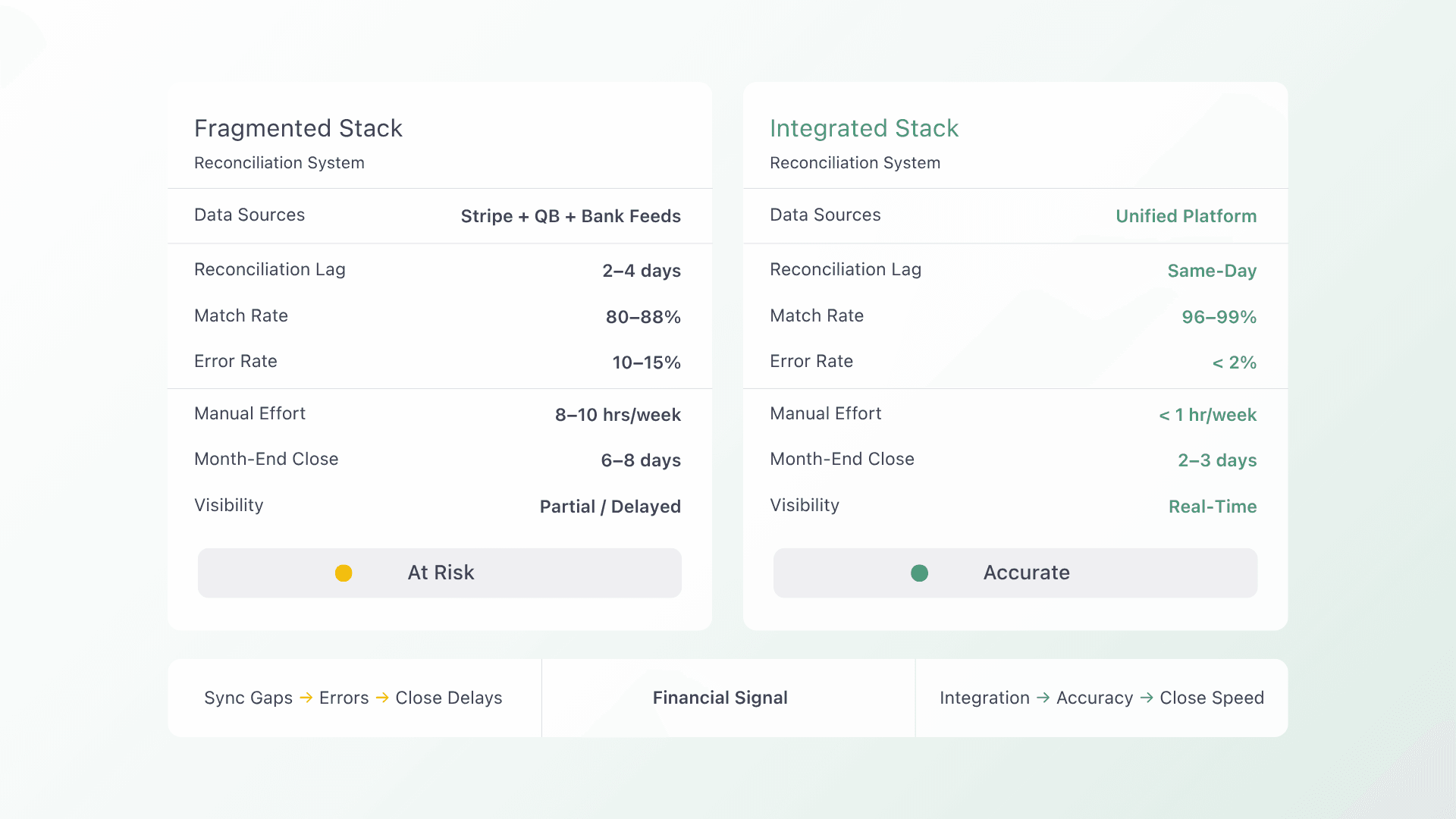
Firms that use Stripe as a payment processor and then route data into QuickBooks will often encounter Stripe QuickBooks reconciliation friction, since Stripe was not designed with QuickBooks workflows in mind and typically requires additional reconciliation steps or third party connectors to keep records aligned.
QuickBooks Payments is designed for small businesses that want fast, simple payment processing inside their existing QuickBooks environment. Firms that need more automation, flexible client billing, or multi platform integration may find it limiting.
How Alternative Payments Compares
Alternative Payments was built for service based businesses that need more than a payment button. For accounting firms specifically, the platform addresses the full billing workflow rather than just the transaction layer.
On the reconciliation side, Alternative Payments integrates natively with both QuickBooks and Xero, automatically posting payments and syncing invoice status in real time. For firms that use Stripe alongside QuickBooks, reconciliation typically requires additional steps or third-party connectors — a known friction point that comes up frequently in accounting workflows. Alternative Payments solves this at the source: payments flow directly through a platform that was built to stay in sync with your accounting software, with no manual data entry or connectors required.
For firms running client advisory services (CAS) billing workflows, Alternative Payments supports recurring billing, installment payments, and auto pay enrollment. Clients get a branded self-service portal where they can view invoices, manage payment methods, and pay on their own schedule without needing to call your office.
Surcharging is built into the platform with compliance guardrails, so firms passing card fees to clients can do it cleanly without piecing together a separate solution. ACH payments are supported with no per transaction ACH fee, which makes a meaningful difference for firms processing larger invoice volumes.
Alternative Payments also includes Collections Assist, an AR automation tool that handles payment reminders, follow ups, and overdue invoice management automatically. For firms looking to reduce DSO without hiring collections staff, this is where the platform earns its keep.
You can see a detailed breakdown of how Alternative Payments stacks up against QuickBooks Payments at alternativepayments.io/vs/quickbooks.
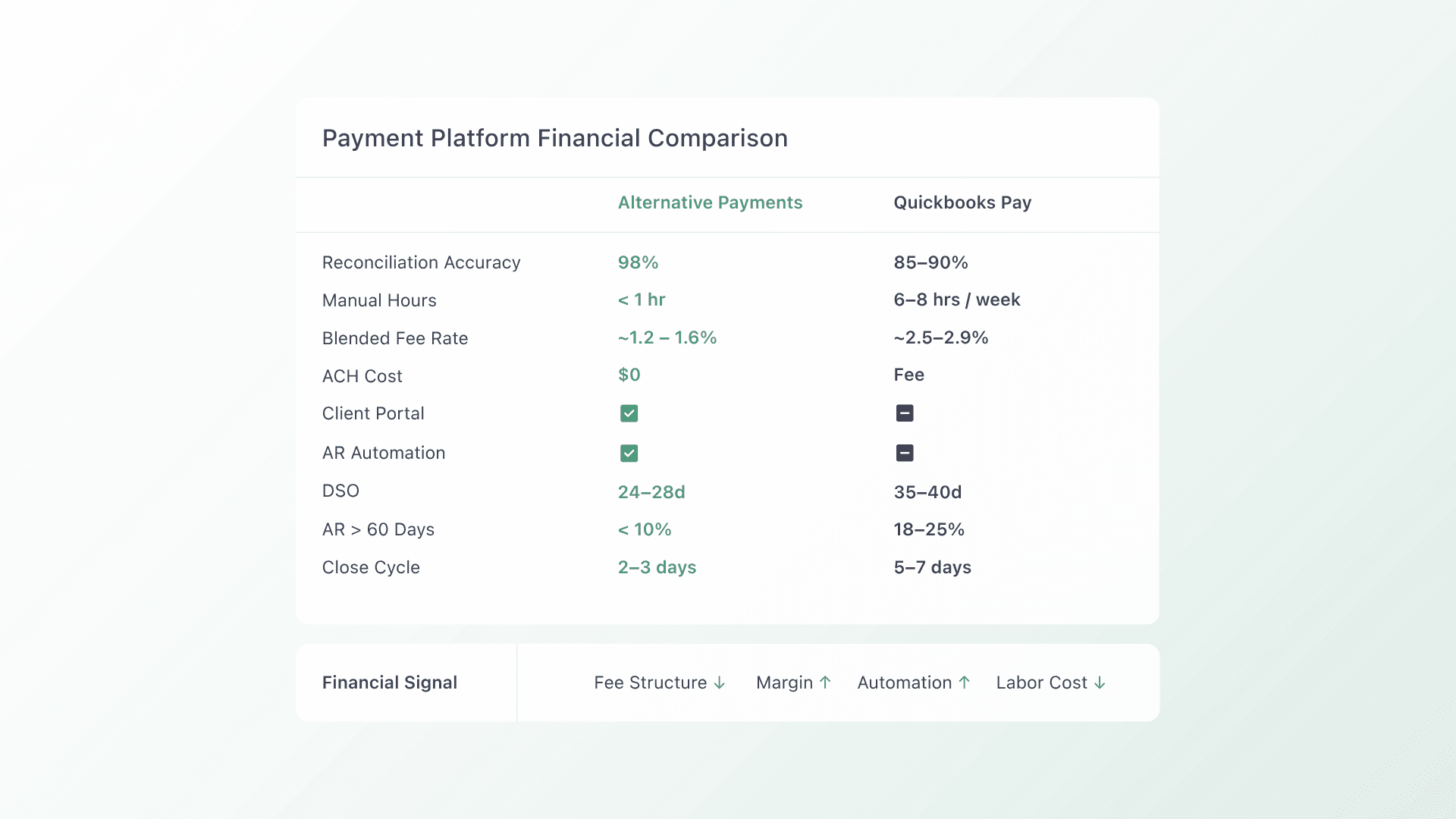
Side-by-Side Comparison Table
Which Solution Fits Your Needs
Neither platform is the right answer for every firm. The better question is which one fits the way your firm bills and collects.
QuickBooks Payments may be the right fit if…
- Your firm is small and already fully inside the QuickBooks ecosystem
- You process a low volume of invoices and do not need a persistent client portal
- You do not pass card fees to clients and have no surcharging requirement
- Simplicity and keeping tools consolidated inside QuickBooks is the top priority
Alternative Payments may be a better fit if…
- You are dealing with Stripe QuickBooks reconciliation friction and want a cleaner path
- You want clients to self-serve through a branded portal rather than paying via email link
- You need surcharging, ACH without transaction fees, or installment billing
- You want AR automation that reduces DSO without adding manual follow up work
- You use Xero, or a mix of accounting and practice management platforms
If you are evaluating options, book a 20-minute demo to see how Alternative Payments works for your firm before making a decision.
FAQs
Is QuickBooks Payments a good fit for accounting firms?
QuickBooks Payments works well for small firms that primarily need simple payment acceptance inside QuickBooks. Firms that need surcharging, a client portal, AR automation, or Xero integration will likely find it too limited for their day to day billing workflow.
What is the best QuickBooks Payments alternative for accounting firms?
Alternative Payments is purpose built for service based businesses and accounting firms. It offers native QuickBooks and Xero reconciliation, surcharging, ACH with no transaction fees, a branded client portal, and AR automation. It is designed to reduce DSO and eliminate manual billing work at scale.
How does Alternative Payments compare to QuickBooks Payments?
QuickBooks Payments is built for simplicity inside the QuickBooks ecosystem. Alternative Payments is built for firms that need more: automated reconciliation, client self-service, surcharging compliance, and AR automation. The comparison table above covers the key differences. You can also see the full breakdown at alternativepayments.io/vs/quickbooks.
What causes Stripe QuickBooks reconciliation issues?
Stripe was not designed with QuickBooks workflows in mind. Reconciling Stripe payments inside QuickBooks typically requires additional steps, third party connectors, or manual data entry to match transactions. Platforms with native QuickBooks integration eliminate this friction by syncing payment and invoice data automatically.