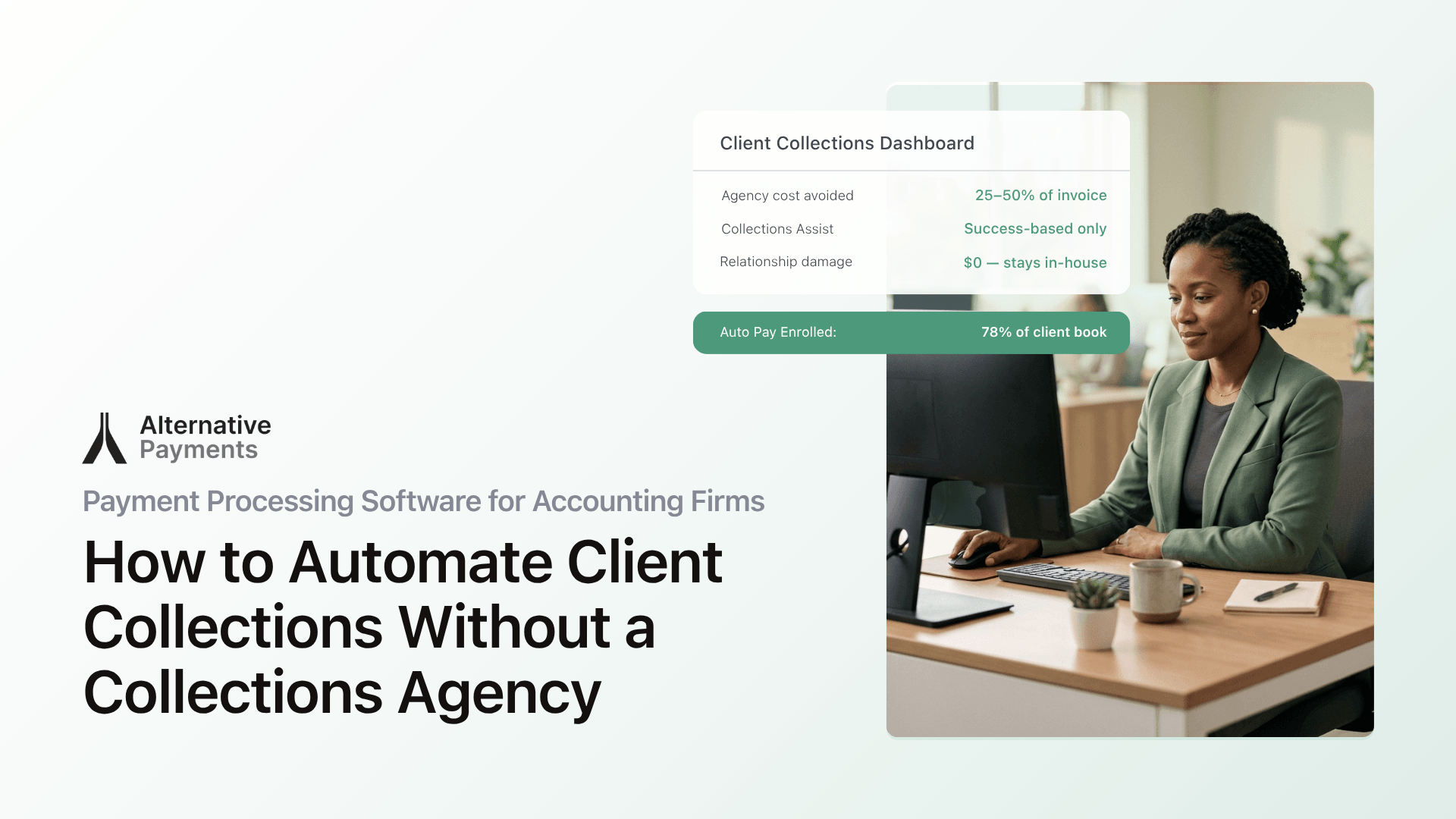
Late payments are not a minor inconvenience for accounting firms. They are a structural threat to the business model, and the right payment processing software for accounting firms can fix the root cause.
According to the 2025 Intuit QuickBooks Small Business Late Payments Report, 56% of U.S. small businesses are owed money from unpaid invoices, with the average amount outstanding sitting at $17,500 per business. For accounting firms and CAS practices that bill on recurring retainers, every late payment compounds, tying up cash, consuming staff time, and eroding the advisory relationship you are trying to build.
The instinct is to chase harder. Send more emails. Pick up the phone. Eventually, consider a collections agency. But there is a cleaner path: automate client collections with software designed for the way accounting firms actually bill, collect, and reconcile.
This guide breaks down what that software looks like, why generic tools fall short, and how to implement automated client collections without disrupting the relationships your firm depends on.
Why Accounting Firms Have a Unique Collections Problem
Most payment tools were built for one-time transactions: an ecommerce purchase, a one-off invoice, a retail checkout. Accounting firms operate differently. The billing is recurring, contract-based, and tied to service agreements that may span months or years.
That mismatch creates three friction points:
Fragmented follow-up. QuickBooks and Xero handle invoicing well, but their built-in reminder systems hit caps at scale. When your firm manages 50, 100, or 200 clients, manually tracking who paid, who needs a nudge, and who is 30 days past due is a full-time job nobody signed up for.
Reconciliation gaps. Generic processors deposit funds in lump sums. Your team then has to match each deposit back to individual invoices, client accounts, and the general ledger. That manual matching is where errors enter the books, and where staff hours disappear.
Client friction. When clients receive a payment link that leads to an unfamiliar third-party portal, trust erodes. They hesitate. They email your team to confirm legitimacy. The payment sits unpaid while your AR ages.
These problems are not signs that your clients are bad payers. They are symptoms of a billing infrastructure that was not designed for recurring service businesses.
Why a Collections Agency Is the Wrong Fix
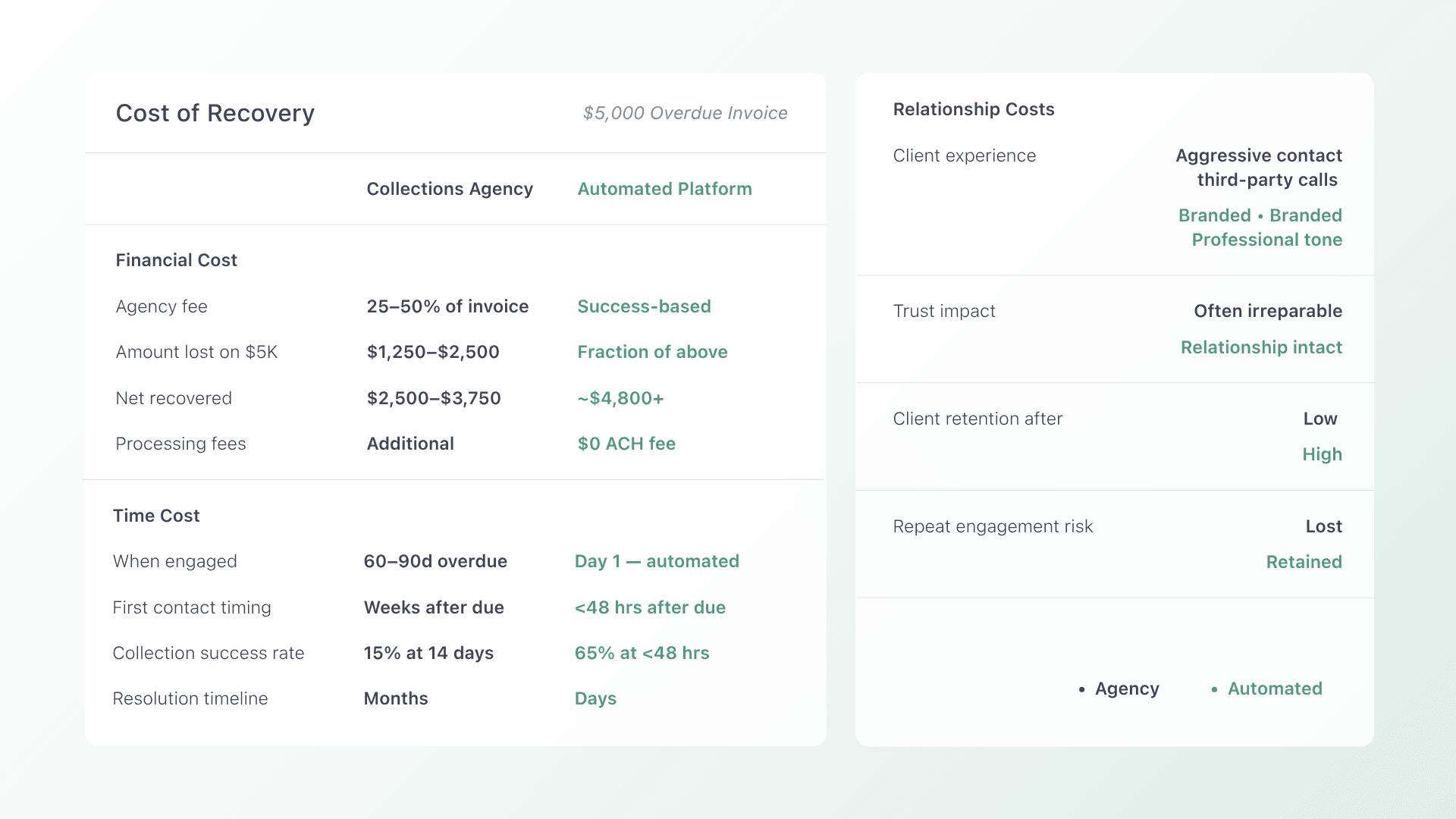
Hiring a collections agency feels decisive, but it addresses the symptom (overdue invoices) without fixing the cause.
For accounting firms, the downsides are significant:
- Relationship damage. Your clients are ongoing advisory relationships, not one-time customers. Sending a client to collections signals a breakdown in trust that is difficult to repair.
- High cost. Most agencies charge 25–50% of the collected amount. On a $5,000 retainer invoice, you could lose $1,250–$2,500 just to recover what was already owed.
- Reactive timing. Agencies engage after the invoice is deeply overdue. By then, the cash flow damage is done and the client relationship may be strained beyond repair.
The better approach is to prevent invoices from becoming overdue in the first place. That means automating the entire payment lifecycle, from invoice delivery to reconciliation, so clients pay on time and your team does not have to chase.
What Automated Client Payment Collection Looks Like
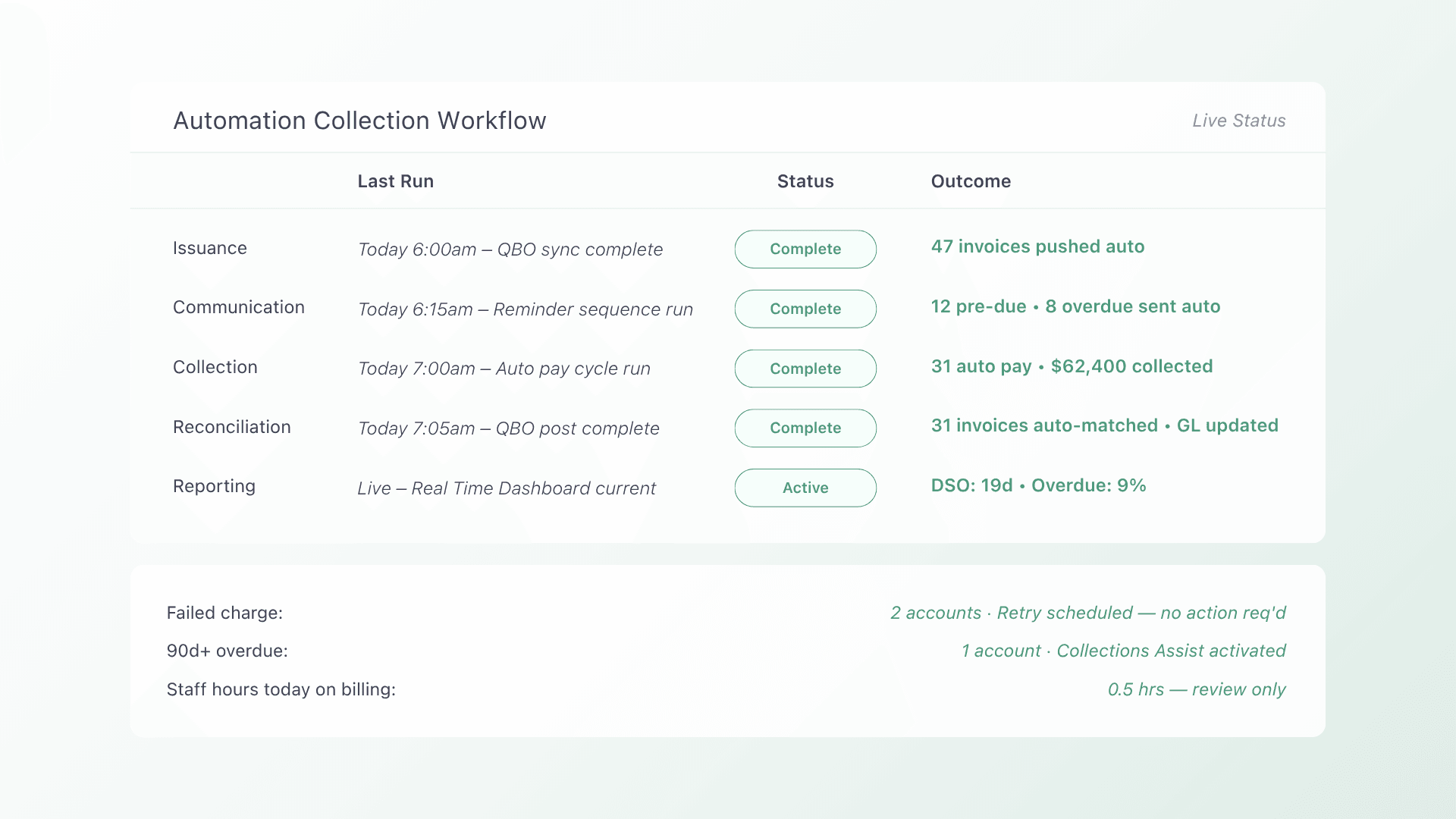
Automation does not mean sending a few extra email reminders. For accounting firms, a fully automated collection workflow covers five stages:
1. Invoice issuance
Your accounting or practice management system generates the invoice. A purpose-built payment platform syncs with that system (whether it is QuickBooks, Xero, or another tool) and pulls the invoice data automatically. No manual re-entry. No copy-paste errors.
2. Client communication
Automated reminders go out before the due date, on the due date, and at intervals you define after the due date. Each message includes the invoice details, the amount owed, and a direct link to pay. Unlike generic “you have a balance” notifications, these communications are traceable and consistent, which eliminates the “I never got the invoice” excuse.
3. Payment collection
This is where auto-pay changes the equation. Clients enroll through a branded, white-label checkout that looks like your firm, not a third-party processor. They choose ACH, credit card, or both, and the platform charges the stored method on the due date automatically.
For clients who prefer to pay manually, the same checkout provides a one-click experience with the invoice pre-loaded. Either way, payment happens without your staff lifting a finger.
4. Auto-reconciliation
Every payment maps to the specific invoice it covers. When the platform integrates with QuickBooks or your ERP, it posts the payment record directly. No lump-sum deposits, no manual matching. This is the step where most generic processors fail and where accounting firms save the most time.
5. Reporting
DSO, on-time payment ratios, overdue balances, and exception rates appear in one view. Instead of pulling reports from three tools and cross-referencing spreadsheets, you get a single dashboard that shows your firm’s AR health in real time.
This lifecycle framing (issuance, communication, collection, reconciliation, reporting) is not theoretical. It is the operational architecture that separates purpose-built platforms from duct-taped billing stacks.
Features to Prioritize When Choosing Payment Software
Not every platform that accepts payments is built for accounting firms. Here is what to evaluate:
ACH-first payment acceptance
For recurring advisory retainers, ACH should be your default collection method. It carries lower processing costs than credit cards and suits the predictable billing cycles accounting firms run on. Look for platforms that support ACH with low or no per-transaction fees, which becomes significant at volume.
For clients who prefer cards, compliant surcharging allows your firm to pass the processing cost through rather than absorbing 2–3% on every transaction.
Auto-pay enrollment
The single highest-impact feature for reducing late payments. When clients enroll in auto-pay, the platform charges their stored payment method on the due date without any action from either side. This eliminates the gap between “invoice received” and “payment submitted” that causes most aging AR.
White-label client portal
A branded self-service portal gives clients access to their invoice history, payment method management, and auto-pay enrollment without contacting your office. When the experience looks like your firm, not a generic processor, clients trust it and use it. That trust translates directly into faster payments.
Client-facing financing
Not every client can pay the full invoice immediately. Platforms that offer installment plans, B2B buy now pay later, or flexible payment terms reduce the “I’ll pay when I can” delay. When clients can split a large engagement fee into manageable installments, they pay sooner and your AR ages less.
Deep accounting integration
The platform must sync bi-directionally with your accounting system. Invoices flow out; payments and reconciliation data flow back. If the integration requires manual imports, CSV uploads, or periodic batch syncs, it is not truly automated. It is just moving the manual work to a different step.
Automated collections escalation
For invoices that do slip past due despite auto-pay and reminders, a built-in Collections Assist feature can escalate overdue invoices through a structured process, without sending your client to a traditional collections agency. Success-based fees mean you only pay when the invoice is collected.
How CAS Firms Are Making the Switch
Moving from manual billing to automated collections does not require rebuilding your firm’s infrastructure. Based on how CAS firms have implemented these workflows, a phased approach works best:
- Audit your current billing flow. Map where invoices are created, how reminders go out, where payments land, and how they get reconciled. Identify the manual handoffs.
- Start with 5–10 clients on auto-pay. Choose clients with straightforward retainer agreements. Enroll them in auto-pay and let the system run for one billing cycle to confirm the workflow.
- Configure your accounting integration. Connect the platform to QuickBooks Online or your ERP and verify that payments reconcile correctly: right invoice, right amount, right GL account.
- Roll out the client portal. Give all clients access to the branded portal for invoice history, payment method management, and self-service auto-pay enrollment. Train your team on the dashboard.
Most CAS firms complete full rollout within two billing cycles. The phased approach is not about slowing the transition. It is about protecting existing client relationships while the new workflow proves itself.
Generic Processors vs. Purpose-Built Platforms
The difference matters more than most firms realize. Here is what changes when you move from a generic payment processor to a platform built for recurring, contract-based billing:
|
Capability |
Generic processor |
Purpose-built platform |
| Invoice sync | Manual upload or basic API | Bi-directional sync with accounting systems |
| Reminders | Limited or manual | Automated cadence before, on, and after due dates |
| Reconciliation | Lump-sum deposits; manual matching | Per-invoice auto-reconciliation to the GL |
| Client experience | Third-party checkout | White-label portal branded to your firm |
| Payment flexibility | Card only or limited ACH | ACH, cards, surcharging, installments, B2B BNPL |
| Collections escalation | Not available | Built-in, success-based collections assist |
When every payment maps cleanly to an invoice and posts correctly to your accounting system without human triage, your team stops reacting to overdue invoices and starts focusing on client delivery.
FAQs
Can I automate payments without switching away from QuickBooks? Yes. Purpose-built platforms integrate directly with QuickBooks Online, syncing invoices and reconciliation data automatically. You keep QuickBooks as your accounting system; the payment platform handles collection, reminders, and reconciliation on top of it. Learn how the QuickBooks integration works.
Will auto-pay work for clients with variable monthly fees? Auto-pay charges the invoice amount on the due date, regardless of whether that amount changes month to month. As long as your system generates the invoice with the correct amount, the payment platform collects it automatically.
What happens when a client’s payment method fails? The platform retries the payment according to rules you configure and notifies both your team and the client. Failed payments surface in your dashboard with clear next steps, so nothing falls through the cracks.
Is ACH safe for collecting client payments? ACH payments are processed through the Automated Clearing House network, which is regulated and widely used for B2B transactions across the U.S. and Canada. For recurring retainer billing, ACH is generally more cost-effective than credit cards and avoids the processing fees that eat into margins.
How is Collections Assist different from a traditional collections agency? Collections Assist uses automated outreach and structured follow-up, not aggressive calls or letters. It operates on a success-based fee model, and the escalation stays within a professional framework that protects your client relationship.
Take the Manual Work Out of Getting Paid
Accounting firms and CAS practices should not spend their expertise chasing payments. When client collections run automatically, from invoice to reconciliation, your team reclaims the hours spent on follow-up, your books stay clean, and your clients experience a professional payment process that reinforces trust.
The firms that have made this shift report the same pattern: predictable cash flow, fewer overdue invoices, and month-end closing that takes hours instead of days. The operational lift is modest (most teams are fully running within two billing cycles), and the payoff compounds with every client you add.
Book a demo to see how Alternative Payments automates client collections for accounting firms and CAS practices, with auto-pay, ACH, white-label checkouts, and direct QuickBooks integration.