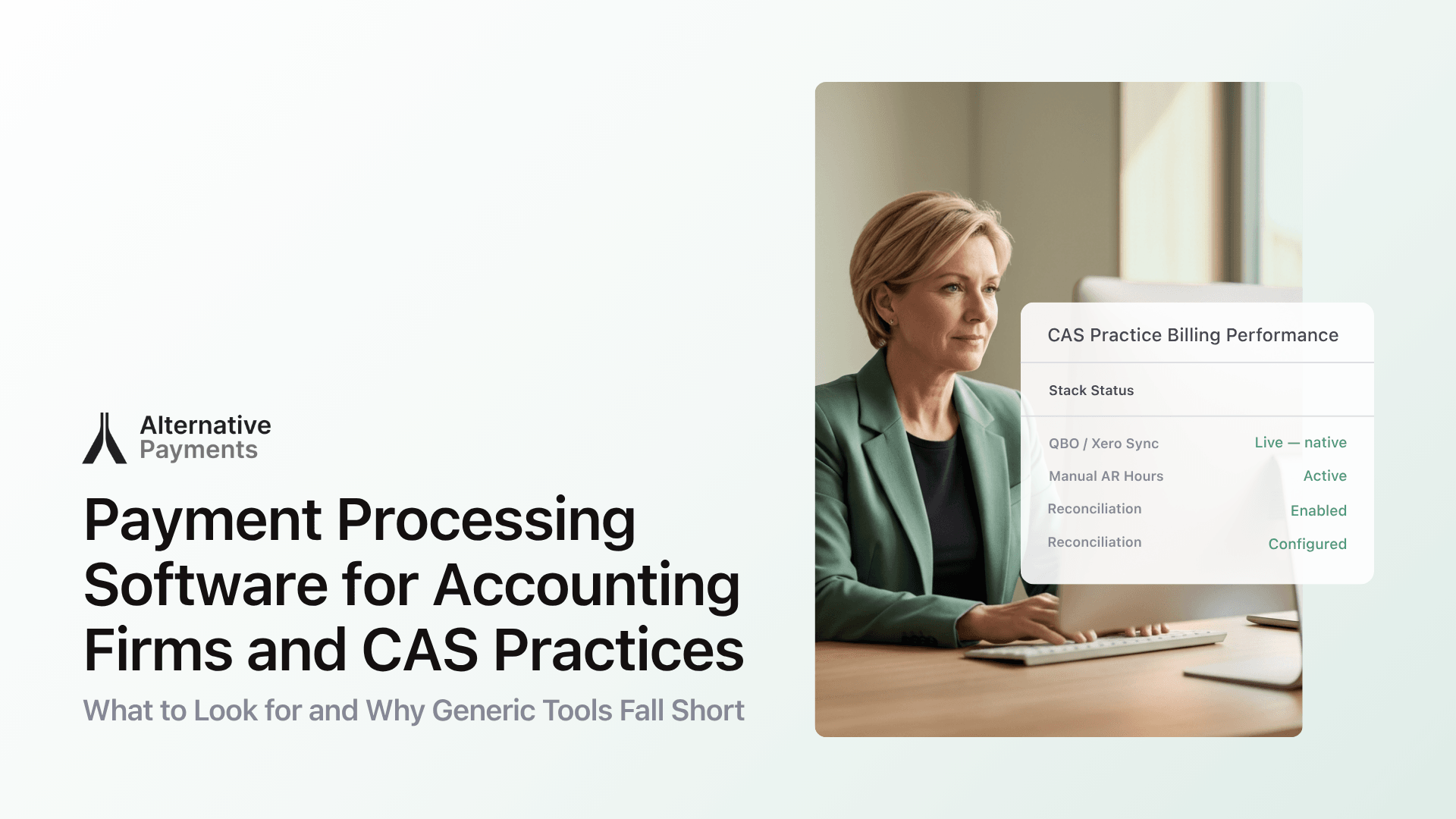
Why Accounting Firms Need a Dedicated Payment Platform
CAS is no longer a niche service line. According to the 2024 CPA.com & AICPA PCPS CAS Benchmark Survey, firms project a median CAS revenue growth rate of 99% over the next three years. That growth is built on recurring engagements like monthly bookkeeping, payroll management, and fractional CFO work that demand recurring billing infrastructure.
The billing model shift is already well underway. In 2018, 53% of CAS practices used hourly billing as their primary pricing method. By 2024, only 10% still did. The rest moved to fixed-fee or value-based models that create predictable revenue, but only if the payment system supports automated collection.
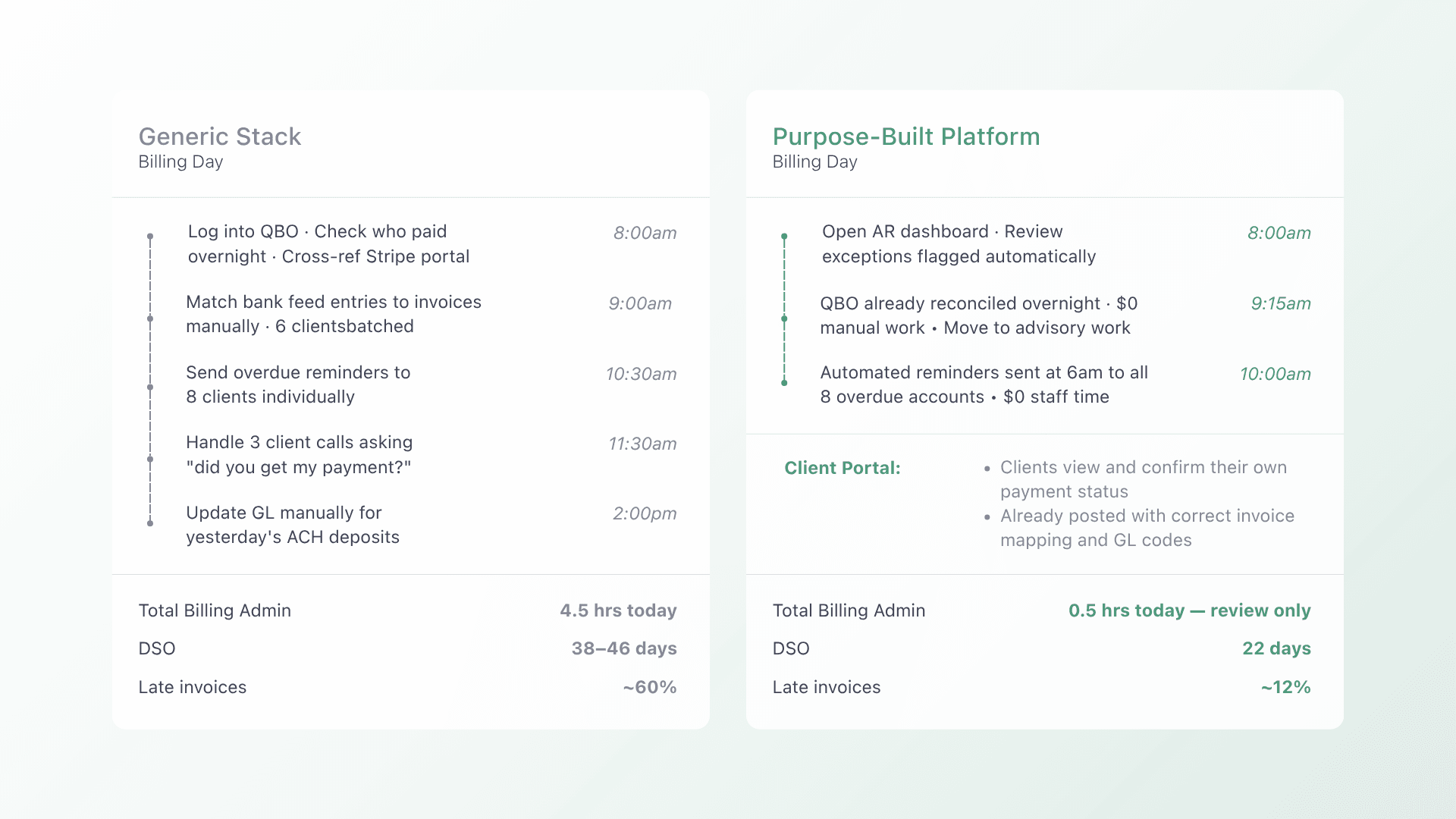
Here is where generic tools break down. A typical CAS firm might use QuickBooks Online for accounting, a separate processor like Stripe for card payments, bank feeds for reconciliation, and email for payment follow-ups. Each tool works on its own. Together, they create fragmented data, manual reconciliation steps, and no single view of what is owed, what is paid, and what needs attention.
The Real Cost of Manual Collections
Professional services firms operate with a DSO benchmark of 30 to 60 days. But industry-wide, only 14% of companies maintain a DSO under 30 days, while 42% report DSO exceeding 46 days.
The gap between standard payment terms and actual collection time represents real cash stuck in receivables. For a CAS practice billing $50,000 per month, every 15 extra days of DSO means roughly $25,000 tied up in unpaid invoices at any given time. That is money that cannot fund payroll, technology, or growth.
Timing matters for collection efforts, too. First contact within 48 hours of a missed payment achieves a 65% collection success rate. Wait 14 days, and that drops to 15%. Manual follow-up cannot maintain that cadence across 50, 100, or 200 active clients. Someone always slips through.
Automated reminder cadences outperform manual follow-up by 12 to 18 days on average when it comes to collecting payment. The gap is not about being more aggressive. It is about being more consistent.
What to Look for in a Payment Platform
Not every payment tool is built for the way accounting firms operate. Here are the capabilities that separate a workable solution from one that actually removes friction.
Recurring billing that runs without manual invoicing
Your clients pay on a schedule. Your platform should match that schedule without requiring someone to create and send each invoice by hand. Look for auto-pay enrollment, configurable billing rules, and the ability to handle prorated charges, credits, and adjustments within a single system.
Auto-reconciliation with your accounting software
Every payment should map to the specific invoice it covers and post to the correct account in your GL automatically. If your team still exports CSVs, matches transactions by hand, or manually records payments in QuickBooks or Xero, that reconciliation gap is where errors, duplicate entries, and month-end delays live.
Multiple payment methods in one checkout
Clients expect options. ACH, credit card, and client-facing financing (like installments or B2B buy now pay later) should all be available through a single branded checkout, not three separate portals. The fewer steps between invoice delivery and payment, the faster you collect.
White-label client experience
Your payment page should look like your firm, not like a third-party processor. A branded, white-label checkout builds client trust and reduces confusion, especially for CAS clients who interact with your billing system every month.
Deep accounting integrations
The platform should integrate directly with QuickBooks Online, QuickBooks Desktop, Xero, NetSuite ERP, Sage Intacct, FreshBooks, and Microsoft Dynamics, not through workarounds but through native connections that keep invoices, payments, and your GL in sync. As your firm grows or moves to a more robust ERP, the payment layer should scale with you.
Collections automation without a collection agency
Overdue invoices need structured follow-up, not manual email chains. A collections assist feature that surfaces overdue accounts, automates outreach sequences, and tracks resolution lets your team act on exceptions without spending hours chasing every late payment.
Purpose-Built Platforms vs. Generic Processors
The difference between a purpose-built payment platform and a generic processor is not just features. It is workflow alignment.
| Dimension | Generic processor | Purpose-built platform |
| Invoice handling | Treats each payment as a standalone transaction | Maps payments to specific invoices and contract terms |
| Reconciliation | Manual matching via CSV exports or bank feeds | Auto-reconciliation that posts directly to your GL |
| Billing logic | Flat recurring charges only | Supports prorated billing, credits, adjustments, and multi-entity structures |
| Client experience | Processor-branded checkout page | White-label checkout with your firm’s branding |
| Payment methods | Card or ACH (often separate setups) | ACH, credit card, and client-facing financing in one flow |
| Collections | No built-in follow-up | Automated reminder cadences and collections workflows |
| Integrations | Accounting only (often limited) | Accounting, PSA, and ERP connections that keep all systems in sync |
Generic processors like Stripe or QuickBooks Payments are solid tools for simple payment acceptance. But they were not designed for contract-driven, recurring revenue workflows where billing logic, client communication, and reconciliation need to work as a connected system.
Extending the Platform to Your Clients’ Businesses
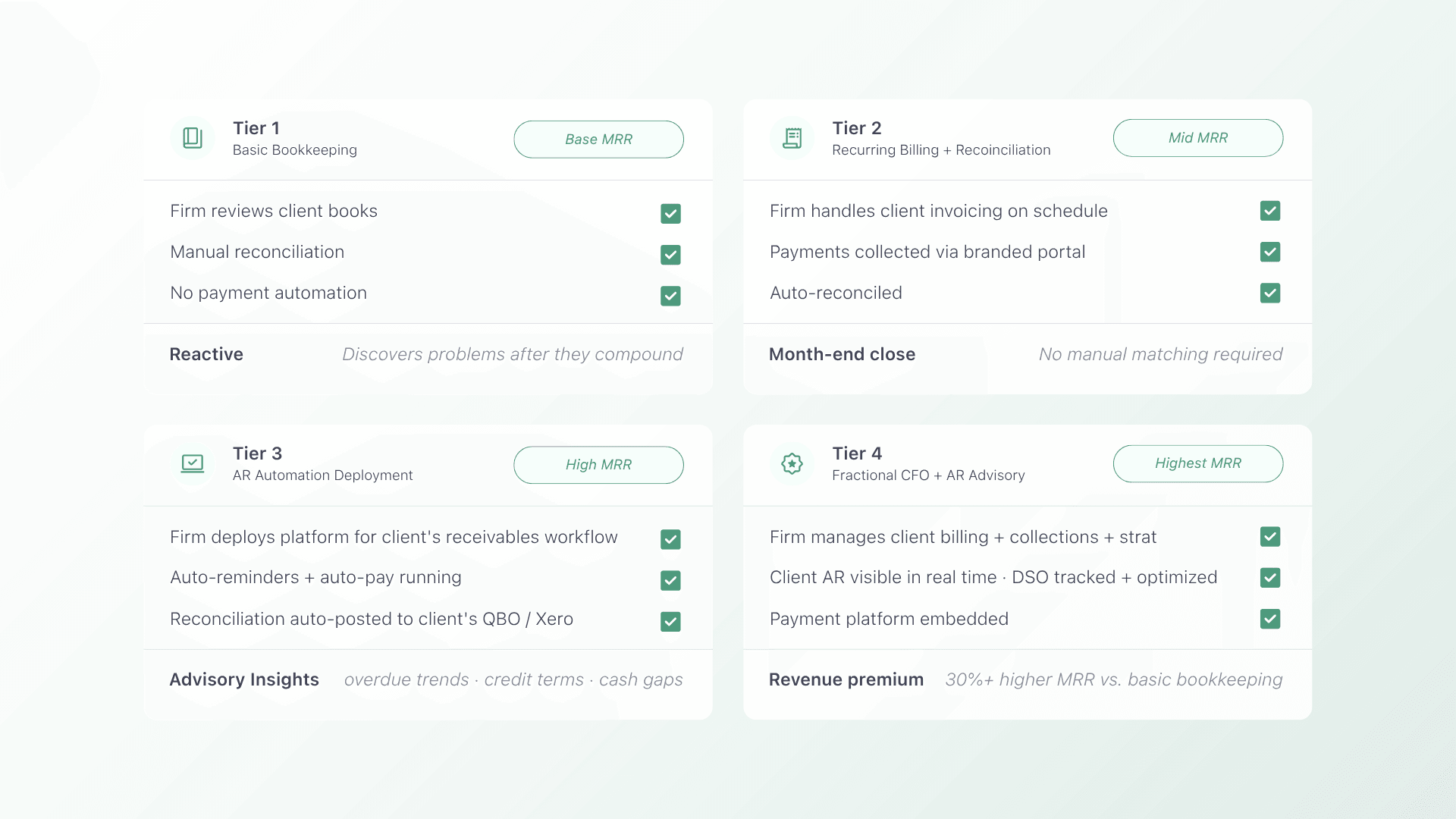
This is where a purpose-built payment platform becomes a growth lever for CAS practices. Firms that offer CFO-level or higher advisory services earn more than 30% higher monthly recurring revenue than firms offering basic bookkeeping alone.
AR automation is one of the highest-impact advisory services you can deliver. When you deploy a payment platform that also works for your clients’ businesses, you create a shared system where:
- Client invoices go out on schedule without manual intervention from your team or theirs.
- Payments reconcile automatically in the client’s accounting system, which you already manage.
- Overdue accounts surface proactively, giving you data to advise on credit terms, payment incentives, or client segmentation.
- Cash flow becomes visible in real time, which strengthens your advisory relationship and makes your services harder to replace.
The operational benefit is mutual. Your clients collect faster. You spend less time on manual reconciliation. And the stickiness of your CAS engagement increases because you are embedded in their financial infrastructure, not just reviewing their books after the fact.
How Alternative Payments Fits
Alternative Payments is built for service businesses that run on recurring revenue, including accounting firms and the businesses they serve. The platform unifies invoicing, payment collection, reconciliation, and reporting in one system that integrates with QuickBooks, Xero, NetSuite ERP, Sage Intacct, FreshBooks, and Microsoft Dynamics.
Key capabilities for accounting firms and CAS practices:
- Auto-pay and recurring billing: set up billing rules once and let the system handle collection on schedule.
- Auto-reconciliation: every payment maps to the right invoice and posts to your accounting software without manual matching.
- Client-facing financing: offer ACH, credit card, installments, and B2B buy now pay later through a single branded checkout.
- Collections Assist: automate follow-up on overdue invoices without hiring a collection agency or burning client trust.
- White-label checkouts: deliver a payment experience that carries your brand, not a third-party processor’s.
- Multi-entity support: manage billing for multiple client businesses or firm locations from one platform.
Alternative Payments recently raised $22 million in funding, led by MissionOG and Third Prime, to accelerate automation and expand into underserved B2B sectors, including professional services firms that have been stuck with generic payment tools.
Book a demo to see how the platform works with your accounting stack and your clients’ billing workflows.
Frequently Asked Questions
Can I use one payment platform for both my firm’s billing and my CAS clients’ businesses?
Yes. A platform like Alternative Payments supports multi-entity structures, so you can manage billing for your own firm and your clients’ businesses from a single account. Each entity maintains its own integrations, branding, and billing rules.
Does automating payment collection hurt client relationships?
Consistent, professionally branded communication actually strengthens relationships. Automated reminders are timely, predictable, and free of the awkwardness of personal follow-up calls. Clients know exactly what is owed, when, and how to pay, which reduces disputes and builds trust.
What accounting software integrations should I look for?
At minimum, your platform should integrate natively with QuickBooks Online, QuickBooks Desktop, and Xero. For firms growing into mid-market or enterprise CAS work, look for connections to NetSuite ERP, Sage Intacct, and Microsoft Dynamics. Native integrations eliminate manual data entry and reconciliation gaps.
How does a purpose-built platform reduce DSO compared to manual collections?
Automated reminders, easy online payment options, and structured follow-up cadences collectively shorten time-to-pay. Automated cadences outperform manual follow-up by 12 to 18 days on average. Combined with auto-pay enrollment, firms typically see measurable DSO reductions within the first few billing cycles.
Is Alternative Payments available for firms outside the U.S.?
Alternative Payments serves companies in the United States and Canada that operate recurring revenue models. If your firm or your clients’ businesses are based in either country, the platform is designed for your workflows.