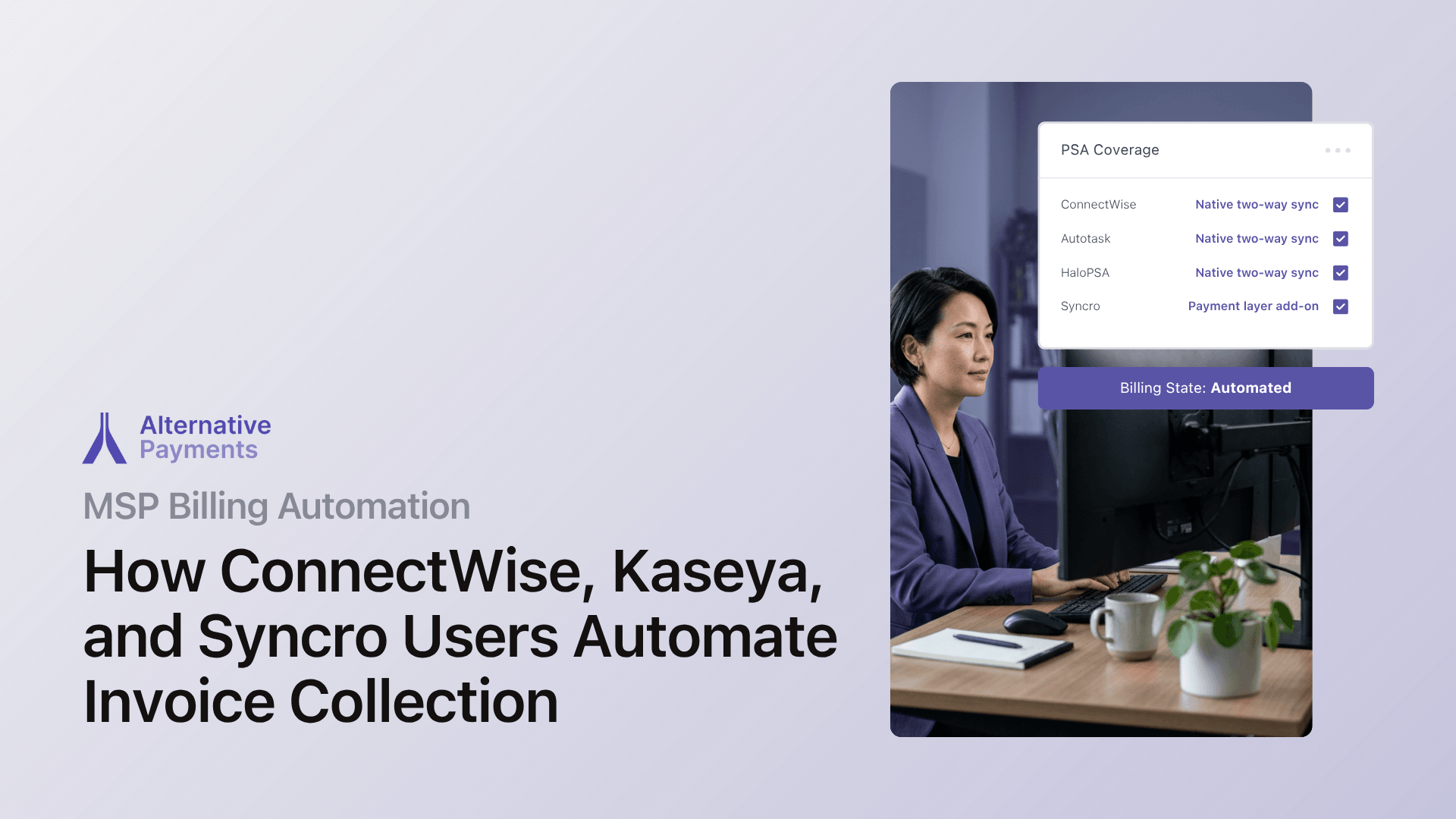
MSPs automate invoice collection by connecting their PSA (ConnectWise, Autotask (Kaseya), Syncro, or HaloPSA) to a purpose built payment platform that handles the entire billing lifecycle: issuance, communication, collection, reconciliation, and reporting. Native two way PSA integration eliminates manual data entry, auto charges stored payment methods on schedule, and posts settlements back to accounting without human triage.
If you are still exporting CSVs, chasing overdue invoices by email, or reconciling payments in a spreadsheet, this guide breaks down how each major PSA connects to automated billing, and where the gaps are that a dedicated payment layer fills.
Why Manual MSP Billing Breaks at Scale
Every MSP starts with a manageable billing process. A few dozen clients, predictable contracts, and a bookkeeper who knows every account by name. Then the client list grows, per seat counts shift monthly, and one off project charges pile up alongside recurring agreements.
The math gets ugly fast. According to Versapay’s accounts receivable research, AR teams spend an average of 31.24% of their workday resolving invoice disputes. For a lean MSP finance team, that is not a rounding error. It is the difference between proactive financial management and a monthly scramble.
The downstream effects compound:
- Late payments become structural. Kaseya reports that 81% of MSPs wait 60 or more days to get paid. When billing depends on manual invoice exports and email follow ups, slow collections are a system design problem, not a client behavior problem.
- Cash flow suffers across the industry. PYMNTS (2024) found that 60% of small businesses cite cash flow management as a major challenge, with late client payments identified as the number one contributing factor.
- Labor costs leave no room for waste. In an October 2025 Omdia analysis of the MSP market, Syncro CEO Michael George estimated that MSPs spend up to 80% of total costs on labor. Every hour your team spends on manual reconciliation is an hour not spent on service delivery or growth.
The root cause is almost always the same: the PSA creates invoices, but it does not collect payments, reconcile transactions, or communicate with clients about overdue balances in a unified workflow. That gap between invoice creation and cash in your account is where billing automation lives.
What Each PSA Does, and Where It Stops
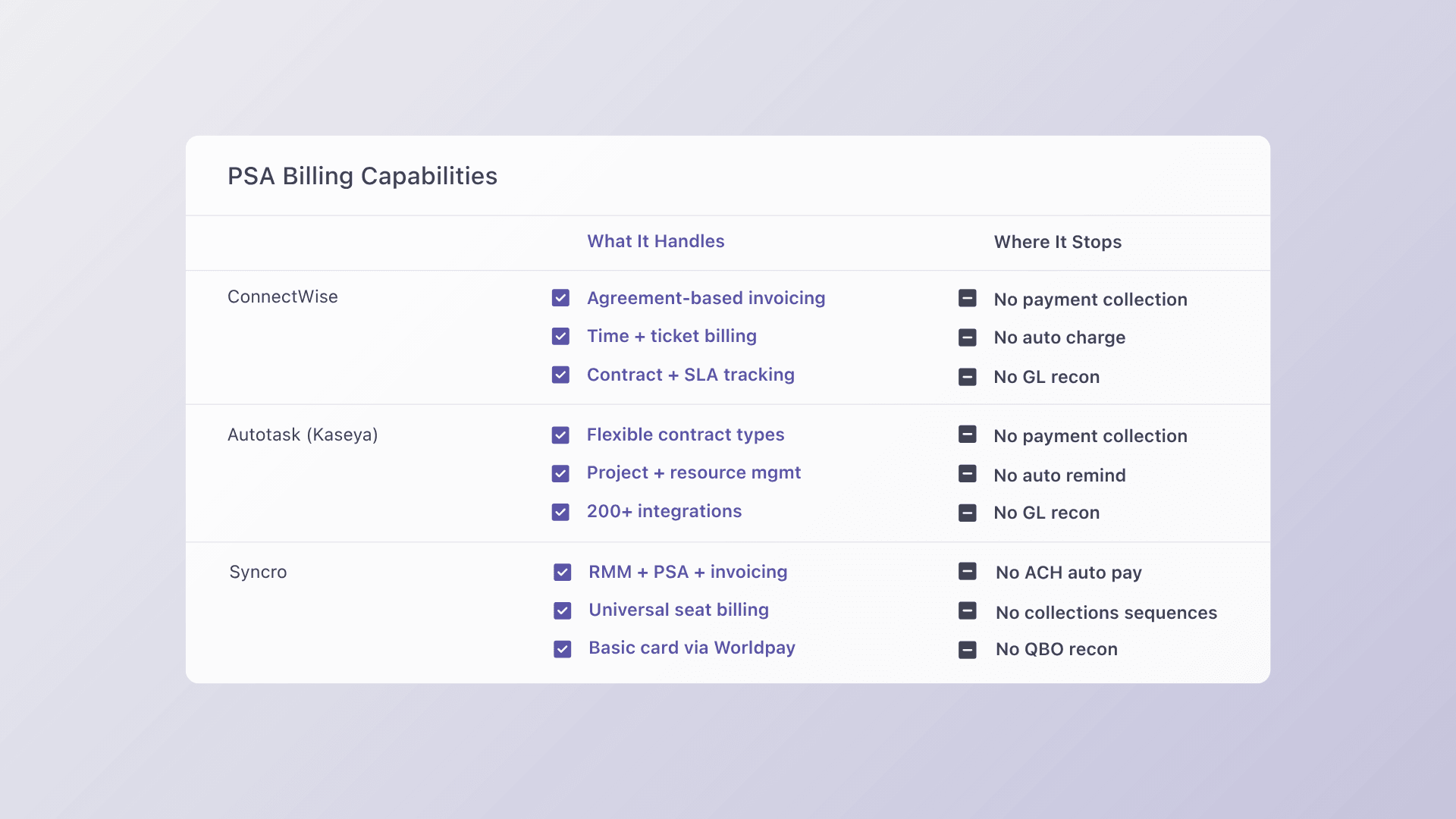
Understanding where your PSA’s billing capabilities end is the first step toward closing the automation gap. Here is a candid look at the three most common PSA environments.
ConnectWise PSA
ConnectWise is the most widely deployed PSA among mid market and enterprise MSPs. Its agreement engine handles complex contract structures (recurring services, time and materials, milestone billing) and generates invoices from tracked work.
What ConnectWise does well:
- Agreement based recurring invoice generation
- Time entry and ticket based billing
- Contract management with SLA tracking
Where ConnectWise stops: ConnectWise generates invoices, but it does not natively process payments, auto charge stored client payment methods, or reconcile collected funds back to accounting. MSPs need an external payment layer that syncs bidirectionally with ConnectWise to close the loop from invoice to deposit.
Kaseya Autotask PSA
Autotask PSA is the enterprise grade platform within Kaseya’s IT Complete ecosystem. It manages ticketing, project management, contract billing, and integrates with over 200 third party applications. The 2025 umbrella contracts feature improved billing visibility by consolidating all client agreements into a single view.
What Autotask does well:
- Flexible contract types and billing terms
- Strong project management and resource scheduling
- Deep ecosystem integration across the Kaseya stack
Where Autotask stops: Autotask handles invoice generation and contract management, but payment collection, automated reminders, and GL reconciliation still require an external integration. MSPs using Autotask need a payment platform that connects natively to pull invoices, collect payments, and push settlement data back, without middleware or manual exports.
Syncro PSA
Syncro combines RMM, PSA, and basic billing in a single platform. It is popular among smaller MSPs and solo operators who want a unified tool without managing multiple vendors. Syncro’s Universal Billing feature automates license count based invoicing for resold services like Microsoft 365 and Acronis.
What Syncro does well:
- Unified RMM + PSA + basic invoicing in one platform
- Automated seat count billing for vendor integrations
- Built in payment processing via Worldpay
Where Syncro stops: Syncro’s built in payment processing covers basic card acceptance, but it lacks the deeper AR automation that growing MSPs need: configurable auto pay rules, automated collections sequences, multi method payment support (ACH, cards, and installments in one portal), and automatic reconciliation to external accounting systems like QuickBooks. MSPs outgrowing Syncro’s native billing need a dedicated payment layer that adds these capabilities without replacing their PSA.
The Complete Billing Lifecycle: Where Automation Fits
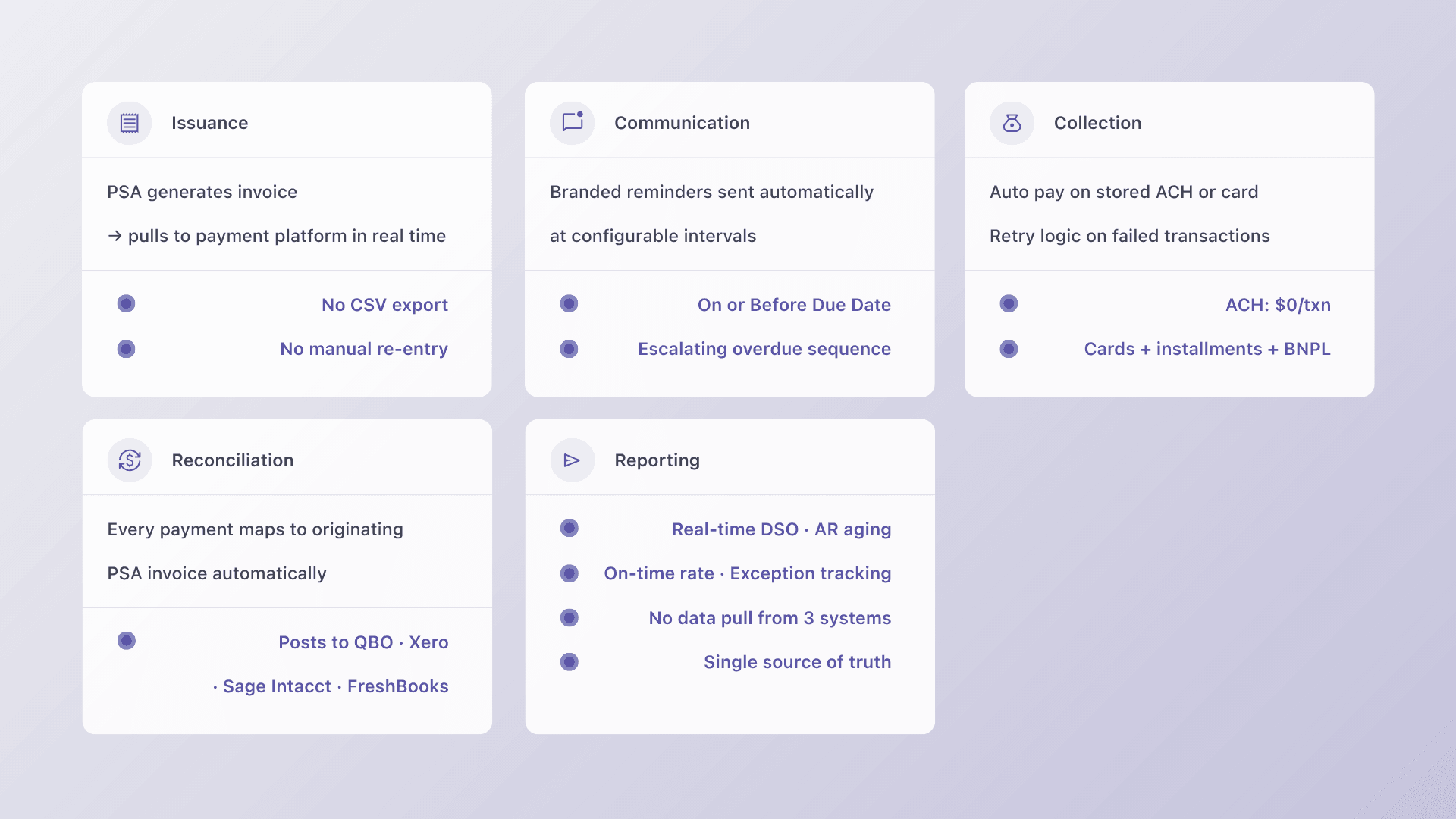
Billing automation is not a single feature. It is a system that spans five stages, and the value compounds when all five are connected.
1. Issuance
Your PSA generates invoices based on agreements, time entries, and project milestones. Automation starts here: the payment platform pulls invoice data from the PSA in real time, so there is no manual export or CSV upload.
2. Communication
Automated payment reminders replace manual email follow ups. The platform sends branded notifications at configurable intervals (before due date, on due date, and at escalating intervals after) so your team never has to chase a payment manually.
3. Collection
This is where the gap between PSA and payment platform matters most. A purpose built payment layer offers:
- Auto pay on stored methods: ACH and card charges triggered automatically on the billing schedule
- Retry logic: Failed transactions are retried on a configurable schedule before escalating
- Multiple payment options: ACH, credit card, and client facing financing (installments or B2B buy now pay later) in a single branded checkout
4. Reconciliation
Every collected payment maps back to the originating invoice in the PSA and posts to your accounting system (QuickBooks, Xero, Sage Intacct, or others). No manual matching. No spreadsheet reconciliation. No month end scramble to figure out which deposits match which invoices.
5. Reporting
With the full lifecycle connected, you get real time visibility into DSO, aging AR, on time payment ratios, and exception rates, without pulling data from three different systems.
When all five stages are automated and connected, billing becomes a system that runs in the background. Your team reviews exceptions and makes strategic decisions instead of processing transactions.
Native Integration vs. Bolt On: Why the Distinction Matters
Not all integrations are equal. The difference between a native PSA integration and a bolt on connector determines how much manual work remains in your billing process.
Bolt on integrations (via Zapier, generic APIs, or middleware) typically:
- Import invoice totals without line item detail
- Require manual mapping between PSA entities and accounting categories
- Break when PSA data structures change
- Create reconciliation gaps that compound over months
Native two way integrations operate differently:
- Invoice data flows automatically from PSA to payment platform with full detail
- Payment status updates push back to the PSA in real time
- Settlements reconcile to accounting automatically
- Contract changes in the PSA reflect immediately in billing
The practical impact: a bolt on integration might reduce your billing workload by 30–40%. A native integration eliminates the manual reconciliation step entirely.
For MSPs evaluating payment platforms, the question is not “does it integrate with my PSA?” It is “does it sync bidirectionally, in real time, with no middleware required?”
How Alternative Payments Connects the Stack
Alternative Payments is purpose built for recurring revenue businesses running on PSA workflows. Here is what the integration stack looks like in practice:
PSA connections: Native two way sync with ConnectWise, Autotask, HaloPSA, and SuperOps. Invoices created in your PSA push directly to the payment platform. Payment status and settlement data push back automatically.
Payment methods: ACH (with no per transaction fee), credit cards, and client facing financing, including installments and B2B buy now pay later, all available through a single white label checkout branded to your MSP.
Auto pay and collections: Configurable auto pay rules, auto charge on stored payment methods, retry logic for failed transactions, and Collections Assist, automated reminders and overdue follow up that run without manual input.
Reconciliation: Every payment maps to the right invoice and posts to accounting (QuickBooks Online, QuickBooks Desktop, Xero, Sage Intacct, FreshBooks, and more) with no manual matching required.
Results: MSPs on the platform report over 60% improvement in collection times and a 40% reduction in DSO. Firms report saving 5 to 8 hours per week on average, redirecting that time from chasing payments to client delivery.
What syncs automatically vs. what needs configuration
Automatic (no setup after initial connection):
- Invoice creation and push from PSA to payment portal
- Payment status updates back to the PSA
- Auto reconciliation to QuickBooks or your accounting system
- Client payment method storage and auto pay enrollment
Requires one time configuration:
- Auto pay rules and billing cycle timing
- Payment reminder sequences and escalation intervals
- Surcharging settings (if passing card fees to clients)
- Chart of accounts mapping in your accounting system
Setup typically completes in 1 to 3 business days, not weeks of custom development.
How to Choose the Right Billing Automation Path for Your PSA
The right approach depends on your PSA, your current pain points, and how quickly you need results.
| If you use… | Your biggest gap is… | What to evaluate |
| ConnectWise | Payment collection and GL reconciliation | Native ConnectWise → payment platform → QuickBooks sync |
| Autotask (Kaseya) | Automated collections and accounting reconciliation | Native Autotask integration with auto pay and Collections Assist |
| Syncro | AR automation beyond basic card processing | A payment layer that adds ACH, auto pay, and reconciliation to Syncro’s billing |
| HaloPSA | End to end billing lifecycle automation | Native HaloPSA → payment platform → accounting sync |
Regardless of PSA, prioritize these capabilities:
- Native two way PSA sync: not middleware or Zapier
- Auto pay with retry logic: the single highest impact feature for reducing DSO
- Automatic GL reconciliation: eliminates month end manual matching
- Multiple payment methods: ACH, cards, and financing options in one checkout
- Branded client portal: reduces friction and speeds time to pay
FAQ
How do MSPs automate invoice collection from clients? MSPs automate invoice collection by connecting their PSA (ConnectWise, Autotask, HaloPSA, or Syncro) to a dedicated payment platform with native two way sync. The platform pulls invoices from the PSA, charges stored payment methods on schedule, sends automated reminders for unpaid balances, and reconciles every transaction back to accounting, without manual intervention.
What billing automation options exist for Syncro and Kaseya users? Syncro includes basic built in billing with Worldpay payment processing and Universal Billing for vendor license counts. Kaseya’s Autotask handles invoice generation and contract management. Both platforms require an external payment layer for advanced capabilities like ACH auto pay, automated collections sequences, client facing financing, and automatic reconciliation to QuickBooks or other accounting systems. Alternative Payments integrates natively with Autotask and adds these capabilities without replacing your PSA.
How does native PSA integration eliminate manual reconciliation? Native integration creates a closed data loop. When a client pays through the payment portal, the platform matches the payment to the originating PSA invoice, updates the invoice status in the PSA, and posts the transaction to your accounting system, all automatically. There is no spreadsheet, no CSV export, and no manual matching step. Learn more in our PSA integration guide.
What is the difference between a payment gateway and a billing automation platform? A payment gateway processes individual transactions, like swiping a card. A billing automation platform manages the full lifecycle: pulling invoices from your PSA, communicating with clients, collecting payments on multiple methods, reconciling to accounting, and reporting on AR health. MSPs need the latter because their billing is contract driven and recurring, not transactional. Our MSP Payments 101 guide explains this distinction in detail.
How long does it take to set up billing automation? With a purpose built platform like Alternative Payments, setup typically takes 1 to 3 business days. The process includes connecting your PSA, mapping your chart of accounts, configuring auto pay rules, and setting up your branded client checkout. No custom development or middleware is required.
Manual billing worked when your MSP had 20 clients. It does not work at 100, and it certainly does not work at 200. The good news: the automation path is well defined, and the payoff (faster collections, cleaner books, and hours returned to your team every week) is measurable from the first billing cycle.
Ready to see how your PSA connects to automated billing? Book a demo and we will walk through your specific stack in 20 minutes.