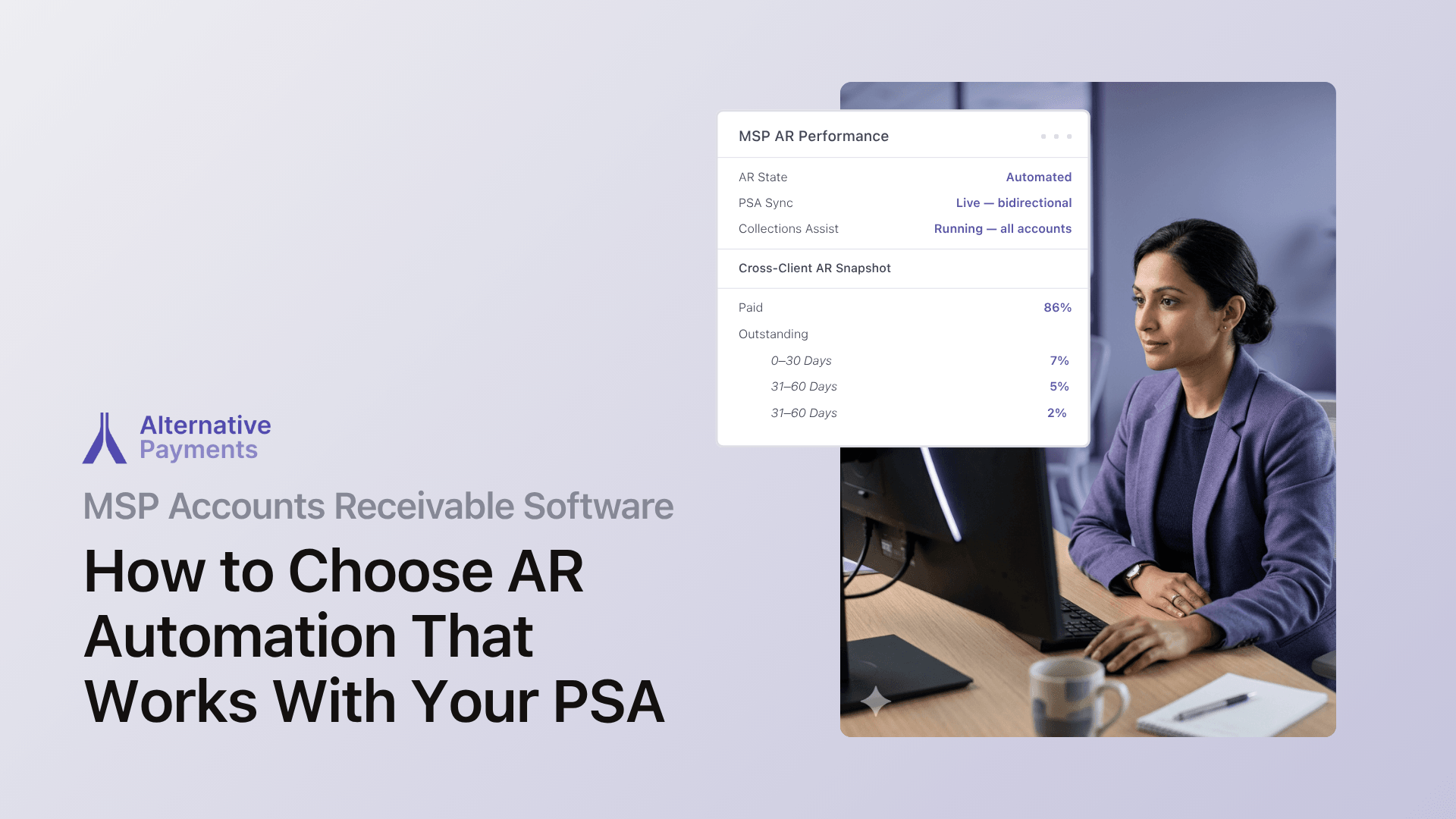
The best accounts receivable software for MSPs integrates directly with your PSA (ConnectWise, Autotask, or HaloPSA) so invoices, payments, and reconciliation flow automatically from service delivery to your general ledger. If your AR platform treats every invoice like a standalone ecommerce transaction instead of a line item in a recurring service contract, you are leaving cash on the table and creating manual work that compounds every billing cycle.
This guide covers what to prioritize when evaluating AR software, where each major PSA stops short, and how purpose-built automation closes the gap between invoice creation and cash collection.
Why Generic AR Software Fails MSPs
Most accounts receivable platforms were designed for businesses that bill from an ERP. They pull invoice data from NetSuite, Sage, or similar systems, run dunning sequences, and post payments to accounting. That workflow makes sense for companies sending one-off invoices against purchase orders.
MSPs operate differently. Your invoices originate in a PSA (ConnectWise, Autotask, or HaloPSA) where they draw from service agreements, per-device tiers, time entries, and ticket logs. A platform that connects only to accounting software misses the upstream data that makes billing accurate and collections context-aware.
Here is where the distinction matters most:
| Capability | Generic AR Platform | PSA-Integrated AR Platform |
| Invoice source | ERP or manual entry | PSA (ConnectWise, Autotask, HaloPSA) |
| Billing model support | Standard net terms | Recurring, per-device, tiered, hybrid |
| Reconciliation | Accounting system only | PSA → payment → accounting (full lifecycle) |
| Client context | Company name and invoice number | Contract type, service history, payment patterns |
| Dashboard scope | Invoice aging and payment status | Cross-client AR with collection workflow tracking |
A generic platform can tell you that Invoice #4872 is 45 days overdue. A PSA-integrated platform tells you that invoice belongs to a managed services agreement with a per-device tier, the client’s average payment time has drifted from 18 to 34 days over the past quarter, and a reminder sequence is already running.
That context gap is expensive. According to research published by DeskDay, 42% of businesses report DSO exceeding 60 days, and manual payment processes take 67% longer to follow up on overdue invoices compared to automated systems.
Where Your PSA Stops and AR Automation Begins
Understanding where your PSA’s billing capabilities end is the first step toward closing the automation gap. Each major PSA handles invoice creation well but leaves collection, reconciliation, and client communication to external tools.
ConnectWise PSA
ConnectWise is the most widely deployed PSA among mid-market and enterprise MSPs. Its agreement engine handles complex contract structures (recurring services, time and materials, milestone billing) and generates invoices from tracked work.
Where ConnectWise stops: ConnectWise generates invoices but does not natively process payments, auto-charge stored payment methods, or reconcile collected funds back to accounting. MSPs need an external payment layer that syncs bidirectionally with ConnectWise to close the loop from invoice to deposit.
Autotask (Kaseya)
Autotask handles invoice generation and contract management well. It tracks billable time, maps contracts to clients, and creates invoices on schedule.
Where Autotask stops: Payment collection, automated reminders, and GL reconciliation still require an external integration. MSPs using Autotask need a payment platform that connects natively to pull invoices, collect payments, and push settlement data back without middleware or manual exports.
HaloPSA
HaloPSA offers a modern PSA with strong ticketing and contract management, particularly popular with growing MSPs.
Where HaloPSA stops: Like ConnectWise and Autotask, HaloPSA requires an external payment layer for end-to-end billing lifecycle automation, from payment collection through reconciliation to accounting sync.
The pattern is consistent: PSAs create invoices, but they do not collect payments, reconcile transactions, or communicate with clients about overdue balances in a unified workflow. That gap between invoice creation and cash in your account is where AR automation lives.
What to Prioritize When Evaluating MSP AR Software
Not every AR platform is built for recurring service businesses. When evaluating B2B collection software for MSPs, these capabilities separate solutions that reduce manual work from those that just shift it around.
1. Native two-way PSA sync
The platform should integrate bidirectionally with ConnectWise, Autotask, or HaloPSA, not through middleware or third-party connectors that introduce sync delays and maintenance overhead. Native sync means invoice data flows automatically from your PSA with full detail, payment status updates push back in real time, and contract changes reflect immediately in billing.
The question is not “does it integrate with my PSA?” It is “does it sync bidirectionally, in real time, with no middleware required?”
2. Auto-pay with retry logic
Auto-pay is the single highest-impact feature for reducing DSO. The platform should charge stored payment methods (ACH or credit card) on schedule, retry failed payments automatically, and update status in both the PSA and accounting system. The Hackett Group’s research shows top-performing companies collect within 28 days, while the median sits at 46 days. Configurable auto-pay rules close much of that 18-day gap.
3. Automated collections sequences
Beyond auto-pay, the platform should run configurable reminder sequences (pre-due-date nudges, due-date notifications, and escalating past-due messages) without anyone on your team drafting emails. These sequences should link to service context in the PSA so you can make informed decisions about escalation rather than following a rigid dunning script.
4. Automatic GL reconciliation
Every collected payment should map to the originating invoice and post to your accounting system (QuickBooks, Xero, or your ERP) without manual matching. This eliminates the month-end reconciliation scramble and keeps your books audit-ready. As The Hackett Group’s 2025 Working Capital Survey found, roughly $600 billion sits trapped in accounts receivable across the top 1,000 U.S. public companies, representing 35% of total gross working capital. Faster, more accurate reconciliation helps free that capital.
5. Multiple payment methods in one checkout
Your clients should be able to pay via ACH, credit card, or installment plans through a single, branded checkout experience. Offering client-facing financing, including B2B buy now pay later, removes friction for clients who need flexibility while preserving your cash flow.
6. Cross-client AR visibility
A multi-client AR dashboard consolidates aging reports, payment statuses, and collection actions into one view. Instead of checking receivables client by client in your PSA or accounting software, you see all outstanding invoices sorted by aging bucket, client, or payment status in a single interface. This visibility is what lets you move from reactive collections to proactive cash management.
Recurring Contracts vs. One-Time Invoices: Why the Distinction Matters
One of the most common frustrations MSPs voice when searching for collection software is that most tools are built for one-time invoices, not recurring service contracts. The difference is not cosmetic. It changes how every part of the billing lifecycle works.
Recurring contracts involve per-device or per-user pricing that adjusts as clients add or remove seats. They include mid-cycle changes, pro-rated charges, and tiered pricing that shifts month to month. Payments recur on a schedule tied to the contract, and collection behavior should reflect the client’s payment history across months or years of service, not just a single overdue invoice.
One-time invoices are standalone transactions. They have a fixed amount, a single due date, and no contract context. Generic AR software handles these well because each invoice is independent.
When your AR platform treats a recurring managed services invoice the same way it treats a one-off hardware sale, you lose contract context at every stage. Reminders go out without awareness of the client relationship. Auto-pay rules can’t account for agreement changes. Reconciliation mismatches accumulate as mid-cycle adjustments fail to sync.
Purpose-built MSP AR software maintains contract context across the entire billing lifecycle and automates collections based on client payment patterns rather than static rules. That is the difference between software that processes transactions and software that manages recurring revenue operations.
How PSA-Integrated AR Automation Works in Practice
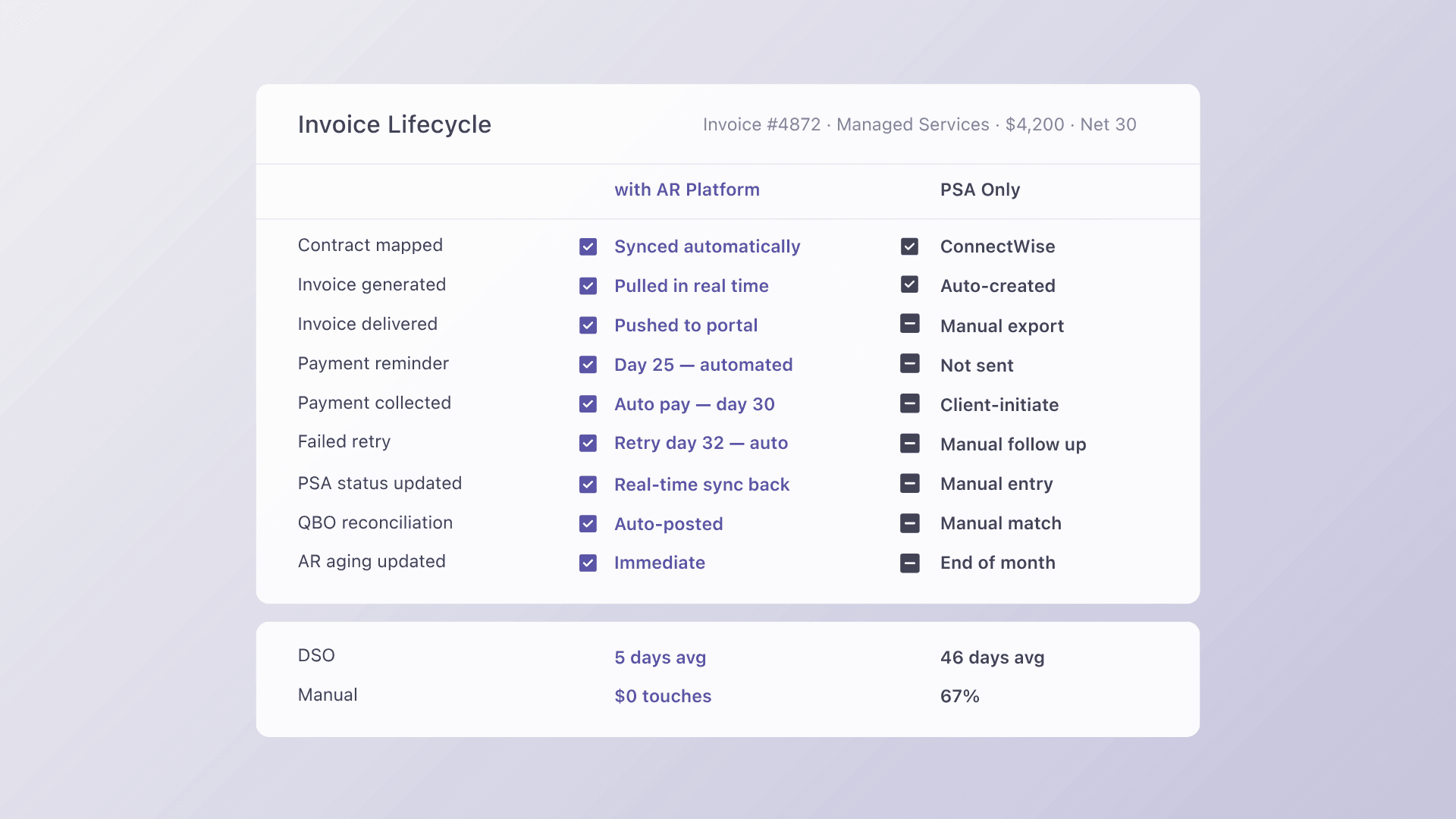
The billing lifecycle for MSPs follows five stages. AR automation connects them into a single, continuous workflow:
- Issuance: Invoices generate automatically in your PSA based on service agreements, time entries, and ticket data. The AR platform pulls these invoices in real time with full line-item detail.
- Communication: The platform sends branded payment notifications and reminders on a configurable schedule. Clients receive a link to a white-label checkout where they can view the invoice and pay immediately.
- Collection: Payments process via ACH, credit card, or installment plan. Auto-pay charges stored methods on schedule. Failed payments trigger automatic retries and alerts.
- Reconciliation: Every payment maps to the originating invoice and posts to accounting (QuickBooks, Xero) without manual intervention. Settlement data syncs back to the PSA so invoice status updates automatically.
- Reporting: Dashboards surface DSO, overdue rates, exception counts, and on-time payment ratios across all clients. Finance leaders see AR health in real time instead of compiling reports from multiple systems at month-end.
This lifecycle framing (issuance, communication, collection, reconciliation, reporting) is how the most effective MSP billing systems are structured. When any stage is disconnected, manual work fills the gap.
How Alternative Payments Connects the Stack
Alternative Payments is purpose-built for recurring revenue businesses running on PSA workflows. Here is what the integration stack looks like:
- PSA connections: Native two-way sync with ConnectWise, Autotask, HaloPSA, and SuperOps. Invoices created in your PSA push directly to the payment platform. Payment status and settlement data push back automatically.
- Payment methods: ACH (with no per-transaction fee), credit cards, and client-facing financing, including installments and B2B buy now pay later, all available through a single white-label checkout branded to your business.
- Automated reconciliation: Every payment maps to the right invoice and posts to QuickBooks or Xero without manual matching. No spreadsheet reconciliation. No month-end scramble.
- Collections Assist: Automated reminder sequences that escalate based on aging and client behavior. Alternative Payments was the first payments company to embed collections support directly within its product.
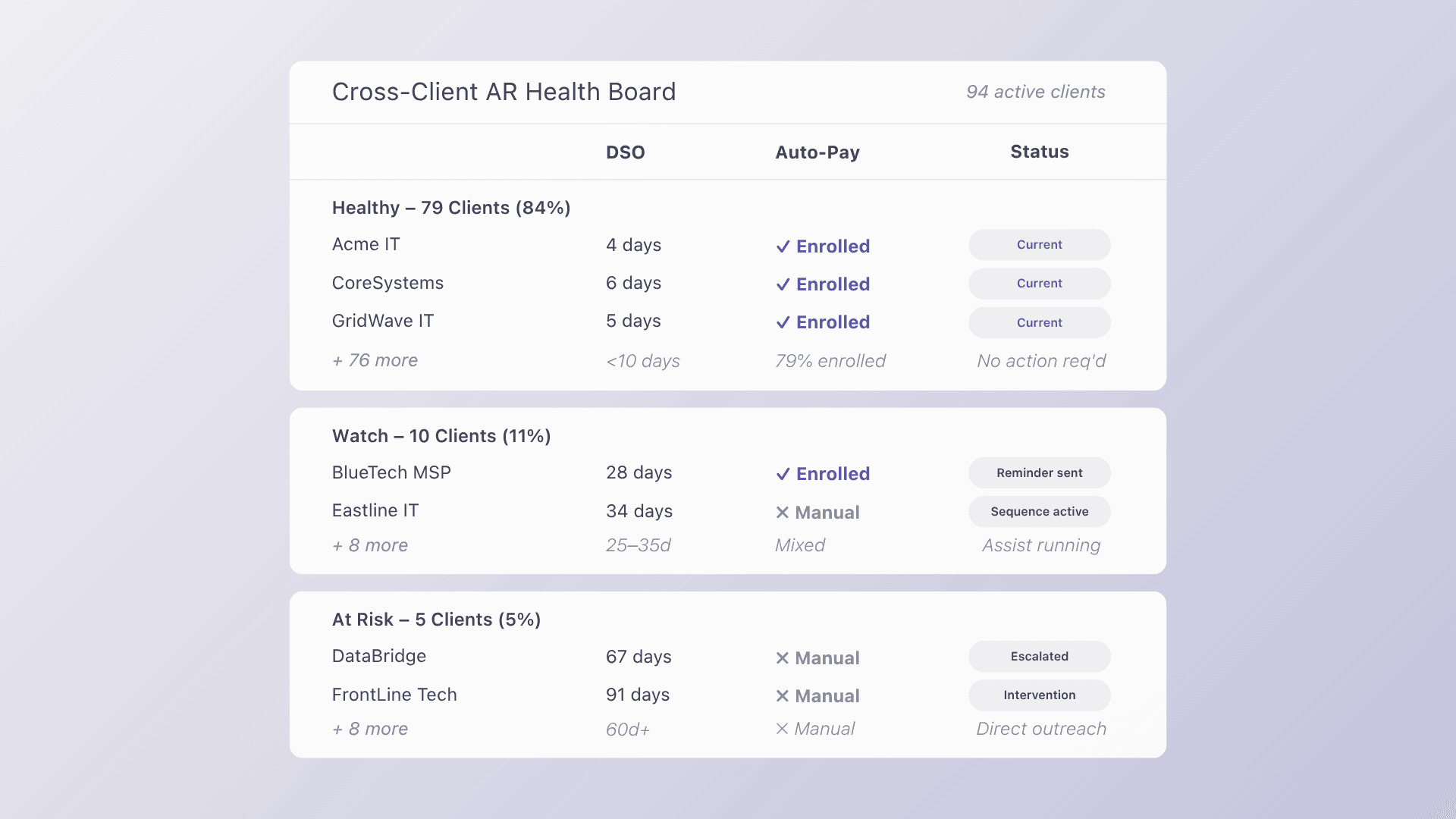
- Cross-client dashboard: A single view of AR health across all clients, with aging buckets, payment trends, and exception tracking. Track DSO, overdue rates, and on-time payment ratios without switching between systems.
Internal data from Alternative Payments shows that MSPs on the platform carry only 6.7% of invoices overdue, compared to 20.5% for MSPs using traditional methods, a reduction of more than two-thirds. The platform’s average DSO sits at 5 days, compared to 30+ day averages on manual methods.
The AR automation market is growing rapidly. Mordor Intelligence projects the space will expand from $3.44 billion in 2025 to $6.66 billion by 2031. For MSPs, the question is not whether to automate but whether the platform you choose understands contract-driven billing or just processes transactions.
Book a demo to see how the full lifecycle connects for your PSA.
Frequently Asked Questions
What is the best accounts receivable software for MSPs using a PSA?
The best AR software for MSPs integrates natively with your PSA (ConnectWise, Autotask, or HaloPSA) and automates the full billing lifecycle from invoice creation through payment collection and GL reconciliation. Look for bidirectional sync, configurable auto-pay, and automated collections sequences that maintain contract context. Generic AR tools designed for ERP-driven billing miss the upstream service data that makes MSP invoicing accurate. Learn more in our MSP Payments 101 guide.
Can I automate invoice collection if I use ConnectWise?
Yes. ConnectWise generates invoices but does not natively process payments or reconcile to accounting. A purpose-built payment platform connects to ConnectWise, pulls invoices automatically, collects payments via ACH, card, or installments, and posts settlements back to QuickBooks or Xero. The key requirement is native, bidirectional integration, not middleware or Zapier connectors that introduce sync delays.
How is B2B collection software for MSPs different from a payment gateway?
A payment gateway processes individual card or ACH transactions. It handles the “swipe.” MSP collection software manages the full lifecycle: pulling invoices from your PSA, sending payment communications, collecting via multiple methods, reconciling to accounting, and reporting on AR health. MSPs need the latter because billing is contract-driven and recurring, not transactional. Read more about the distinction in our guide to connecting payments to PSA tools.
What DSO should MSPs target?
According to The Hackett Group’s research, top-performing companies collect within 28 days, while the median is 46 days. MSPs with automated payment collection and auto-pay rules typically operate well below the median. Alternative Payments’ internal data shows an average DSO of 5 days for MSPs on the platform, driven primarily by auto-pay adoption and automated reconciliation.
Does Alternative Payments work with QuickBooks?
Yes. Alternative Payments integrates with QuickBooks and Xero for accounting, creating a complete data flow from PSA to GL. Payments collected through the platform automatically post to the correct accounts in QuickBooks without manual journal entries or CSV imports. This PSA → payment platform → accounting sync eliminates the reconciliation gaps that compound over months.