The Billing Problem Accounting Firms Will Not Talk About
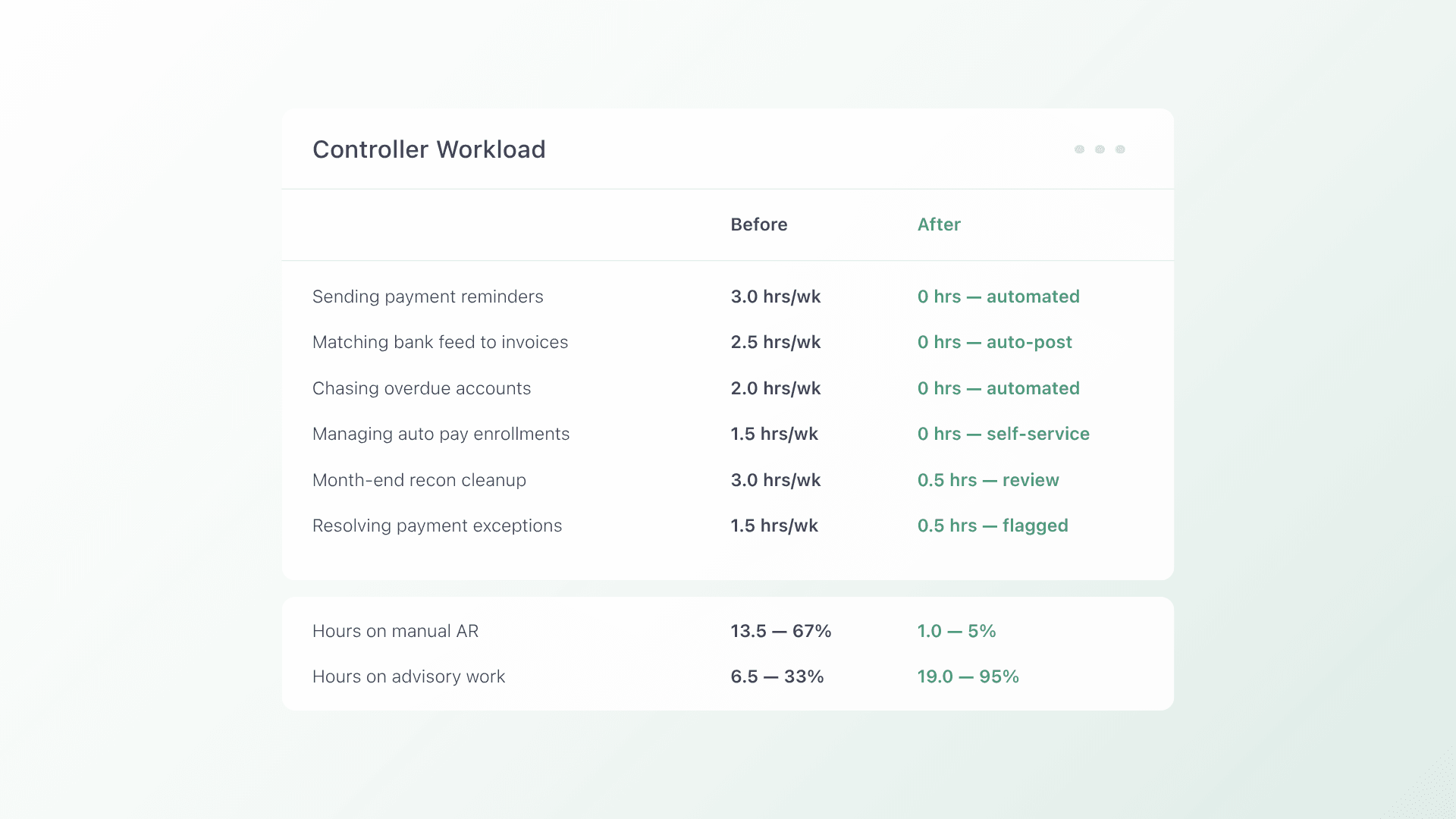
QuickBooks automatic payments solve part of the billing problem for CAS firms. They do not solve the whole thing. Controllers at growing accounting firms are spending roughly 40% of their week on manual AR tasks that should be automated: generating payment reminders, matching bank feed transactions, chasing overdue balances, and reconciling payments across multiple client books.
The reminder cap issue is a specific example most firms encounter before they acknowledge it as a structural problem. QuickBooks Online limits how many automated reminders can run simultaneously across active AR accounts. For a firm with 50 or more clients on recurring retainers, that cap means some accounts get consistent follow up and others do not. Late payment habits form in the gaps, and they compound over time.
The data frames this as an industry problem, not a firm level one. According to the Institute of Finance and Management (IOFM, 2024), companies using automated AR workflows reduce days sales outstanding by an average of 15 to 25% and cut manual collection labor by up to 40%. The firms achieving those results are not working harder on collections. They have replaced the manual steps entirely.
The question for CAS firms is not whether automation delivers those results. It is whether the tools they are currently using are capable of delivering them at the scale and complexity those firms actually operate at.
Why Traditional Billing Tools Fall Short for CPA Firms
The tools most CAS firms rely on were built for simpler billing structures and smaller client volumes. Each serves its core purpose well. Where they fall short is in the handoffs between steps, which is exactly where manual work accumulates at scale.
QuickBooks Online Automatic Payments
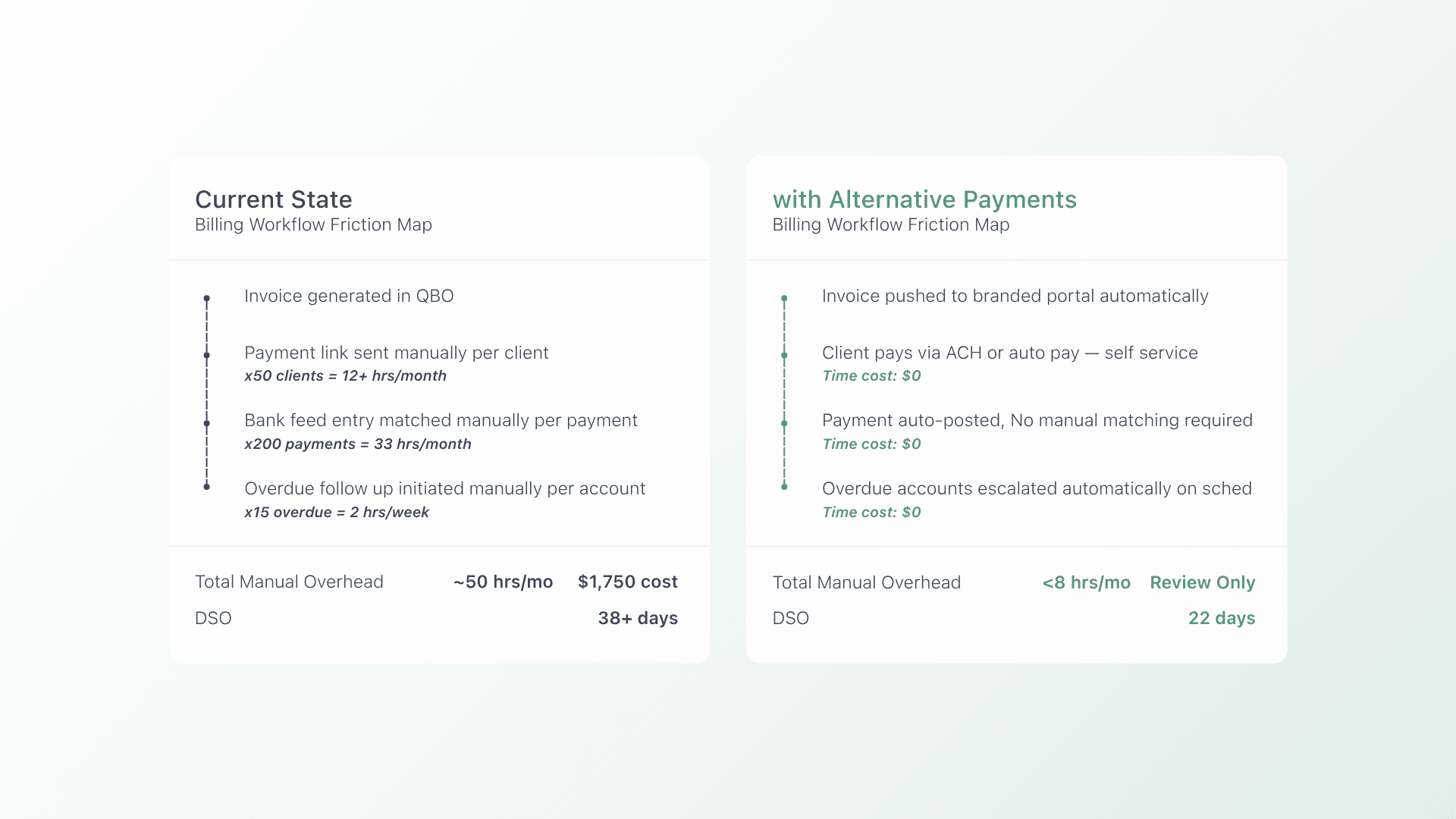
QuickBooks automatic payments handle the basics of recurring invoice delivery and payment acceptance cleanly for firms operating within the QBO ecosystem. For straightforward billing structures with a manageable client count, the built in functionality covers the essentials. The natural ceiling appears at scale: reminder caps limit consistent follow up across large client books, surcharging is not natively supported, and reconciliation between bank feeds and individual invoice records still requires manual review on every batch.
Auto Pay
Auto pay enrollment within QBO is a meaningful step forward from purely manual collection. Once clients are enrolled, payments run on schedule without individual follow up. The limitation is in the enrollment and management layer. Bulk enrollment across a full client book, payment method updates, and failed payment retry logic are not handled automatically, which means someone on your team still owns those touchpoints per client.
ACH Transfers
ACH is the right default collection method for most CAS retainer billing. It carries lower processing costs than card, settles predictably, and suits the recurring nature of advisory engagements. The gap is in the reconciliation layer. When ACH payments arrive as bank feed entries, matching each one to the originating invoice in QuickBooks is a manual step that runs every week across every client account. At higher volumes, that matching work becomes a meaningful recurring time cost.
The operational cost of staying in this manual middle ground is measurable. According to HighRadius (2024), organizations with manual AR processes average a DSO 8 days longer than those with automated collections, representing significant tied-up working capital for mid-market firms. For CAS firms, those 8 days represent cash that is owed but not yet available to fund operations or reinvestment.
A Modern Approach to QuickBooks Automatic Payments for CAS Firms
The most effective QuickBooks automatic payments upgrade for CAS firms is not a replacement for QBO. It is a connected workflow layer that closes the gaps between invoice generation, payment collection, and reconciliation so that each step hands off to the next automatically.
The Workflow: Engagement to Reconciliation
Engagement scoping and client work management sit in your practice management platform, whether that is Karbon, Canopy, or another tool your firm already uses. Invoices generated in QuickBooks Online, which stays the accounting source of truth throughout. Alternative Payments then handles the collection side: presenting the invoice through a branded client portal, collecting payment via ACH or card, and posting the result back to QuickBooks automatically.
Unlike QuickBooks automatic payments, which hand the client a payment link and then require manual matching when payment arrives, this workflow closes the loop without staff input. Payment received, invoice status updated, reconciliation posted. No one on your team needs to initiate any of those three steps.
Unlike general purpose payment tools that accept payments but leave reconciliation as a manual step, Alternative Payments was built to handle the full collection lifecycle. The invoice syncs from QuickBooks, the client pays through a branded self service portal, and the payment posts back automatically with full invoice level detail.
ACH First with Surcharging as an Option
ACH should be the default collection method for CAS retainer billing. It costs less to process, suits recurring billing cycles, and settles predictably. Alternative Payments supports ACH with no per transaction fee, making it more cost effective at volume than platforms that charge a percentage per ACH payment. For clients who prefer cards, built-in surcharging allows the firm to pass the processing fee through compliantly rather than absorbing 2 to 3% on every transaction.
Client Self Service Portal
A branded self service portal gives clients persistent access to invoice history, payment method management, and auto pay enrollment without requiring them to contact your office. For firms managing 50 or more client accounts, this directly addresses the QuickBooks reminder cap limitation. When auto pay enrollment and reminders run automatically across every account, the number of accounts a controller can manage effectively is no longer capped by the tool.
What to Look for in a QuickBooks Automatic Payments Alternative for Accounting Firms
Choosing the right platform to extend QuickBooks automatic payments for a CAS firm comes down to four criteria that most general purpose payment tools do not fully address.
QBO Integration Depth: Auto Reconciliation, Not Just Invoice Sync
Many platforms claim QuickBooks integration but deliver only invoice sync, leaving reconciliation as a manual step. The standard to look for is full auto reconciliation: payments post back to QuickBooks automatically with invoice level detail, invoice status updates in real time, and no manual matching is required at month end. This is the depth that eliminates the bank feed reconciliation overhead that currently runs across every client account every week.
Trust Accounting Compliance
For firms handling client funds, trust accounting compliance is a non-negotiable requirement. The platform needs to support the separation of client funds from operating funds in a way that meets professional standards requirements. This is not universally supported across payment platforms, so verify it explicitly before committing. It is frequently overlooked in general purpose payment evaluations and can create compliance exposure for firms that assume it is included.
Surcharging Support That Is Built In
Absorbing 2 to 3% on every card transaction across a full client book is a significant and avoidable cost. A platform with built in surcharging compliance handles fee passthrough cleanly without additional configuration or third party tools. Alternative Payments includes this natively with guardrails that enforce state level compliance requirements automatically, so firms do not need to manually track jurisdiction rules per client.
Client Portal with Auto Pay and AR Automation
A client portal with auto pay enrollment and automated AR follow up resolves the controller workload problem directly. When reminders go out automatically across every account and clients can enroll in auto pay through a self service interface, 40% of the week spent on manual AR tasks becomes available for higher value work. The cap on active AR accounts disappears when the follow up runs without anyone initiating it.
Implementation: Getting Your CAS Firm Started
Extending QuickBooks automatic payments with a full AR automation layer does not require rebuilding your firm’s billing infrastructure. These four steps are how CAS firms make the transition without disrupting active client billing cycles.
- Audit your current billing flow. Map every manual touchpoint from engagement scoping to payment collected and reconciled. Where does a team member need to send a reminder, manually match a transaction, or chase an overdue account? Every touchpoint you identify is a step the new workflow will automate.
- Start with 5 to 10 clients on auto pay. Choose a representative mix of retainer and project based clients and run two full billing cycles before expanding. This validates QBO integration accuracy and surfaces any configuration adjustments before they affect your full book.
- Configure QBO integration and verify reconciliation. Confirm that payments are posted back to QuickBooks Online automatically with invoice level detail and that invoice status is updating in real time. Run a manual reconciliation check on the first billing cycle to verify accuracy before relying on the automation fully.
- Roll out client portal access and train staff. Send portal invitations to clients with clear instructions for setting up payment methods and enrolling in auto pay. Brief your team on what the new workflow handles automatically and what, if anything, still requires their attention.
Most CAS firms complete full rollout within two billing cycles. The phased approach protects existing client relationships while the new workflow proves itself.
From Manual AR Overhead to Automated, Reconciled Collections
QuickBooks automatic payments give CAS firms a starting point. What they do not give you is a complete collection workflow that handles reminders, auto pay enrollment, reconciliation, and AR follow up across every client account without manual steps at every stage.
The firms that are reclaiming the 40% of controller time currently spent on manual AR tasks are not doing it by working more efficiently inside the same tools. They are adding a dedicated payment automation layer that closes every gap between invoice generation and payment reconciled in QuickBooks.
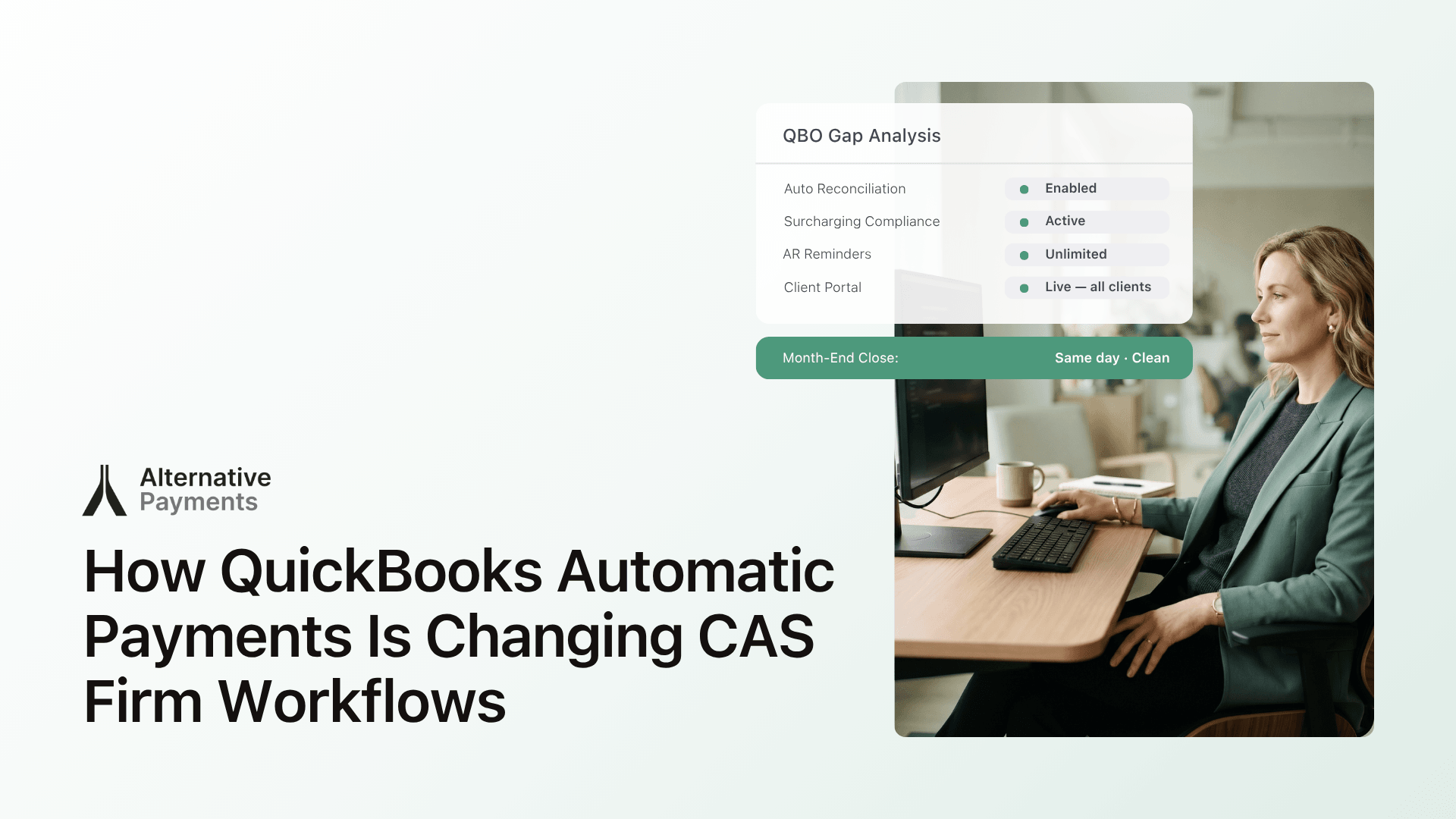
Alternative Payments delivers exactly that for accounting firms. Native QuickBooks Online and Xero integration with full auto reconciliation. ACH with no transaction fees. Built in surcharging compliance. Collections Assist for automated AR follow up. A branded client portal that works from day one. Setup in days, not weeks.
FAQs
Q: How much time does billing automation actually save?
A: Firms report saving 5 to 8 hours per week on average, which is 260 or more hours per year redirected from chasing payments to client work. For a controller spending 40% of their week on manual AR tasks, automation eliminates the majority of that overhead within the first billing cycle. The return on investment is immediate and measurable.
Q: What should you automate first in your AR workflow?
A: Start with payment reminders and auto pay enrollment. These two steps alone eliminate 60 to 70% of manual follow up and carry the lowest implementation friction of any AR automation task. Most firms see measurable improvement in collection times and controller workload within the first month of deployment.
Q: Does automation work for clients who prefer paying by check?
A: Yes. The goal is not to force a payment method but to automate the collection process itself. Scheduled ACH with automated reminders converts most check paying clients within one billing cycle, without requiring any manual effort from your team. Clients who prefer check can continue while the reminder and follow up workflow still runs automatically on their account.
Q: How does Alternative Payments extend QuickBooks automatic payments for CAS firms?
A: Alternative Payments adds the capabilities that QuickBooks automatic payments do not include natively: full auto reconciliation at the invoice level, unlimited AR reminders across every client account, built in surcharging compliance, a branded client self service portal, and Collections Assist for automated overdue follow up. The platform integrates natively with QuickBooks Online and Xero with no middleware required.