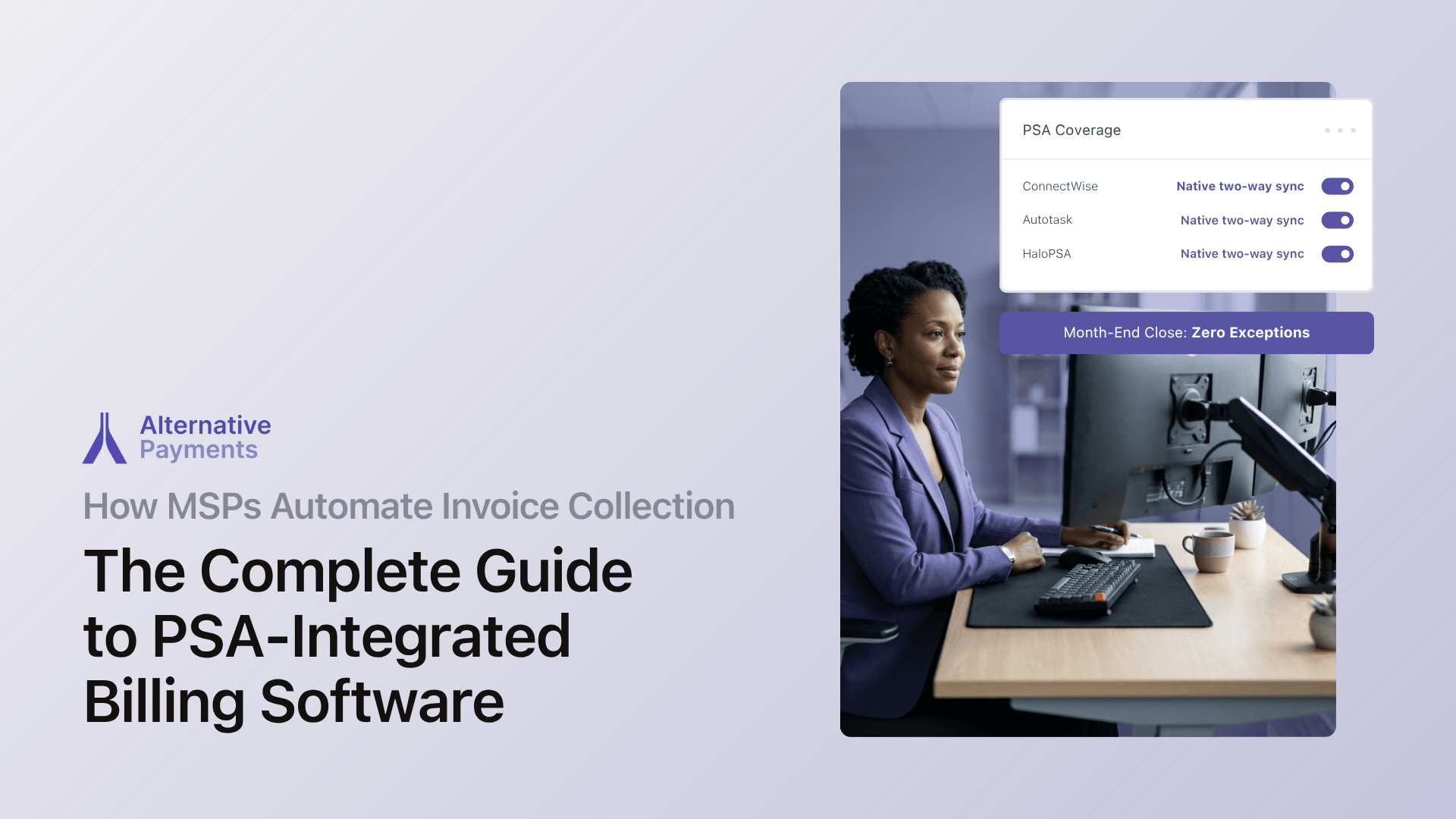
Your PSA creates invoices. It does not collect payments.
That gap between invoice creation in ConnectWise, Autotask, or HaloPSA and actual cash in your account is where most MSPs lose time, money, and client trust. The fix is not another portal or payment link bolted onto your existing stack. It is a purpose-built billing platform that integrates natively with your PSA and automates the full lifecycle: issuance, communication, collection, reconciliation, and reporting.
This guide breaks down exactly how that automation works, what each major PSA can and cannot do, and what to evaluate when choosing MSP billing software that actually closes the loop from invoice to deposit.
The Real Cost of Manual MSP Billing
Manual billing does not just waste time. It compounds errors, delays cash flow, and quietly drains revenue you may never recover.
According to Ardent Partners’ AP Metrics That Matter 2025 report, the average organization spends $9.40 to process a single invoice. Best-in-class enterprises that leverage automation achieve costs 80% lower. And top-performing teams process invoices in 3.1 days, compared to 17.4 days for teams still running manual workflows, a gap that translates directly into slower cash collection and higher DSO.
The exception problem compounds this. Ardent Partners’ same 2025 benchmarks show top-performing AP teams maintain a 9% invoice exception rate, while the industry average sits at 22%. For an MSP processing 500 invoices monthly, that means 110 invoices requiring manual intervention, each one consuming staff time, delaying payment, and risking client friction.
Despite these costs, 68% of businesses still enter invoice data manually into their ERP or accounting systems. For MSPs, this manual handoff between the PSA and the payment process is where the billing lifecycle breaks down.
What Your PSA Does Well and Where It Stops
Understanding where your PSA’s billing capabilities end is the first step toward closing the automation gap. Here is a candid breakdown of the three most common environments.
ConnectWise PSA
ConnectWise is the most widely deployed PSA among mid-market and enterprise MSPs. Its agreement engine handles complex contract structures (recurring services, time and materials, milestone billing) and generates invoices from tracked work.
Where ConnectWise stops: ConnectWise generates invoices, but it does not natively process payments, auto-charge stored payment methods, or reconcile collected funds back to accounting. MSPs need an external payment layer that syncs bidirectionally with ConnectWise to close the loop from invoice to deposit.
Autotask (Kaseya)
Autotask handles invoice generation and contract management well. It tracks billable time, maps contracts to clients, and creates invoices on schedule.
Where Autotask stops: Payment collection, automated reminders, and GL reconciliation still require an external integration. MSPs using Autotask need a payment platform that connects natively to pull invoices, collect payments, and push settlement data back without middleware or manual exports.
HaloPSA
HaloPSA offers flexible service desk and ticketing capabilities with built-in billing features for recurring contracts and project work.
Where HaloPSA stops: End-to-end billing lifecycle automation, including auto-pay, collections sequences, multi-method payment acceptance, and automatic reconciliation to external accounting systems, requires a dedicated payment layer connected to HaloPSA.
In every case, the pattern is the same: your PSA creates invoices, but it does not collect payments, reconcile transactions, or communicate with clients about overdue balances in a unified workflow. That gap between invoice creation and cash in your account is where billing automation lives.
What MSP Billing Software Actually Needs to Do
The term “billing software” gets applied to everything from basic invoicing tools to full-lifecycle payment platforms. For MSPs running contract-driven, recurring revenue models, the distinction matters.
A payment gateway processes individual transactions, like swiping a card. MSP billing software manages the full lifecycle: pulling invoices from your PSA, communicating with clients, collecting payments across multiple methods, reconciling to accounting, and reporting on AR health.
Here are the capabilities that separate purpose-built MSP billing platforms from generic processors:
Native two-way PSA sync
This is the single most important capability. Your billing platform should pull invoice data directly from your PSA with full line-item detail, contract terms, and client mappings intact. Payment status updates should push back to the PSA in real time. Contract changes in the PSA should reflect immediately in billing.
The question is not “does it integrate with my PSA?” It is “does it sync bidirectionally, in real time, with no middleware required?”
Auto-pay with retry logic
Auto-pay is the highest-impact feature for reducing days sales outstanding (DSO). When clients store a payment method and authorize recurring charges, invoices get paid on schedule without anyone sending an email or making a phone call. Retry logic handles failed charges automatically so your team is not manually re-running transactions.
B2B companies that implemented customer payment portals with multiple digital options reduced their DSO by an average of 8 days in the first quarter after implementation.
Automatic GL reconciliation
Every payment should map back to the originating invoice and post correctly to your accounting system (QuickBooks, Xero, or your ERP) without manual matching at month end. This eliminates the reconciliation grind that consumes finance teams during close and prevents the data mismatches that erode trust in your books.
Multiple payment methods in one checkout
Your clients should be able to pay via ACH, credit card, or installment financing through a single branded checkout experience. Offering ACH alongside cards reduces processing costs for you. Offering installments or B2B buy now pay later options reduces friction for clients facing large project invoices.
Automated collections sequences
When an invoice goes past due, your billing platform should handle follow-up automatically, sending reminders, escalating communication, and tracking engagement, without your team writing individual emails. Collections Assist from Alternative Payments automates this entire workflow on a configurable schedule across every client account.
Branded client portal
A white-label payment portal that carries your brand, not your processor’s, reduces friction and builds trust. Clients see your logo, your colors, and a clean interface where they can view invoices, store payment methods, and manage their billing information. This is not cosmetic. Reducing steps between “invoice received” and “payment submitted” directly accelerates time-to-pay.
Native Integration vs. Bolt-On Connectors: Why It Matters
The difference between a native PSA integration and a bolt-on connector determines how much manual work remains in your billing process. This is not a minor technical distinction. It is the difference between automation that works and automation that creates new problems.
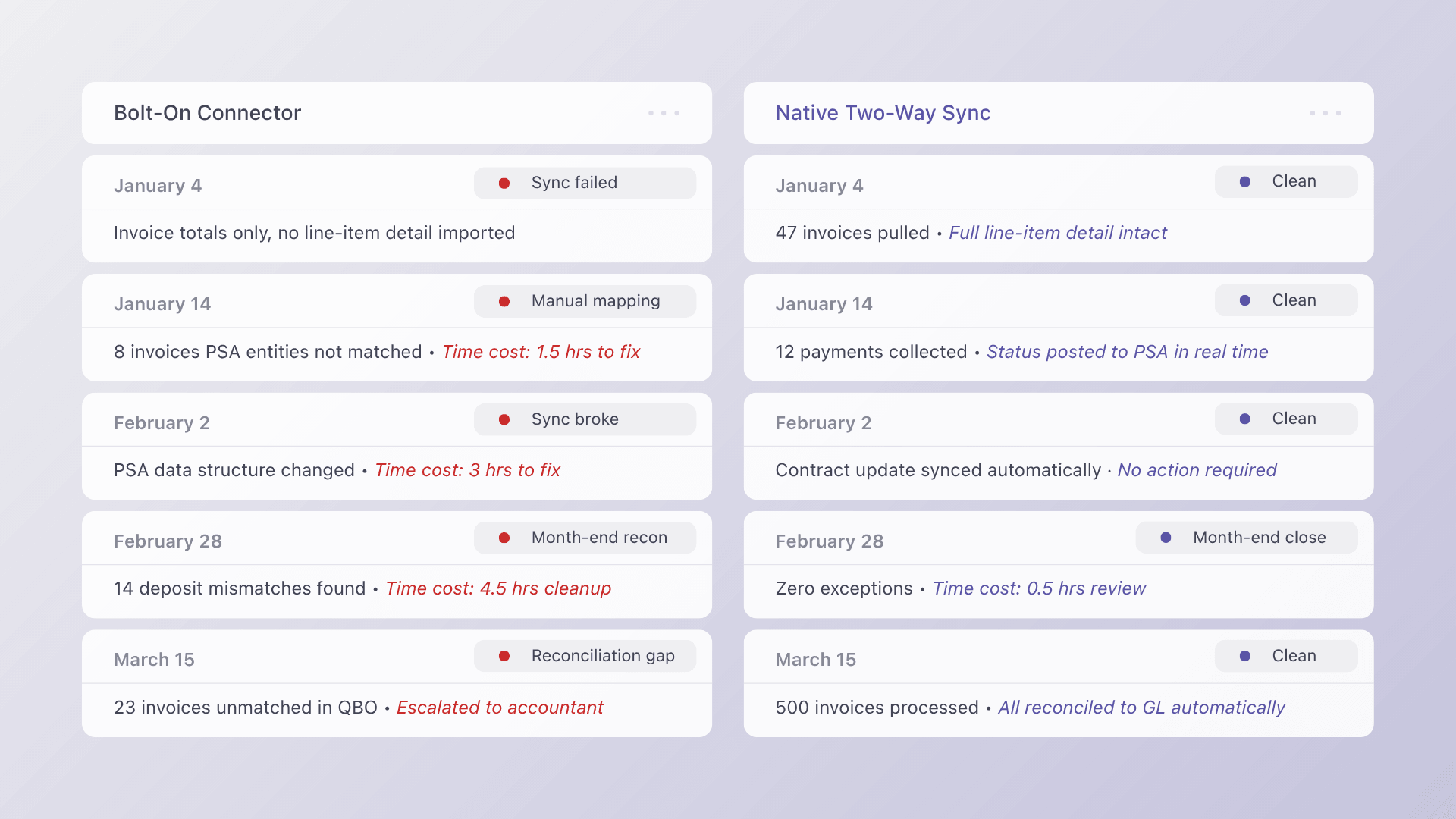
Bolt-on integrations (via Zapier, generic APIs, or middleware) typically:
- Import invoice totals without line-item detail
- Require manual mapping between PSA entities and accounting categories
- Break when PSA data structures change
- Create reconciliation gaps that compound over months
Native two-way integrations operate differently:
- Invoice data flows automatically from PSA to payment platform with full detail
- Payment status updates push back to the PSA in real time
- Settlements reconcile to accounting automatically
- Contract changes in the PSA reflect immediately in billing
For MSPs handling hundreds of invoices monthly, those compounding reconciliation gaps from bolt-on tools translate directly into hours of manual work, mismatched records, and finance staff troubleshooting data discrepancies instead of managing cash flow.
How the Billing Lifecycle Works with a Dedicated Payment Layer
When MSP billing software is implemented correctly, the entire invoice-to-cash process operates as a connected system rather than a series of manual handoffs. Here is what each stage looks like:
- Issuance. Your PSA generates invoices based on contracts, time entries, and billable work. The payment platform pulls these invoices automatically via native sync. No CSV exports, no manual imports.
- Communication. The platform sends branded invoice notifications to clients with clear payment links. Automated reminders follow a configurable schedule for unpaid invoices.
- Collection. Clients pay through a branded checkout portal using their preferred method: ACH, credit card, or installment plan. Auto-pay charges stored payment methods on schedule for recurring invoices.
- Reconciliation. Every collected payment maps back to the originating invoice in your PSA and posts to your accounting system automatically. No manual matching. No mystery deposits.
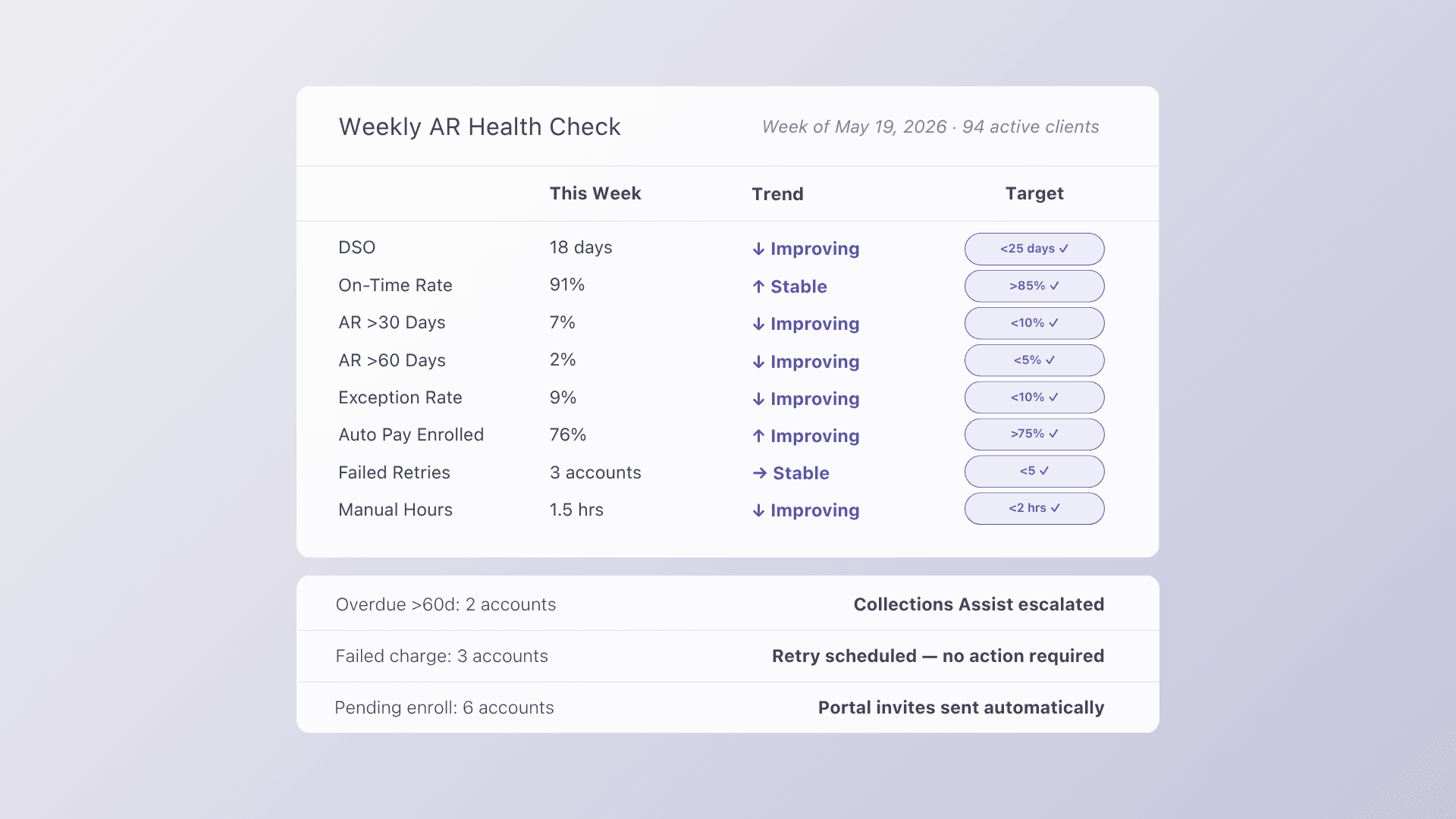
- Reporting. DSO, aging AR, on-time payment ratios, and exception rates are visible in a single dashboard. Finance leaders see cash flow status in real time instead of assembling reports from multiple systems at month end.
This lifecycle framing is not just a framework. It is a diagnostic tool. When something breaks in your billing process, you can identify the exact stage and fix the root cause rather than patching symptoms downstream.
What to Evaluate Based on Your PSA
The right approach depends on your PSA, your current pain points, and how quickly you need results. Here is a quick reference:
| If you use… | Your biggest gap is… | What to evaluate |
| ConnectWise | Payment collection and GL reconciliation | Native ConnectWise → payment platform → QuickBooks sync |
| Autotask (Kaseya) | Automated collections and accounting reconciliation | Native Autotask integration with auto-pay and Collections Assist |
| HaloPSA | End-to-end billing lifecycle automation | Native HaloPSA → payment platform → accounting sync |
Regardless of PSA, prioritize these five capabilities in order:
- Native two-way PSA sync, not middleware or Zapier
- Auto-pay with retry logic, the single highest-impact feature for reducing DSO
- Automatic GL reconciliation, eliminates month-end manual matching
- Multiple payment methods: ACH, cards, and financing options in one checkout
- Branded client portal, reduces friction and speeds time-to-pay
How Alternative Payments Closes the Gap
Alternative Payments is purpose-built for MSP billing workflows and designed to serve the full invoice-to-reconciliation lifecycle. It integrates natively with ConnectWise, Autotask, and HaloPSA, pulling invoices directly from your PSA, collecting payments across ACH, credit cards, and client-facing financing options, and reconciling every transaction back to your accounting system automatically.
Key capabilities include:
- Automated reconciliation: every payment maps to the right invoice and posts to accounting
- White-label checkouts: deliver a branded payment experience that reduces friction
- Client-facing financing: offer installments, ACH, credit cards, and B2B buy now pay later in one place
- PSA, ERP, and accounting integrations: eliminate manual imports and mismatched records
- Collections Assist: automate overdue follow-up with configurable reminders and escalation
- AR reporting: track DSO, exception rates, and on-time payment ratios in one view
The platform operates on flat monthly pricing rather than per-transaction fees, which makes cost predictable as invoice volume grows. ACH payments are supported with no per-transaction fee, a meaningful difference at high billing volume.
In April 2025, Alternative Payments closed $22 million in total funding, backed by MissionOG and Third Prime, to accelerate automation and expand across underserved B2B sectors.
Manual billing worked when your MSP had 20 clients. It does not work at 100, and it certainly does not work at 200. The automation path is well defined, and the payoff (faster collections, cleaner books, and hours returned to your team every week) is measurable from the first billing cycle.
Book a demo to see how the platform connects to your PSA and accounting stack.
Frequently Asked Questions
What is the difference between a payment gateway and MSP billing software?
A payment gateway processes individual card or ACH transactions. It handles the “swipe.” MSP billing software manages the full lifecycle: pulling invoices from your PSA, sending payment communications, collecting via multiple methods, reconciling to accounting, and reporting on AR health. MSPs need the latter because their billing is contract-driven and recurring, not transactional. Learn more in our MSP Payments 101 guide.
Can I automate invoice collection if I use ConnectWise?
Yes. ConnectWise generates invoices but does not natively process payments or reconcile to accounting. A purpose-built payment platform like Alternative Payments connects natively to ConnectWise, pulls invoices automatically, collects payments via ACH, card, or installments, and posts settlements back to QuickBooks or your accounting system. Read our PSA integration guide for the full breakdown.
Does Alternative Payments work with Autotask?
Yes. Alternative Payments integrates natively with Autotask (Kaseya), pulling invoices, syncing payment status bidirectionally, and reconciling to accounting, all without middleware or manual exports. See how the Autotask integration works in practice.
How does auto-pay reduce DSO for MSPs?
Auto-pay charges a client’s stored payment method (ACH or card) on schedule when an invoice is generated. Combined with retry logic for failed charges, it removes the manual follow-up cycle that causes invoices to age. B2B companies that implemented digital payment portals reduced DSO by an average of 8 days in the first quarter after implementation.
What accounting systems does Alternative Payments reconcile with?
Alternative Payments reconciles automatically with QuickBooks Online, QuickBooks Desktop, and other accounting platforms. Every payment maps back to the originating invoice in your PSA and posts to the correct GL account. Learn more about eliminating disconnected system costs.
Is Alternative Payments available outside the United States?
Alternative Payments serves service-based businesses in the United States and Canada that operate recurring revenue models.