The MSP Challenge: Manual Invoice Follow Ups Are Costing You More Than You Think
Most MSPs did not get into managed services to spend 5 to 8 hours a week chasing unpaid invoices. But for teams running billing manually, that is exactly where the time goes. Payment reminders go out inconsistently. Some clients get followed up promptly, others slip through the cracks entirely, and the only person who notices is whoever is doing month end close.
The inconsistency is the real problem. A client who never receives a reminder learns, over time, that late payment carries no consequence. That pattern compounds across a book of 30, 50, or 100 clients until delayed collections become the default rather than the exception.
The data is clear on what happens when MSPs move to automate collections. According to the Institute of Finance and Management (IOFM, 2024), companies using automated AR workflows reduce days sales outstanding by an average of 15 to 25% and cut manual collection labor by up to 40%. For an MSP team, that is not a marginal improvement. That is a meaningful shift in how cash flows through the business.
How Manual Collections Affects MSPs Specifically
The downstream effects of manual collections show up in places that are easy to miss until they are already causing problems. Month end close is the most visible. When reconciliation is done manually across ConnectWise, QuickBooks, and your payment processor, a process that should take a few hours routinely stretches into two or three days.
Auto pay is available in most MSP billing stacks but rarely configured consistently. Some clients are enrolled, others are not, and the ones who are not tend to be the ones who pay late. Without a systematic approach to enrollment, the manual follow up burden stays in place regardless of the tools your team has access to.
The working capital impact is significant. According to HighRadius (2024), organizations with manual AR processes average a DSO 8 days longer than those that automate collections. For mid market firms, that gap represents millions in tied up working capital. For MSPs, it represents cash that is owed but not yet available to cover vendor payments, payroll, or reinvestment in the business.
The tools to solve this are already in most MSP stacks. ConnectWise holds the billing source of truth. QuickBooks handles the accounting. What is typically missing is the payment layer that connects them and runs the collection workflow automatically from invoice to reconciliation.
A Practical Approach to Automate Collections: Step by Step
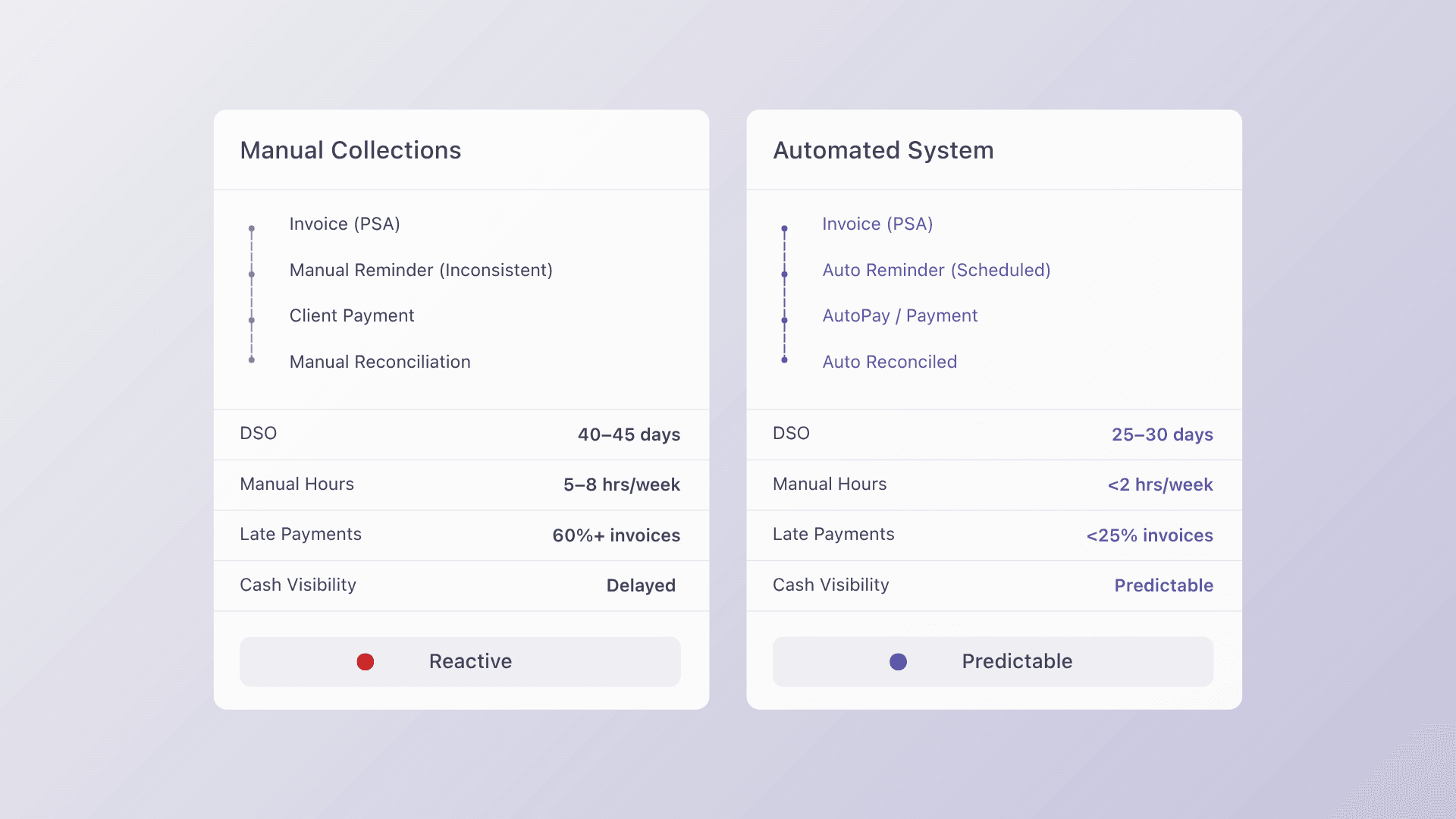
Automating collections does not require replacing your entire billing stack. It requires identifying the right starting point and building out from there in a sequence that keeps your existing client relationships intact.
- Audit. Map your current AR workflow from invoice creation to payment received. Identify where the biggest time sink is: missed reminders, manual reconciliation, or late payment follow up. The audit tells you where automation will have the most immediate impact.
- Prioritize. Fix the single highest impact gap first. For most MSPs this is ConnectWise, where billing data originates. If invoices are not syncing cleanly out of ConnectWise, every downstream step inherits that error. Getting this right first means everything else builds on a clean foundation.
- Implement. Connect ConnectWise to Alternative Payments using the native integration. This eliminates middleware, installs in one to three days, and immediately begins syncing invoice data, collecting payments, and posting reconciliation back to QuickBooks without manual steps. Configure auto pay enrollment and payment reminders at the client level during this phase.
- Measure. Track three numbers weekly for the first 90 days: DSO, average collection time per invoice, and manual hours spent on AR. These give you a clear before and after picture of what automating collections has delivered and where further optimization is possible.
- Scale. Once the integration is validated with your pilot group, roll out to your full client book. Most MSPs complete the full transition within two billing cycles. The phased approach ensures that no configuration issue affects your entire revenue stream before it has been identified and resolved.
What to Look for in an Automated Collections Solution
Not every payment platform is built to automate collections end to end. Most offer one or two pieces of the workflow and leave the rest to manual processes or third party tools. Here is what to evaluate before committing to a platform.
Automated Payment Reminders That Run Without Manual Input
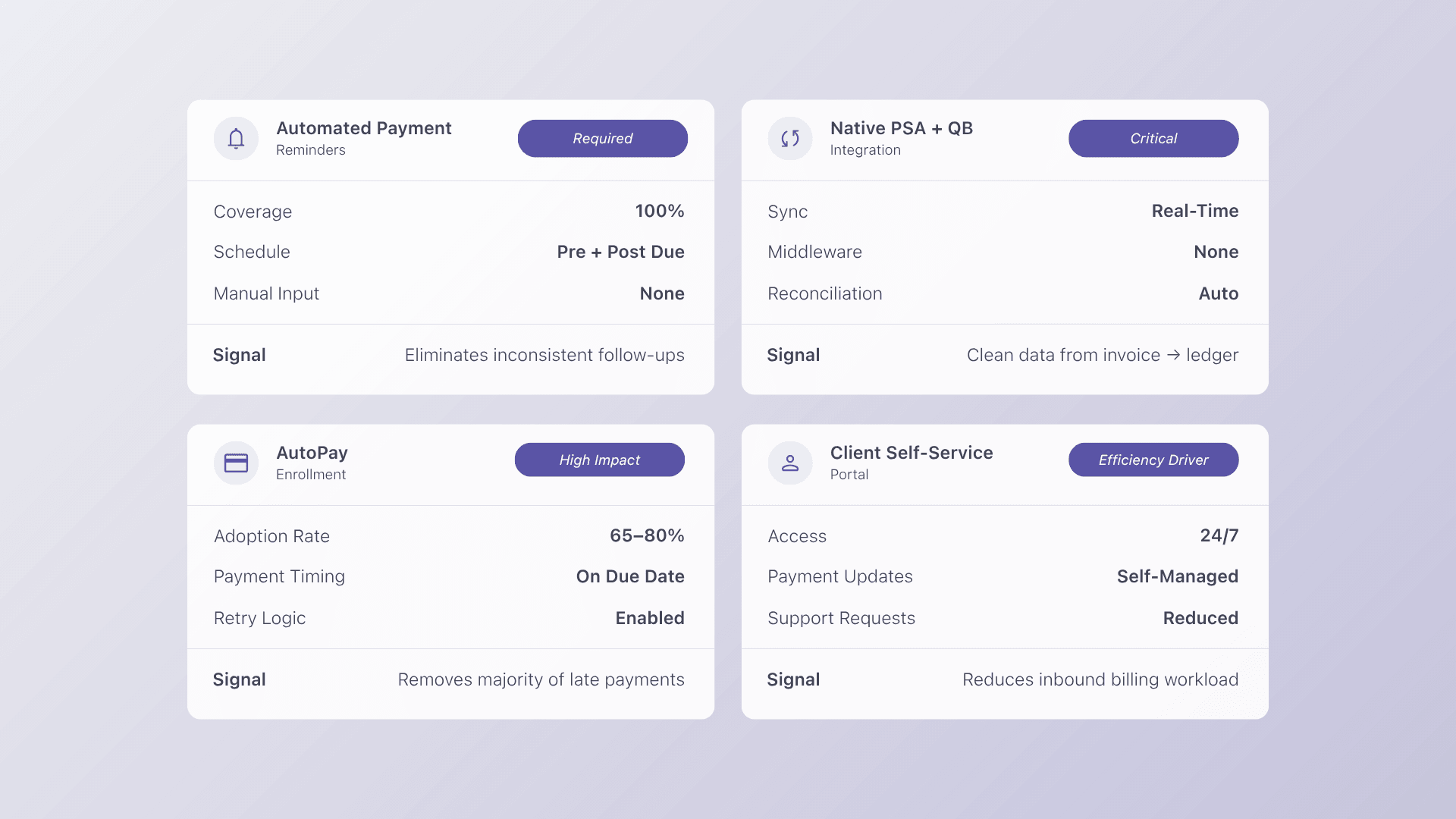
The platform should send reminders on a configurable schedule before and after invoice due dates, across every client account, without anyone on your team initiating them. Inconsistent reminders are what allow late payment habits to form in the first place. Automation removes the variability entirely.
Native ConnectWise and QuickBooks Integration
Any platform that requires middleware, Zapier, or custom API work to connect with ConnectWise or QuickBooks adds failure points rather than removing them. Look for native connectors that sync invoice data, payment status, and reconciliation automatically without additional tooling. Alternative Payments integrates natively with ConnectWise, Autotask, HaloPSA, and QuickBooks, with no middleware required.
Auto Pay Enrollment Across Your Client Book
Auto pay is the most effective tool for eliminating late payments at scale. The platform should support ACH and card auto pay enrollment at the client level, with configurable billing cycles and automatic retry logic for failed payments.
The urgency here is real. According to PYMNTS Intelligence (2024), more than 60% of B2B invoices are paid late, and businesses report that delayed payments directly stall their ability to pay their own vendors on time. Auto pay enrollment is the most direct way to move clients out of that statistic.
A Client Self Service Portal That Reduces Inbound Requests
When clients can log in, view their invoice history, update payment methods, and pay on their own schedule, your team stops fielding billing questions. Alternative Payments includes a branded self service portal that handles this without requiring your staff to act as intermediaries between the client and the payment system.
From Chasing Payments to Running on Autopilot
The MSPs that are reducing DSO, eliminating manual follow up, and closing month end in hours instead of days are not doing it with more headcount. They are doing it with a billing stack that was built to automate collections from invoice to reconciliation without human intervention at every step.
When collections run automatically, your team stops reacting to overdue invoices and starts focusing on client delivery. Cash flow becomes predictable. Month end becomes a review rather than a marathon. And the clients who used to slip through the cracks start paying on time because the system reminds them consistently, every cycle, without fail.
Alternative Payments was built for exactly this workflow. Native ConnectWise, Autotask, and HaloPSA integrations. Auto pay, ACH, and Collections Assist for automated reminders and follow up. Setup in days, not weeks.
FAQs
Q: How much time does billing automation actually save?
A: Firms report saving 5 to 8 hours per week on average, which is 260 or more hours per year redirected from chasing payments to client delivery. For most MSP teams, the return on investment is visible within the first billing cycle.
Q: What should you automate first in your AR workflow?
A: Start with payment reminders and auto pay enrollment. These two steps alone eliminate 60 to 70% of manual follow up and carry the lowest implementation friction of any AR automation task. Most teams see measurable improvement within the first month.
Q: Does automation work for clients who prefer paying by check?
A: Yes. The goal is not to force a payment method but to automate the collection process itself. Scheduled ACH with automated reminders converts most check paying clients within one billing cycle, without requiring any manual effort from your team.
Q: How does Alternative Payments automate collections for MSPs?
A: Alternative Payments connects natively to ConnectWise, Autotask, and HaloPSA to sync invoice data automatically. Collections Assist then handles payment reminders, auto pay enrollment, and overdue follow up without manual input. Payments post back to QuickBooks automatically with no reconciliation steps required from your team.