Why MSP Payment Integration Is Harder Than It Looks
For most MSPs, the billing process looks functional on the surface. Invoices go out, payments come in, and the books get updated. But underneath that, the reality is a mess of manual steps that nobody signed up to manage. PSA to QuickBooks syncs break down at every software update, creating manual re-entry and reconciliation gaps that eat up hours your team does not have.
Payment data is rarely in one place. Most MSPs are pulling from three or more systems: their PSA, QuickBooks, and a payment processor like Stripe or ConnectBooster. With no single source of truth, your finance team is constantly reconciling versions of the same data that should never have drifted apart in the first place.
The cost of staying manual is well documented. According to the Institute of Finance and Management (2024), companies using accounts receivable automation software reduce days sales outstanding by an average of 15 to 25% and cut manual collection labor by up to 40%.
That gap between where most MSPs operate and where they could be is exactly what the right integration stack closes. Here is what that stack looks like and how to build it.
The Accounts Receivable Automation Software Stack That Actually Works
The problem with most MSP billing setups is not that the tools are bad. The tools are simply not connected in a way that eliminates manual work. True accounts receivable automation software does not just process payments. It syncs invoice data, tracks payment status, posts reconciliation, and triggers follow ups without anyone on your team lifting a finger.
The Recommended Stack
ConnectWise → Autotask → HaloPSA → Alternative Payments
Alternative Payments integrates natively with all three major MSP PSA platforms. This is the foundation of a stack that actually removes manual work rather than just shifting it around. Native connectors mean data moves directly between systems in real time, without middleware, Zapier workarounds, or additional failure points.
Unlike general purpose payment tools that treat MSP billing as an afterthought, Alternative Payments was purpose built for the service business model. Most generic platforms require you to configure reconciliation manually, build your own automation rules, and stitch together integrations through third party connectors that break without warning. Alternative Payments handles all of that out of the box, so your team is not spending the first three months of adoption just trying to make the tool work with your existing systems.
What Syncs Automatically
- Invoices created in your PSA pushed directly to the Alternative Payments portal
- Payment status updates synced back to the PSA in real time
- Reconciliation posted automatically to QuickBooks
- Overdue payment reminders triggered without manual follow up
- Client receipts sent upon payment confirmation
What Requires Configuration
- Payment method preferences per client (ACH, card, auto pay)
- Auto pay enrollment rules and billing cycles
- Branded client portal and checkout experience
- Installment or financing options for larger contracts
The Data Flow
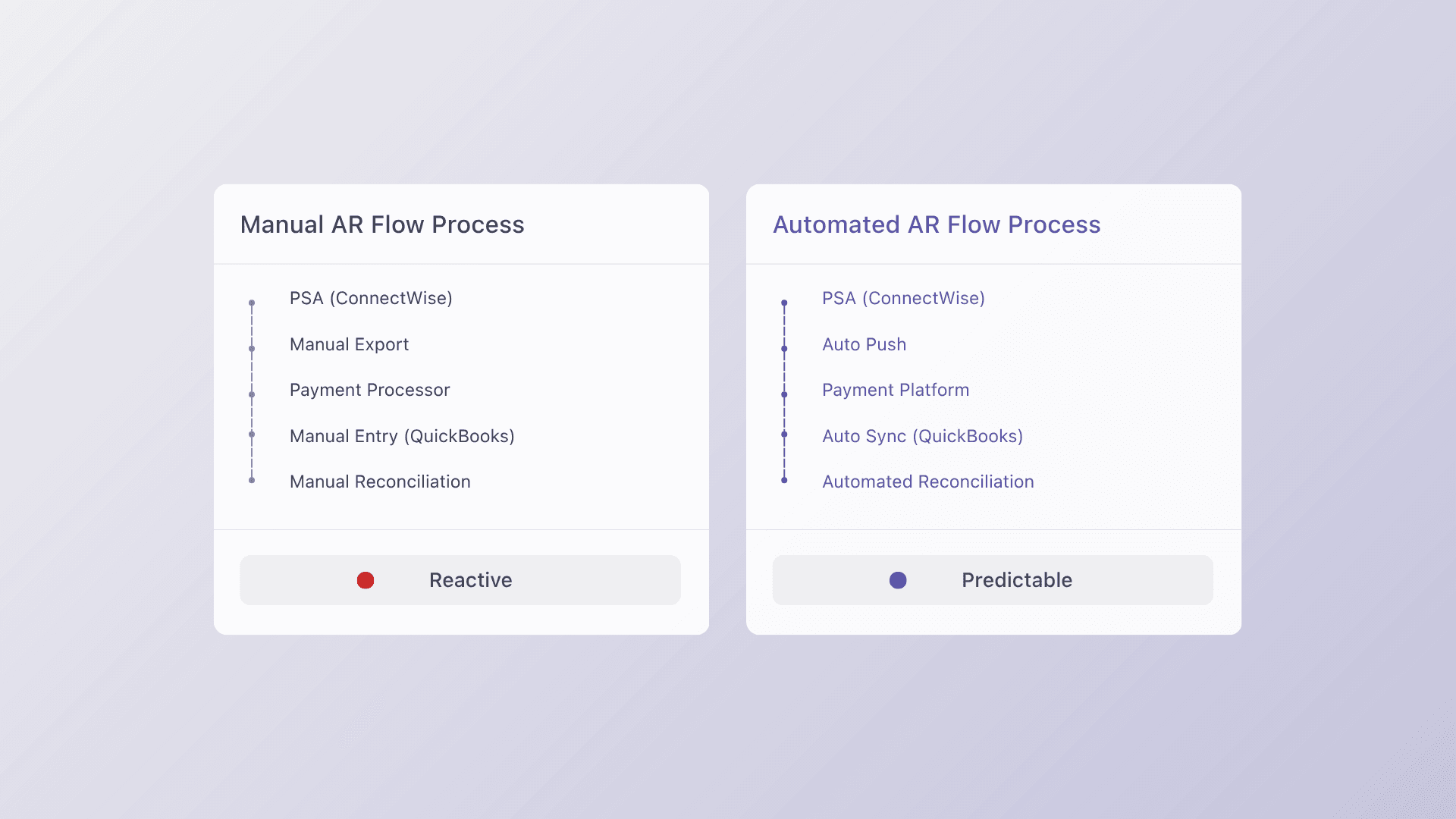
Invoice created in PSA → pushed to Alternative Payments portal → client pays via ACH, card, or auto pay → payment posted back to PSA → reconciliation auto posted to QuickBooks.
No human intervention. No data entry. No chasing down which system has the accurate number. That is what accounts receivable automation software is supposed to do, and that is what this stack delivers when it is set up correctly.
Setup Walkthrough: From Disconnected to Integrated
Getting from where most MSPs are today to a fully automated AR workflow does not require a full systems overhaul. It requires doing the right things in the right order. These four steps are how teams make the transition without disrupting their current book of business.
Step 1: Audit Your Current Data Flow
Before connecting anything, map out exactly where manual re-entry is happening today. Which systems are out of sync after an update? Where does a payment get recorded in one place but not another? Every gap you identify becomes a point on your integration checklist and a failure point the new stack will eliminate.
Step 2: Connect ConnectWise First
ConnectWise is the foundation of the stack. Your contracts, recurring services, and client billing data all live here, which makes it the source of truth that everything else should sync from.
Alternative Payments’ native ConnectWise connector installs without middleware and typically goes live within one to three business days. Getting this connection right before adding anything else ensures that downstream syncs are accurate from the start.
Step 3: Configure Payment Methods
Set up ACH, card, and auto pay based on each client’s preferences and contract structure. Avoid applying blanket rules across your entire book at this stage. Configuring payment methods per client gives you the flexibility to handle different billing arrangements without creating exceptions you will need to manage manually later.
Step 4: Test with 5 Clients Before Full Rollout
Choose five clients that represent a range of contract sizes and payment methods, then run two complete billing cycles before expanding. This surfaces configuration issues while they are still easy to resolve.
Most MSPs complete a full rollout within two billing cycles. The phased approach is not about moving slowly. It is about making sure the automation actually works before it is running across your entire revenue stream.
Integration Pitfalls to Avoid
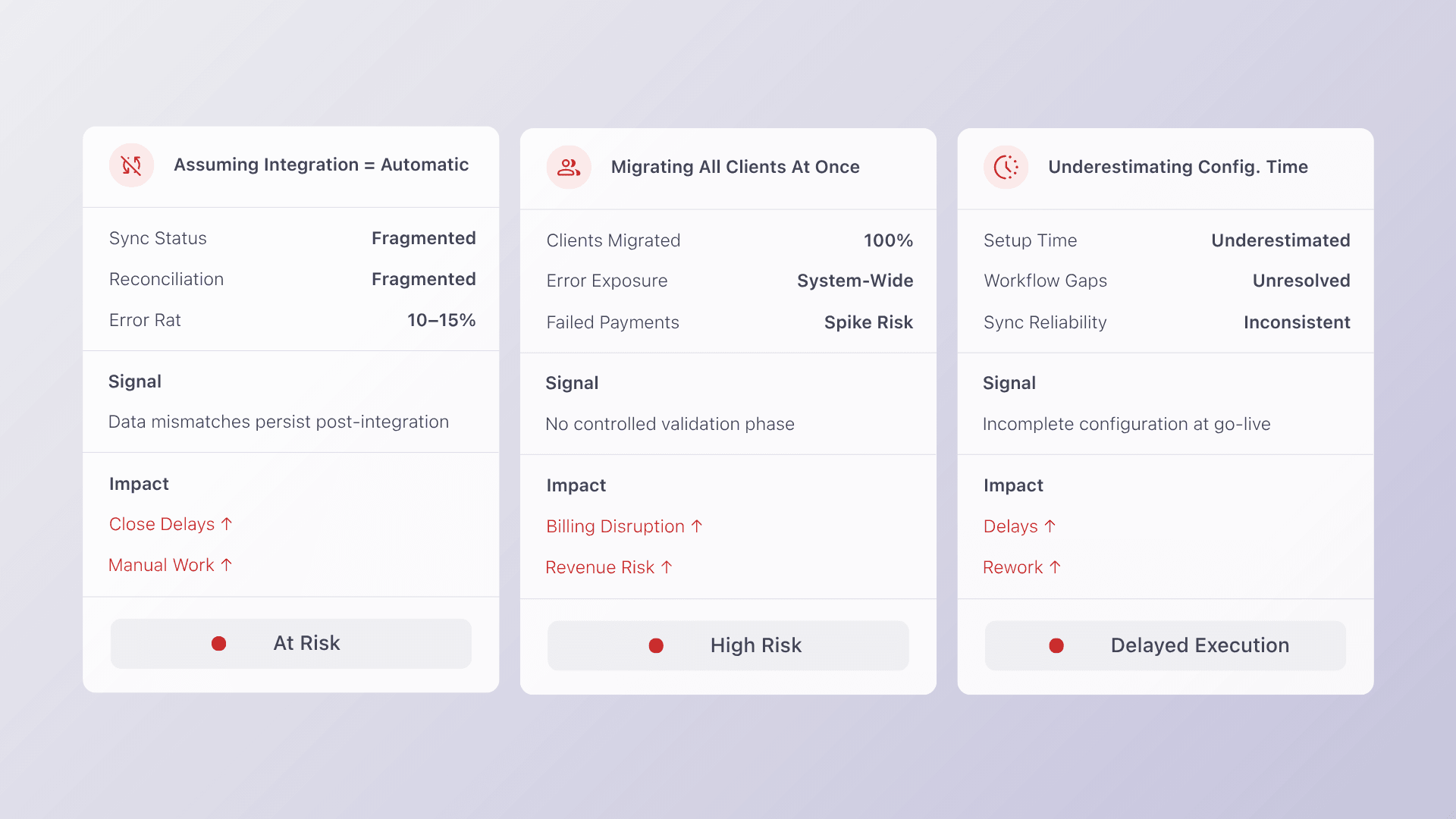
Even with the right tools in place, a few recurring mistakes slow MSPs down during the transition to automated AR. Knowing what they are before you start saves weeks of troubleshooting.
Assuming Integration Means Automatic
Connecting two systems does not mean they are working correctly. Always validate with real invoices from real clients before assuming the sync is functioning as expected. Confirm that payment statuses are updating in your PSA and that reconciliation is posting accurately to QuickBooks. Integration is a foundation, not a guarantee.
Migrating All Clients at Once
A simultaneous full book migration is the fastest way to turn a manageable problem into a billing crisis. If something breaks, it breaks for every client at the same time. A phased rollout of 10 to 20 clients first gives you room to catch and fix issues before they affect your entire revenue stream.
Underestimating Configuration Time
Onboarding a new tool typically means weeks of configuration and the risk of breaking workflows that are already running. This is why native integrations matter. Platforms that require middleware, custom API work, or Zapier connections introduce more failure points than they eliminate.
Prioritize accounts receivable automation software that connects natively to your PSA and goes live in days, not weeks. The goal is less manual work, not a longer implementation project.
The Right Automation Stack Pays for Itself
The MSPs that are reducing DSO, eliminating manual reconciliation, and scaling their billing operations without adding headcount are not doing it with more staff. They are doing it with accounts receivable automation software that was built for the way service businesses actually operate.
When your PSA, payment processor, and accounting platform are genuinely connected, billing stops being a burden and starts running in the background. Your team focuses on service delivery. Your clients get a smoother payment experience. And your cash flow reflects it.
Alternative Payments was built for exactly this. Native ConnectWise, Autotask, and HaloPSA integrations. Auto pay, ACH, and collections automation included. Setup in days, not weeks.
Book a 20-minute demo and see how Alternative Payments cuts your DSO by 40%.