Mid-market service companies (MSPs, IT providers, accounting firms) share a problem that generic AP automation tools were never built to solve: their billing lives inside a PSA, their books live inside accounting software, and nothing in between connects cleanly.
The result is a reconciliation gap that manual processes and general-purpose platforms only paper over. This guide explains what AP automation actually needs to look like for contract-driven service businesses, why PSA integration changes the equation, and how to evaluate platforms that close the loop from invoice to ledger.
The AP Automation Gap in Service Businesses
The AP automation market is projected to grow from $6.17 billion in 2025 to $12.46 billion by 2031 at a 12.44% CAGR, according to data compiled by Factura.ai from Mordor Intelligence research. But that growth is driven largely by enterprise manufacturing and procurement workflows, not by mid-market service companies with recurring revenue models.
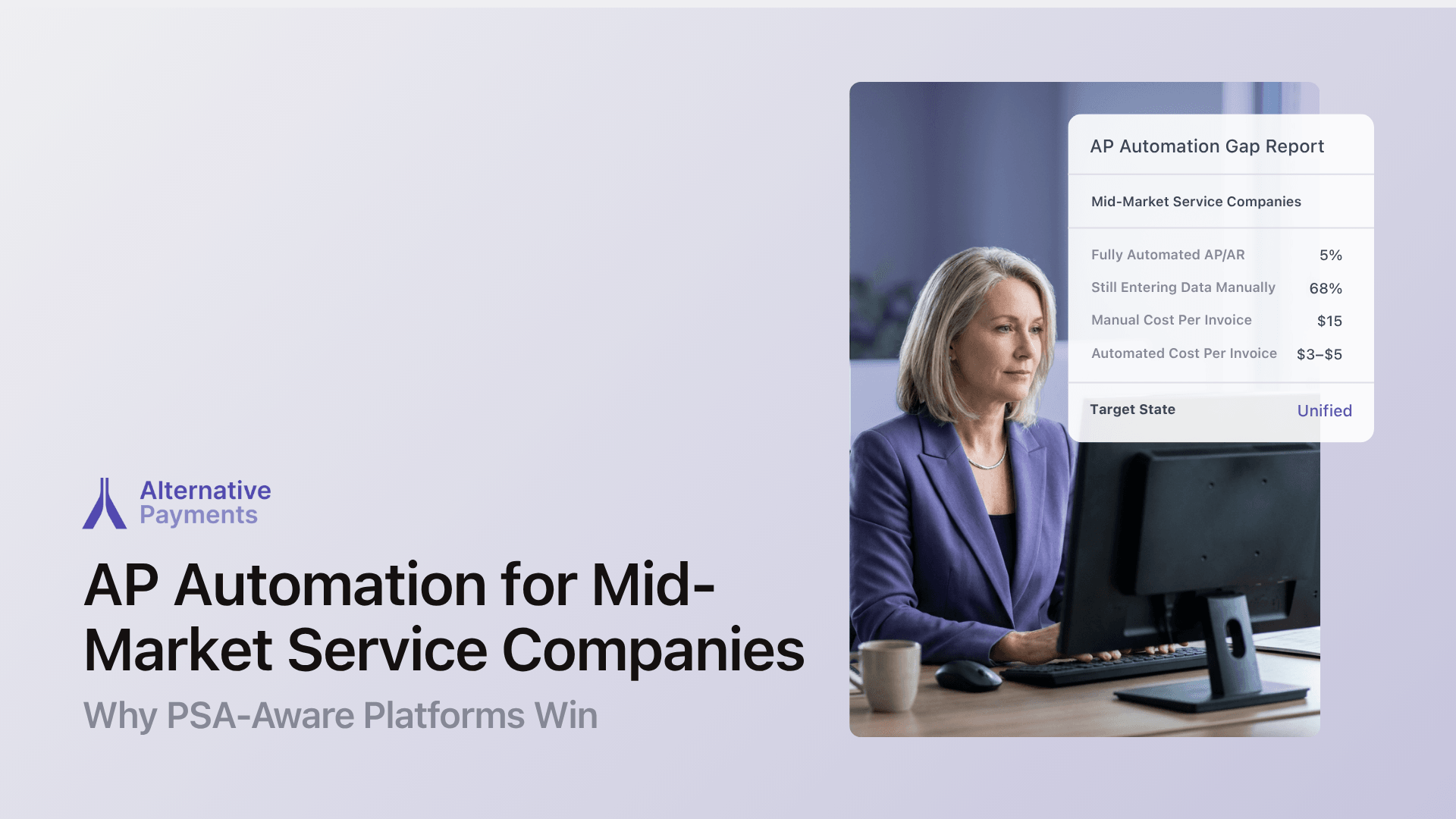
Here’s the disconnect: only 5% of mid-sized companies have completely automated their AP or AR processes, according to a Medius report citing PYMNTS.com data. Meanwhile, 68% of companies still enter invoice data manually, and manual processing costs an average of $15 per invoice, compared to $3–$5 for automated workflows.
For an MSP processing 500 invoices per month, that gap represents roughly $5,000–$6,000 in monthly overhead that automated reconciliation eliminates.
The problem isn’t that AP automation software doesn’t exist. It’s that most platforms are designed for businesses that buy goods, not businesses that deliver services under contract. Purchase-order matching, three-way receipt reconciliation, and vendor catalogs don’t map to how a managed service provider bills recurring agreements in ConnectWise or Autotask.
What Makes AP Automation Different for Service Businesses
Traditional AP automation solves for a procurement workflow: receive invoice → match to PO → route for approval → schedule payment. That workflow assumes one-time transactions with discrete deliverables.
Service businesses operate differently. Their revenue comes from recurring contracts, per-device or per-user billing, project-based engagements, and blended models that combine all three. The billing source of truth isn’t a purchase order; it’s the PSA.
This creates three requirements that generic AP tools miss:
1. Contract-aware billing logic
Service invoices need to reflect agreement terms that change: tiered pricing, mid-cycle adds and removes, prorated charges, and milestone billing. A platform that doesn’t understand contract structures forces manual adjustments on every invoice cycle.
2. Bidirectional PSA synchronization
When an invoice is generated in ConnectWise or Autotask, the payment platform needs to pull that data automatically. When payment is collected, the status needs to sync back. One-directional polling or batch imports create timing gaps where your PSA shows one thing and your accounting system shows another.
3. Unified AR and AP visibility
Service businesses don’t just pay vendors. They collect from clients, manage aging receivables, and reconcile both sides against the general ledger. A platform that handles AP in isolation, without connecting to AR workflows, forces finance teams to maintain parallel systems and reconcile between them.
The Dual-Sync Problem That Plagues MSPs
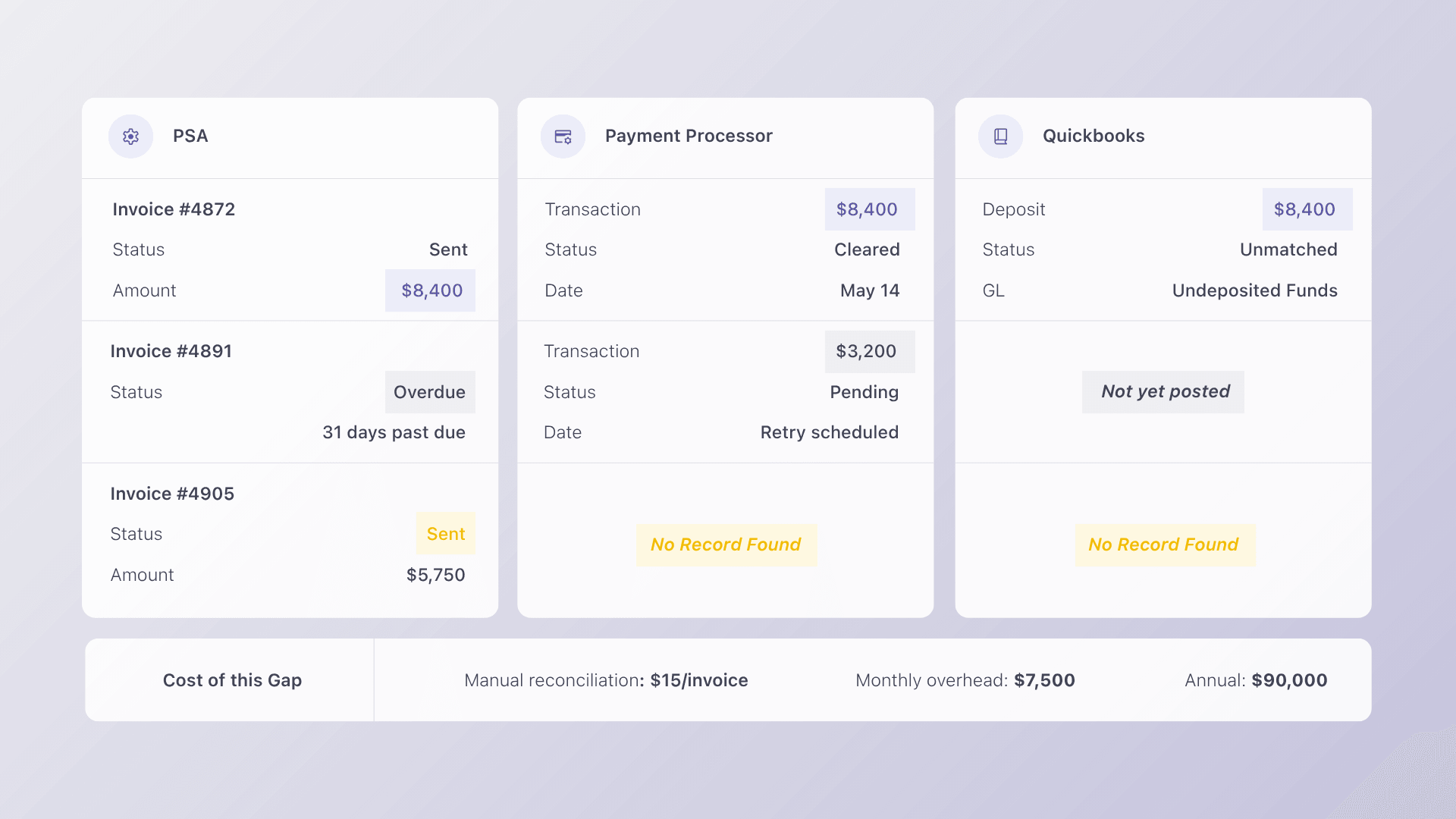
If you run an MSP, you’ve likely encountered this scenario: your PSA generates invoices, your payment processor collects funds, and your accounting software (QuickBooks, Xero) records transactions. The problem is that each system maintains its own version of the truth.
We call this the dual-sync problem. Your payment platform needs to sync simultaneously with your PSA (where invoices originate) and your accounting system (where transactions post). Most AP tools do one or the other. Few do both natively.
The consequences are tangible:
- Reconciliation drift: Payments collected don’t map cleanly to invoices in the PSA, creating exceptions that require manual research.
- GL mismatches: Deposits post to accounting without the invoice-level detail needed for clean reporting.
- Delayed close: Month-end becomes a multi-day forensic exercise matching bank deposits to client invoices.
Generic AP platforms like BILL (formerly Bill.com) address this with separate AR and AP modules. BILL’s pricing starts at $45/month per user for Essentials, $55 for Team, and $79 for Corporate, but none of those tiers include native PSA integration. For an MSP, that means BILL handles the accounting side of the workflow while leaving the PSA side unconnected.
The result: your finance team still manually bridges the gap between ConnectWise or Autotask and whatever BILL syncs to QuickBooks. The “automation” stops at the accounting boundary and never reaches the operational system where invoices are born.
What PSA-Aware AP Automation Actually Looks Like
Purpose-built platforms solve the dual-sync problem by starting where service businesses start: the PSA. Here’s how the workflow differs from generic AP tools.
Invoice issuance: The PSA generates the invoice based on contract terms. A PSA-aware payment platform pulls that invoice automatically: no CSV exports, no manual entry, no middleware.
Payment collection: The client pays via ACH, credit card, or installment plan through a white-label checkout branded to the service company. The payment method maps to the specific invoice and client record.
Reconciliation: When payment clears, the platform posts the transaction to QuickBooks or Xero automatically, mapping it to the correct invoice, client, and GL account. No manual journal entries. No end-of-month matching.
AR follow-up: Overdue invoices trigger automated reminders and escalation workflows. Not generic “your payment is due” emails, but configurable sequences tied to the invoice aging in the PSA.
This is the lifecycle approach to payment operations: issuance → communication → collection → reconciliation → reporting. Each stage connects to the next, and the PSA stays in sync throughout. For a deeper walkthrough, read our guide on how to connect payments to invoicing and PSA tools.
Features That Matter Most for Contract-Based Billing
When evaluating AP automation for a service business, the feature checklist looks different than it does for a manufacturing or retail company. Here’s what to prioritize:
| Feature | Why It Matters for Service Businesses |
| Native ConnectWise/Autotask integration | Eliminates manual invoice sync and ensures payment data flows back to the PSA |
| Bidirectional QuickBooks/Xero sync | Automates reconciliation without middleware or third-party connectors |
| ACH + credit card in one platform | Supports client payment preferences without managing separate processors |
| Auto-pay with configurable rules | Enables recurring collection on stored payment methods, tied to contract billing cycles |
| Collections automation | Reduces DSO with reminder sequences that reference actual invoice data |
| Client-facing financing (B2B BNPL) | Removes friction on large project invoices by offering installment plans |
| White-label client portal | Maintains the service company’s brand throughout the payment experience |
A fully automated AP employee can process over 23,000 invoices annually, compared to just 6,000 with manual methods. But for service businesses, the productivity gain isn’t just about processing speed; it’s about eliminating the reconciliation work that happens after payments arrive.
Why Generic AP Tools Create More Work for MSPs
Generic AP platforms treat every invoice like a one-off ecommerce transaction. They’re built for businesses that receive invoices from hundreds of vendors, not businesses that send invoices to hundreds of clients under recurring agreements.
Here’s where that mismatch creates friction for service businesses:
No PSA awareness: The platform can’t pull invoice data from ConnectWise, Autotask, or HaloPSA. Your team exports invoices, uploads them, and manually confirms payment status in two systems.
Separate AR and AP modules: Platforms like BILL offer AP and AR as distinct products. That means the system that handles your vendor payments knows nothing about your client collections. Reconciliation happens in your head, your spreadsheet, or your accountant’s time.
Accounting-only integration: Many AP tools sync with QuickBooks or Xero but not with the PSA. This handles half the dual-sync problem and leaves the other half for your team to manage manually.
Per-user pricing that scales poorly: When your AP tool charges per user per month, adding a bookkeeper, operations manager, or billing admin to the workflow means a linear cost increase. Flat-fee platforms remove that friction.
The data supports what operators already feel: 91% of mid-sized firms that have fully automated AR systems report increased savings, cash flow, and growth, according to PYMNTS research compiled by Empaxis. The firms stuck at partial automation (most of them) keep paying the overhead of manual reconciliation.
How Alternative Payments Solves the Dual-Sync Problem
Alternative Payments was built specifically for service businesses running on recurring revenue. The platform integrates natively with ConnectWise, Autotask, HaloPSA, and SuperOps on the PSA side, and with QuickBooks and Xero on the accounting side. That means both sides of the dual-sync problem are handled in one platform.
Here’s what that looks like in practice:
- PSA → Platform: Invoices generated in the PSA automatically flow to Alternative Payments. No export, no middleware, no Zapier workaround.
- Platform → Client: Clients receive branded payment communications and pay via ACH, credit card, or installment plan through a white-label checkout experience.
- Platform → Accounting: When payment clears, the transaction posts to QuickBooks or Xero with invoice-level detail, mapped to the right client and GL account.
- AR automation: Collections Assist handles payment reminders, overdue follow-up, and escalation on a configurable schedule. Your team stops chasing payments manually.
The company raised $22 million in funding led by MissionOG and Third Prime to accelerate automation in underserved B2B sectors, and service businesses with PSA-driven billing are the core focus.
Unlike generic AP tools that bolt on service business support as an afterthought, Alternative Payments starts with the MSP billing lifecycle and works outward. The result is fewer exceptions, faster reconciliation, and finance operations that scale without adding headcount. Learn more about how PSA integration is changing MSP operations.
How to Evaluate AP Automation for Your Service Business
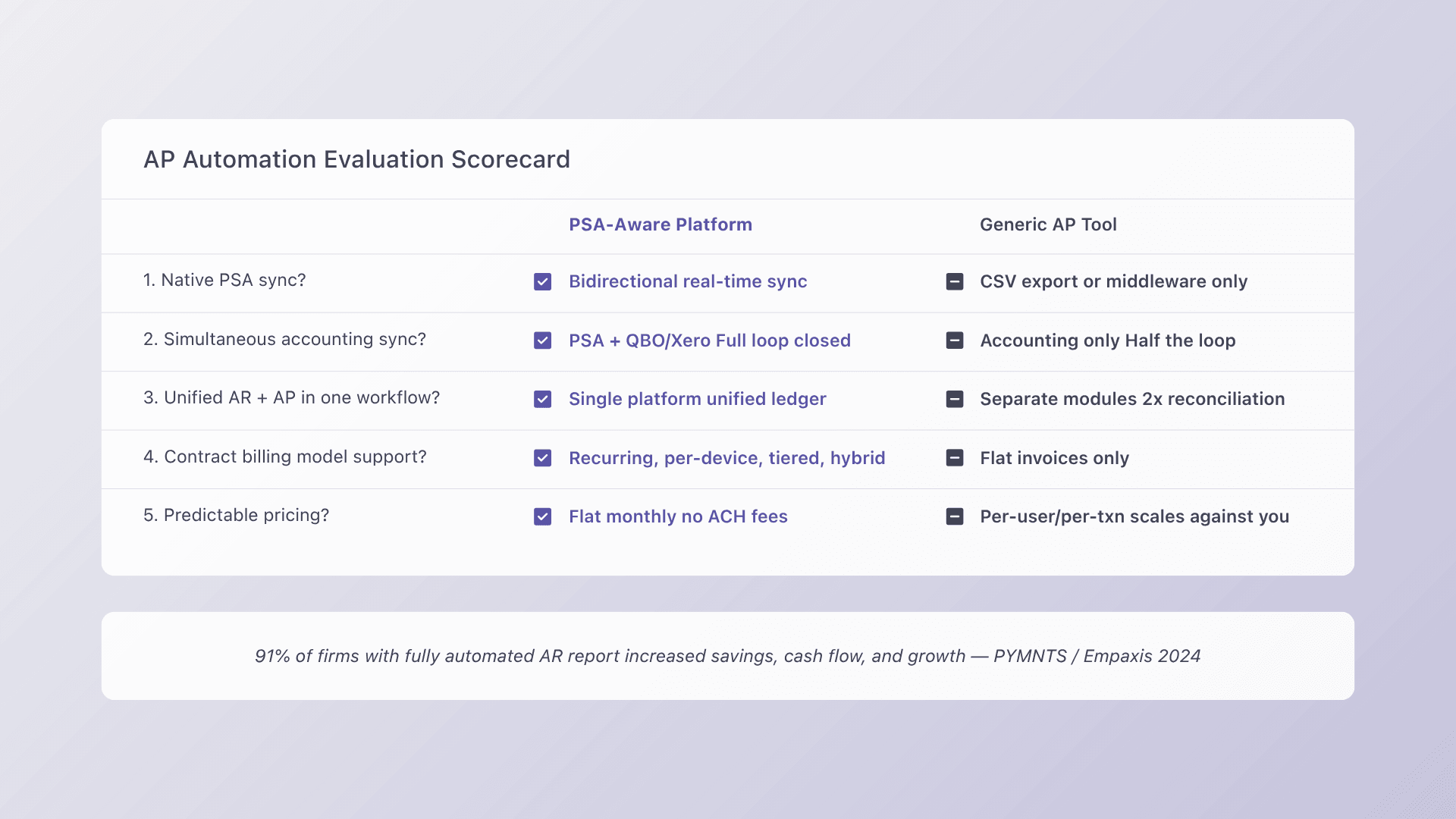
If you’re comparing platforms, run each option through these five questions:
- Does it integrate natively with your PSA? Not via middleware or CSV export, but natively. Bidirectional sync means invoices flow out and payment status flows back.
- Does it connect to your accounting system simultaneously? Reconciliation automation requires the platform to post to QuickBooks or Xero at the invoice level, not as lump-sum deposits.
- Does it handle AR and AP in one workflow? Service businesses need unified visibility into what they owe and what they’re owed. Separate modules create separate reconciliation problems.
- Does it support your billing models? Recurring, per-device, tiered, milestone, and blended billing are standard for MSPs. The platform should handle contract logic, not just flat invoices.
- Does pricing scale with your business? Per-user pricing penalizes growth. Flat-fee or volume-based models keep costs predictable as you add clients and team members.
For a step-by-step walkthrough of the best payment automation integrations for MSPs, start with our integration guide.
FAQs
What is the difference between AP automation for service businesses versus manufacturers? Manufacturers use AP automation to match purchase orders, receipts, and invoices in a three-way match workflow. Service businesses need automation that understands contract-based billing, recurring revenue cycles, and PSA-driven invoicing. The key difference is the source of truth: for manufacturers, it’s the PO system. For service businesses, it’s the PSA.
Can AP automation tools sync with both my PSA and accounting software? Most generic AP tools sync with accounting software (QuickBooks, Xero) but not with PSA platforms like ConnectWise or Autotask. Purpose-built platforms like Alternative Payments offer native, bidirectional integration with both, eliminating the dual-sync problem where your PSA and accounting system show different payment statuses.
What features matter most for MSP AP automation? Native PSA integration, automated reconciliation to accounting, ACH and credit card collection in one platform, configurable auto-pay rules, AR automation with reminder workflows, and client-facing financing options. The platform should also offer a white-label client portal so your clients interact with your brand, not a third-party payment page.
How does Alternative Payments compare to BILL for service businesses? BILL offers separate AP and AR modules with accounting integration but no native PSA connectivity. Alternative Payments unifies collection, reconciliation, and AR automation in one platform with native ConnectWise, Autotask, HaloPSA, and SuperOps integrations. For service businesses, this eliminates the manual bridging work between the PSA and accounting system that BILL leaves to your team.
Is AP automation worth it for a mid-market service company? Yes. Manual invoice processing costs an average of $15 per invoice, and 68% of companies still enter invoice data manually. For a mid-market service company processing hundreds of invoices monthly, automation reduces processing costs, shortens DSO, and eliminates reconciliation overhead, all without adding staff. The 91% of mid-sized firms with fully automated AR that report increased savings and cash flow confirm the ROI.
Ready to see how PSA-aware payment automation works for your service business? Book a demo and walk through the full invoice-to-ledger workflow with our team.