ACH vs Checks: The Direct Answer for MSPs
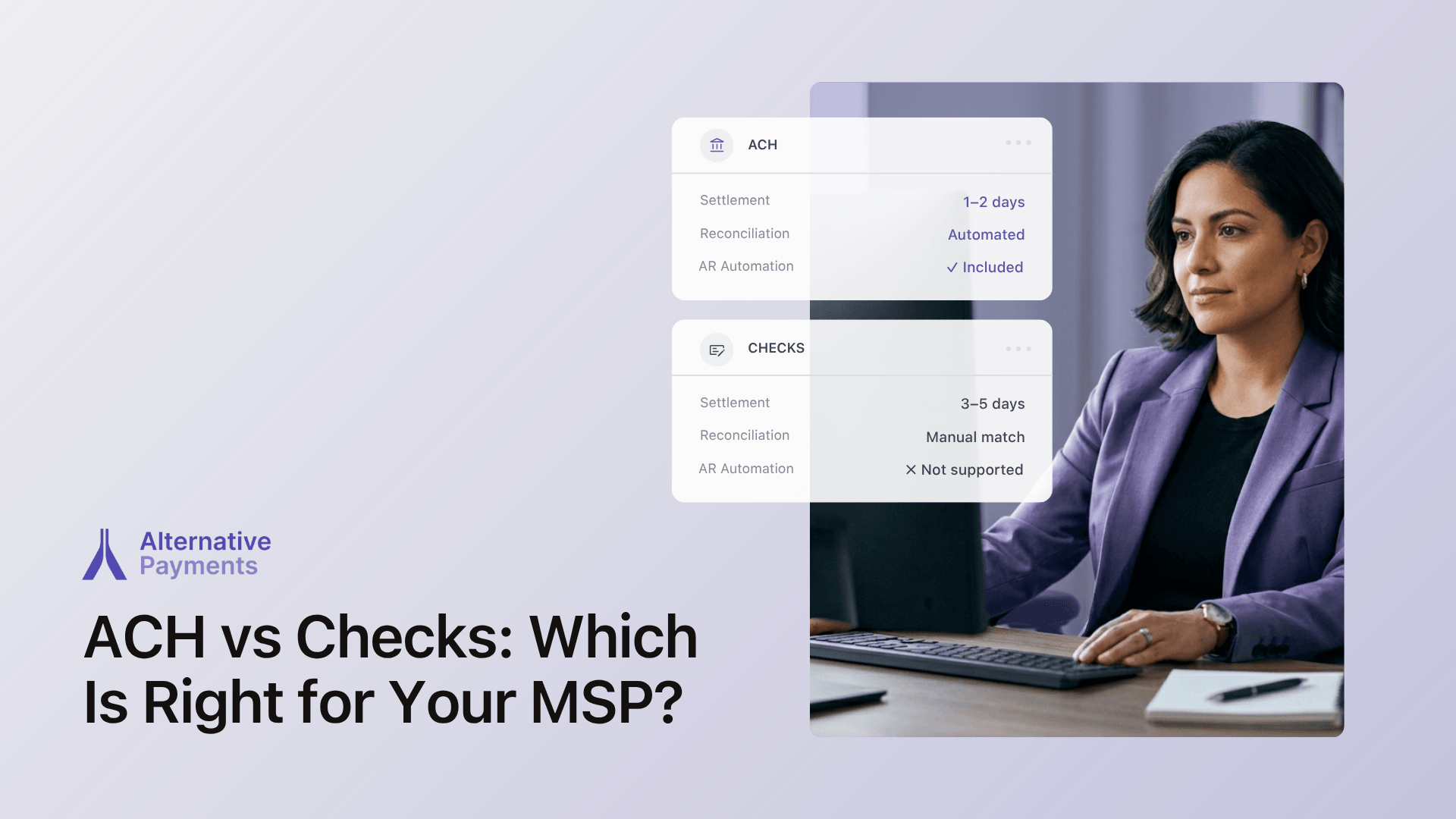
For most MSPs, ACH is the better default payment method. It settles faster than checks, costs less to process, eliminates the manual handling that paper payments require, and integrates directly into automated billing workflows. Checks remain relevant for specific client segments, particularly enterprise clients with procurement processes that require paper documentation or clients in industries where digital payment adoption is slower.
The ACH vs checks decision, however, is only part of the question MSPs should be asking. The payment method matters less than the platform delivering it. An MSP running ACH through a platform that requires manual reconciliation has not solved the billing overhead problem. An MSP running checks through a platform with strong PSA integration and automated matching has more automation than one using ACH through a disconnected processor.
The sections below cover what MSPs actually need from a payment solution, how the leading platforms compare across those criteria, and how to evaluate your specific setup before committing to a change.
What MSPs Actually Need from a Payment Solution
Before comparing ACH vs checks or evaluating platforms, it helps to define what your billing workflow actually requires. Most payment platform feature lists look identical until you try to integrate them into a live PSA environment. The criteria below cut through that noise.
Does it solve the workflow gap that causes the most rework?
For most MSPs the answer is the gap between the PSA and the payment processor. Invoice data created in ConnectWise, Autotask, or HaloPSA should sync automatically to the payment layer without re-entry, and payment confirmation should post back to the PSA and QuickBooks without a manual step.
Does it support both ACH and check conversion without adding manual steps?
ACH is the preferred method for MSP recurring billing, but some clients pay by check. A platform that supports ACH conversion for check payers eliminates the manual handling of paper payments without forcing clients to change their process immediately.
What are the real switching costs?
Switching payment platforms means migrating client payment methods, retraining staff, and rebuilding any existing automation. Platforms with bulk import, auto pay re-enrollment, and a setup time measured in days rather than weeks reduce the switching cost significantly.
Is pricing predictable at your billing volume?
Per transaction pricing compounds as invoice volume grows. A flat monthly fee model makes cost predictable regardless of how many invoices your team processes, which matters more as the client book scales.
Does it include AR automation, or does collections still require manual follow up?
Payment acceptance and payment collection are different capabilities. A platform that accepts ACH but leaves reminder scheduling and overdue follow up to your team has only solved half the problem.
Top Options Compared: Alternative Payments vs ConnectBooster vs WisePay vs Stripe
The table below scores each platform across the five criteria defined above. ACH support is table stakes across all four. The differentiators are integration depth, AR automation, setup time, and pricing model.
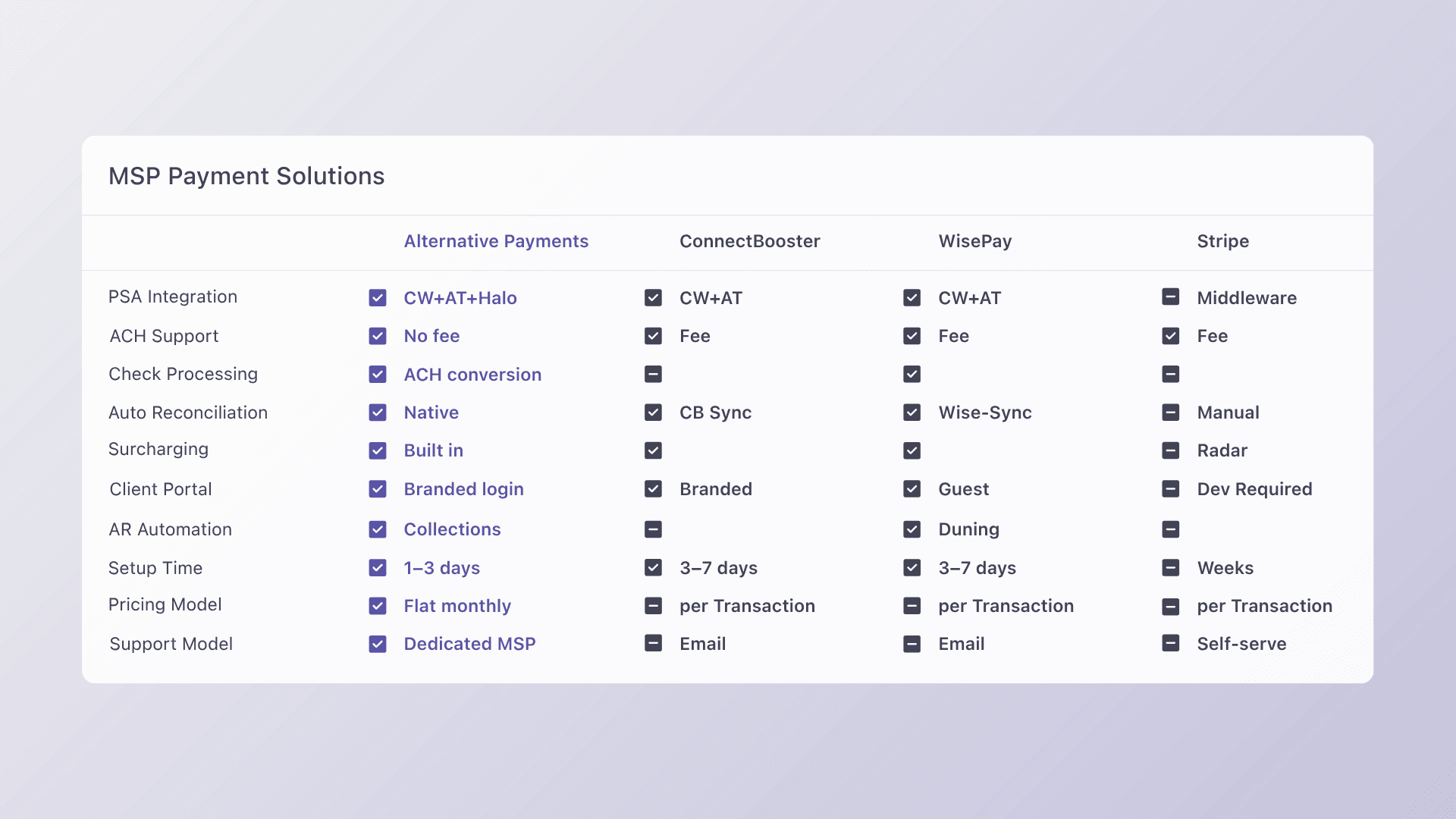
| Criteria | Alternative Payments | WisePay | ConnectBooster | Stripe |
| PSA Integration | ✓ ConnectWise, Autotask, HaloPSA (native) | ✓ ConnectWise native | ✓ ConnectWise, Autotask native | Limited* |
| ACH Support | ✓ No ACH fee | ✓ ACH supported | ✓ ACH supported | ✓ ACH supported (fee applies) |
| Check Processing | ✓ Via ACH conversion | ✓ Supported | ✗ Not natively supported | ✗ Not supported |
| Auto Reconciliation | ✓ Native, no manual steps | ✓ Via Wise-Sync | ✓ ConnectBooster sync | Manual steps required* |
| Surcharging | ✓ Built in, compliant | ✓ Configurable | ✓ Supported | ✓ Via Stripe Radar |
| Client Portal | ✓ Branded, persistent login | Limited** | ✓ Branded, persistent login | ✗ Developer setup required*** |
| AR Automation | ✓ Collections Assist included | ✓ Automated dunning included | ✗ | ✗ |
| Setup Time | 1 to 3 days | 3 to 7 days | 3 to 7 days | Weeks (dev required) |
| Pricing Model | Flat monthly fee | Per transaction + subscription | Per transaction | Per transaction |
| Support Model | Dedicated MSP support | Email and chat | Email and chat | Self-serve documentation |
* Stripe is general-purpose payment infrastructure built for flexibility across industries. Connecting it to a PSA like ConnectWise, Autotask, or HaloPSA requires middleware tools, custom API development, or third-party sync solutions. For MSPs without in-house development resources, that adds meaningful setup time and ongoing maintenance overhead.
** WisePay’s client experience centers on email-linked invoice payment, which works well for straightforward invoice collection. Clients can self-register to save payment methods. The portal does not offer a persistent branded login experience by default, which may or may not matter depending on how your clients prefer to interact with invoices. (wise-pay.com, 2025).
*** Stripe client portal: Stripe does not include a pre-built branded portal for MSP invoice management out of the box. Building a client-facing payment experience requires developer implementation using Stripe’s API. For MSPs with development resources who want full control over the client experience, that flexibility is an advantage. For those who need something live quickly, it adds time. (stripe.com, 2025).
Alternative Payments
Alternative Payments is purpose built for MSP billing with native integrations for ConnectWise, Autotask, and HaloPSA. ACH is supported with no per transaction fee. Collections Assist handles automated payment reminders and overdue follow up without manual input. Flat monthly pricing keeps cost predictable as invoice volume grows. Setup typically completes in one to three business days.
WisePay
WisePay offers strong native integration within the ConnectWise ecosystem, including Quote to Cash functionality for ConnectWise CPQ users. Reconciliation runs through its Wise-Sync module. ACH is supported. It does not include native AR automation, and its client portal experience centers on email-linked invoice payments rather than a persistent branded portal. Per transaction pricing applies.
ConnectBooster
For MSPs already standardized on Kaseya tooling, ConnectBooster is the lowest-friction path and worth evaluating before committing to any platform change — the integrations are already familiar to your team, the migration scope is smaller, and the disruption cost is lower.
Stripe
Stripe is a flexible developer-first payment infrastructure that supports ACH, cards, and a wide range of payment types. For MSPs, the trade-off is setup complexity. Connecting Stripe to a PSA typically requires middleware or custom development, there is no native PSA integration, and the client portal requires developer configuration. Stripe is well suited for MSPs with in-house development resources who want maximum flexibility.
What Most ACH vs Checks Comparison Posts Get Wrong
Most ACH vs checks comparisons focus on settlement times and processing fees, which are real considerations but not the ones that determine whether an MSP billing workflow actually improves. The features listed across payment platforms look nearly identical until you attempt to integrate one into a live PSA environment.
The real question for MSPs is not which payment method has lower fees. It is which platform solves the specific workflow gap that is causing the most rework right now. For most MSPs that gap is the manual step between invoice created in the PSA and payment reconciled in QuickBooks. The payment method used to close that gap matters far less than whether the platform closes it automatically.
According to ConnectWise’s own internal research (2024), MSPs that automate billing and payment collection report 30% faster month end close and significantly lower AR aging balances than those using manual processes. The automation benefit comes from the platform, not the payment method.
Switching costs are the other factor most comparison posts ignore. Migrating client payment methods, retraining staff, and rebuilding workflows represents real time and real disruption. A platform that goes live in one to three days with bulk client import and auto pay re-enrollment minimizes that disruption. One that requires weeks of setup and manual client migration amplifies it.
How to Evaluate for Your Specific MSP Setup
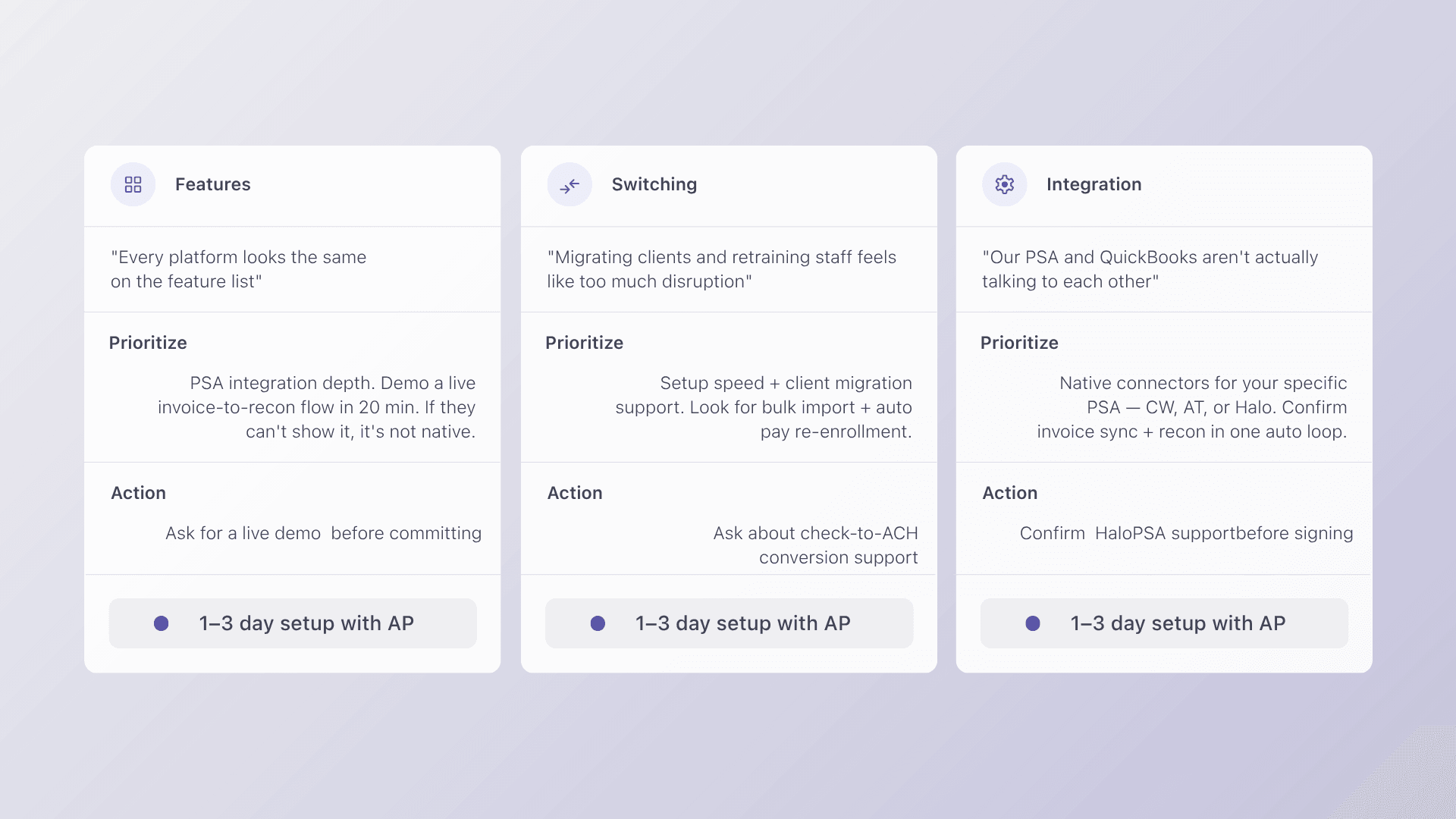
The right platform depends on which workflow pain is costing your team the most time right now. Use the framework below to identify your starting point.
If your pain is evaluating platforms: feature lists all look the same until you integrate
Prioritize PSA integration depth over everything else. Ask each vendor to demo a live invoice sync from ConnectWise or Autotask through to payment collected and reconciled in QuickBooks, without any manual steps. If they cannot show you that in a 20-minute walkthrough, the integration is not as native as the marketing suggests. Alternative Payments demos this end to end by default.
If your pain is switching costs: migrating clients, retraining staff, rebuilding workflows
Prioritize setup time and client migration support. Look for platforms that offer bulk client import, auto pay re-enrollment for existing clients, and a setup process measured in days rather than weeks. Ask specifically how the platform handles clients who currently pay by check and whether ACH conversion is supported without requiring clients to change their behavior immediately.
If your pain is PSA integration depth: generic feature counts miss what MSPs actually care about
Prioritize platforms with native connectors to your specific PSA rather than middleware dependent integrations. Confirm that the integration covers invoice sync, payment status updates, and QuickBooks reconciliation in a single automated loop. Check whether HaloPSA is supported if you use it, since several platforms cover ConnectWise and Autotask but not all three. Alternative Payments integrates natively with all three.
ACH vs Checks: The Right Answer Depends on Your Workflow, Not Just the Method
ACH wins the ACH vs checks comparison on speed, cost, and automation potential for most MSP billing workflows. But the payment method is only one decision. The platform delivering it determines whether your billing operation actually runs more efficiently or simply moves the manual work to a different step.
The MSPs reducing DSO, closing month end faster, and running their billing with less manual overhead have not just switched from checks to ACH. They have connected their PSA, payment processor, and accounting platform into a single automated loop where no one on the team needs to initiate each step.
Alternative Payments was built to deliver exactly that. Native PSA integration with ConnectWise, Autotask, and HaloPSA. ACH with no transaction fees. Built in surcharging. Collections Assist for automated AR follow up. Flat monthly pricing and setup in one to three days.
Book a 20-minute walkthrough and see how Alternative Payments fits your MSP stack.